
Are you treating your Google Business Profile as a passive directory listing? That's a costly mistake. Today, a proper reputation management strategy dictates who wins the high street and who fades into obscurity. Customers don't just read your ratings; they judge exactly how you handle criticism. If you want to manage Google reviews effectively, you must stop reacting blindly and master customer review monitoring to turn local SEO reviews into a growth engine.
Scaling this workflow manually across multiple locations is exhausting, but ReviewSense automates your entire review management process.
The New environment of Google Review Management UK (2026)
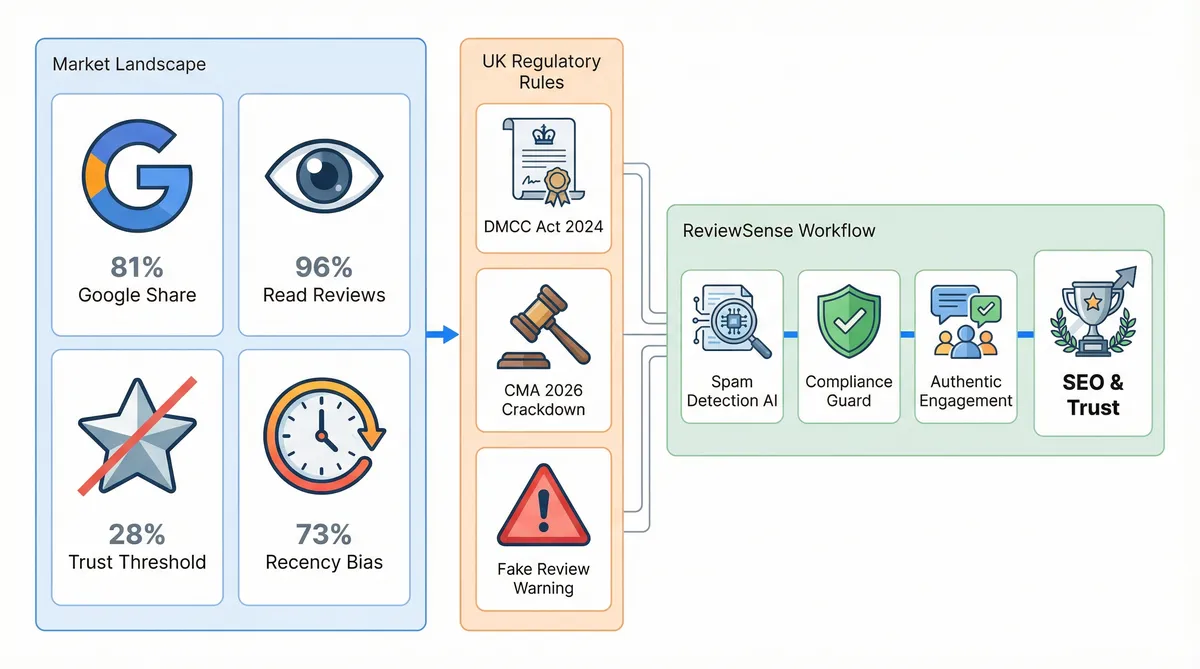
Data shows that Google hosts 81% of all online reviews, making it the primary platform for consumer research. Today, 96% of consumers read online feedback before making a purchase. A strong reputation management strategy is essential. Just 28% of buyers will consider engaging with a business rated below 4.0 stars. Recency is critical, as a full 73% of consumers trust reviews written in the last 30 days.
To manage google reviews, UK businesses face strict rules. The DMCC Act 2024 makes buying, writing, or hosting fake reviews illegal, and the practice of 'review gating' is banned. The Competition and Markets Authority enforces these rules strictly. A major CMA crackdown on large brands is scheduled for March 2026, highlighting the severity of the new regulations. Companies must adapt their operations.
Google is running a UK pilot programme to enforce compliance. Profiles with suspicious activity receive a 'Fake reviews detected' warning badge, which deters potential customers. It brings a high risk of total review deactivation. Proper google review management uk practices are essential to avoid these penalties. You can't afford to ignore toxic content, as a single warning badge can destroy consumer trust.
Staying compliant with these laws requires constant vigilance. ReviewSense offers built-in spam detection to help UK businesses stay safe. The platform flags suspicious reviews before they trigger algorithmic penalties, allowing your team to focus on genuine feedback. You can protect your local seo reviews without manually checking every post. Using review management software ensures you catch issues and maintain a clean profile.
Step-by-Step Guide to Building a Reputation Management Strategy
With strict regulations now enforced, your approach to collecting feedback must evolve from passive waiting to a compliant system.
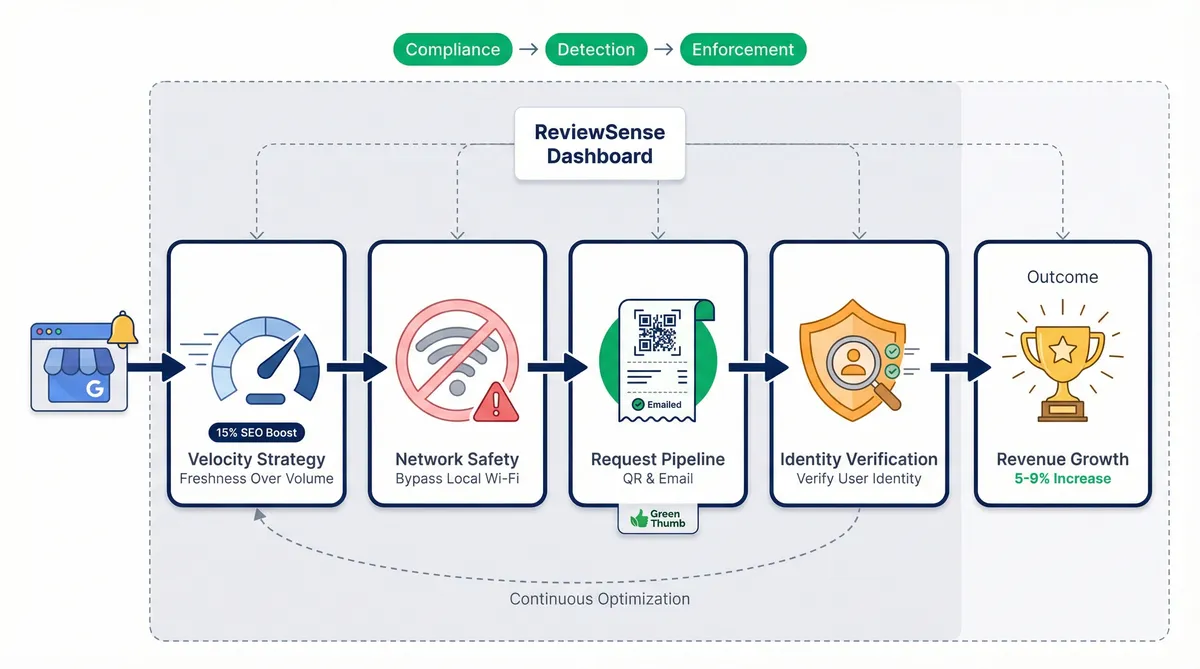
Prioritise review velocity over sheer volume. By 2026, it is projected that 67% of customers will prioritise freshness over the total number of reviews. A steady stream of new feedback signals an active business. Google reviews now account for roughly 15% of local SEO ranking factors, making local seo reviews critical. Maintaining this active profile can increase website conversion rates by 15–20%.
Avoid the on-site review trap. Asking customers to leave feedback while connected to your shop's Wi-Fi seems logical, but it doesn't work well. Google's spam filters track IP addresses. Multiple submissions from the same network look suspicious, causing legitimate feedback to be ghosted.
Implement post-purchase requests. Instead of asking in-store, use QR codes on printed receipts paired with follow-up emails. A garden centre like Green Thumb Nursery used this exact method to generate organic feedback without triggering spam filters. This builds a sustainable reputation management strategy.
Handle pseudonymous feedback with care. The rise of anonymous usernames makes it hard to verify actual customers. When you receive unrecognisable google business reviews, reply asking for a transaction ID or visit date. This shows prospective buyers you take quality control seriously.
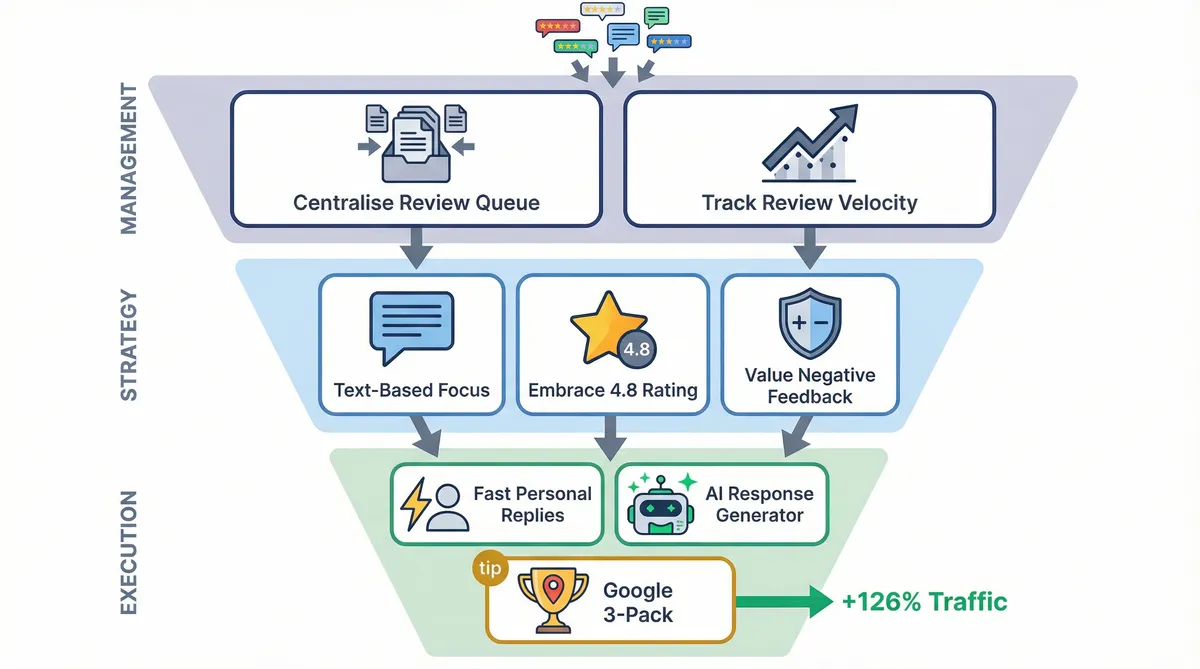
To manage google reviews, teams need the right tools. ReviewSense centralises your queue and tracks review velocity metrics. This helps you maintain a steady stream of fresh feedback. For a deeper dive into these tactics, consult the Online Review Management Guide. A one-star increase in your average rating correlates with a 5–9% increase in revenue, making this process valuable.
The Contrarian Rules for Responding to Google Business Reviews
While tracking metrics and centralising your queue is vital, the way you reply to feedback requires a mindset shift. Most standard advice on how to manage google reviews isn't effective today.
Stop replying to every five-star rating without text. A wall of identical replies looks robotic to prospective clients. Instead, batch your responses. Focus your energy on text-based google business reviews where customers share specific details about their visit. This approach feels authentic.
Embrace a 4.8 rating instead of chasing a perfect score. Consumers are highly sceptical of flawless profiles. The 4.2 to 4.5 range is the consumer sweet spot for authenticity. A few minor complaints prove your feedback isn't fake.
Treat negative feedback as an asset. Search engine algorithms use natural language processing to confirm business entities based on complaint details. A professional rebuttal can win back disgruntled buyers. Crucially, 53% expect a response to negative feedback within 7 days. You can't afford to ignore these expectations.
In 2025, roughly 73% of reviews received a response. To stand out, you need speed and personalisation. ReviewSense features an AI response generator to craft on-brand replies in seconds. This helps you avoid the templated answers that turn off potential buyers. You can maintain a consistent voice across all platforms.
Using AI-powered review management ensures you meet consumer expectations without draining staff time. It forms a vital part of your reputation management strategy. Securing a spot in the Google Local 3-Pack brings 126% more traffic than lower positions. Smart replies help you get there.
Real-World Consequences: When Local SEO Reviews Go Wrong
While smart replies help secure top map rankings, ignoring negative feedback carries major financial risks. The difference between active oversight and neglect is stark.
| Strategy | Proactive Management | Unmanaged Crises |
|---|---|---|
| Issue Detection | Instant alerts for negative spikes | Discovered after revenue drops |
| Fake Reviews | Flagged and removed swiftly | Lingers and damages trust |
| Customer Trust | High confidence and loyalty | High abandonment rates |
| Financial Impact | Protected revenue streams | Costly legal battles |
Real-world cases show how bad local seo reviews can destroy a company. Riverbend Moving suffered a coordinated attack. Their rating plummeted from 4.6 to 3.6 within days. Similarly, Dr. Tavakoli faced a single one-star complaint that caused a 23.61% traffic drop. This isolated post eventually led to a $530k defamation case.
Despite these dangers, only 5% of businesses consistently respond to every negative review. Consumers are vigilant today. Data shows 40% of consumers report being confident they have spotted a fake review on Google in 2025. If a review on your profile looks planted, check it for signs of fakery before you report it. You must take quick action when targeted.
To manage google reviews safely, you need immediate visibility. ReviewSense provides crisis alerts for negative spikes. Your team can flag defamatory attacks before they escalate. Using proper customer review monitoring tools ensures you never miss a sudden drop. This protects your brand image.
Proactive defence delivers clear benefits. Experts note that 94% of businesses using reputation management tools see a positive ROI. Firms responding to at least 75% of their reviews are perceived as 2.8 times more trustworthy. This builds long-term client loyalty.
Generic replies are losing effectiveness. Today, 61% of businesses have shifted toward personalised replies to build authenticity. You can use a negative review response generator to craft these tailored responses without wasting staff time. This approach keeps your profile professional.
Scaling Your Efforts Across Multiple Platforms and Locations
While personalised replies keep your profile professional, applying this standard across dozens of branches requires a new approach. Multi-location enterprises and agencies cannot rely on manual tracking. The same constraint applies in regulated verticals like dental practices and law firms. You need agentic marketing to automate workflows without losing the human touch. This ensures your reputation management strategy scales smoothly across every site.
The Diversification Play
Before spreading effort around, size the Google job itself with our Google review calculator, which turns a target Google rating into the number of 5-star reviews it takes to reach it. Relying on a single platform is risky. Google's strict AI filters often hide legitimate feedback without warning. Instead, execute a diversification play. Direct a portion of your review requests to Facebook, the Apple App Store, and Google Play. This builds a diverse footprint that protects your brand visibility. For the Google share of those requests, our guide to using a Google review generator tool covers building a direct link that survives profile changes.
This multi-platform approach directly impacts search rankings. Today, local seo reviews account for 15% of your search weight. Encourage buyers to upload photos when they leave feedback. Profiles featuring customer-uploaded photos and videos are 53 times more likely to appear on the first page of search results.
Centralising Multi-Location Data
Managing this volume requires the right infrastructure. To manage google reviews alongside other channels, teams need a unified system. Choosing the Right Customer Review Management Software for Multi-Platform Businesses is critical for agencies. You must track sentiment trends and response rates across all locations simultaneously. For UK teams weighing up specific platforms, our 2026 comparison of review management software for UK brands covers pricing, AI features and the multi-location handling that matters here.
ReviewSense scales effortlessly to handle this exact scenario. It provides a single dashboard for Google Business Profile, Facebook, Apple App Store, and Google Play. Agencies benefit from custom integrations and white-label reporting. One client saw a 40% increase in positive google business reviews within six months. This translated to a 25% increase in foot traffic and a 30% boost in total sales.
Automating your queue prevents bottlenecks. You can use a Review Request Email Generator to distribute requests evenly across platforms. This ensures your google review management uk efforts yield consistent growth.
Conclusion
Managing Google reviews effectively requires moving from reactive monitoring to a proactive strategy. By responding promptly to negative feedback, diversifying your presence across Google Business Profile, Facebook, the Apple App Store, and Google Play, and personalizing your replies, you protect your brand's reputation and build lasting customer trust. For multi-location UK businesses and agencies, centralizing this data is essential to scaling operations safely without losing authenticity.
Stop letting valuable customer feedback slip through the cracks. Turn scattered reviews into actionable insights that improve customer experience and drive growth when you Start your 7-day free trial.