
Platform policies are tightening, AI-generated replies are easy to spot, and 89% of consumers read reviews before they buy. That makes choosing the right review management platform more critical than ever. We’ve compared the top tools by features, pricing, and AI capabilities to help you cut through the noise.
Managing this manually is hard. ReviewSense automates it.
What Defines the Best Review Management Software in 2026
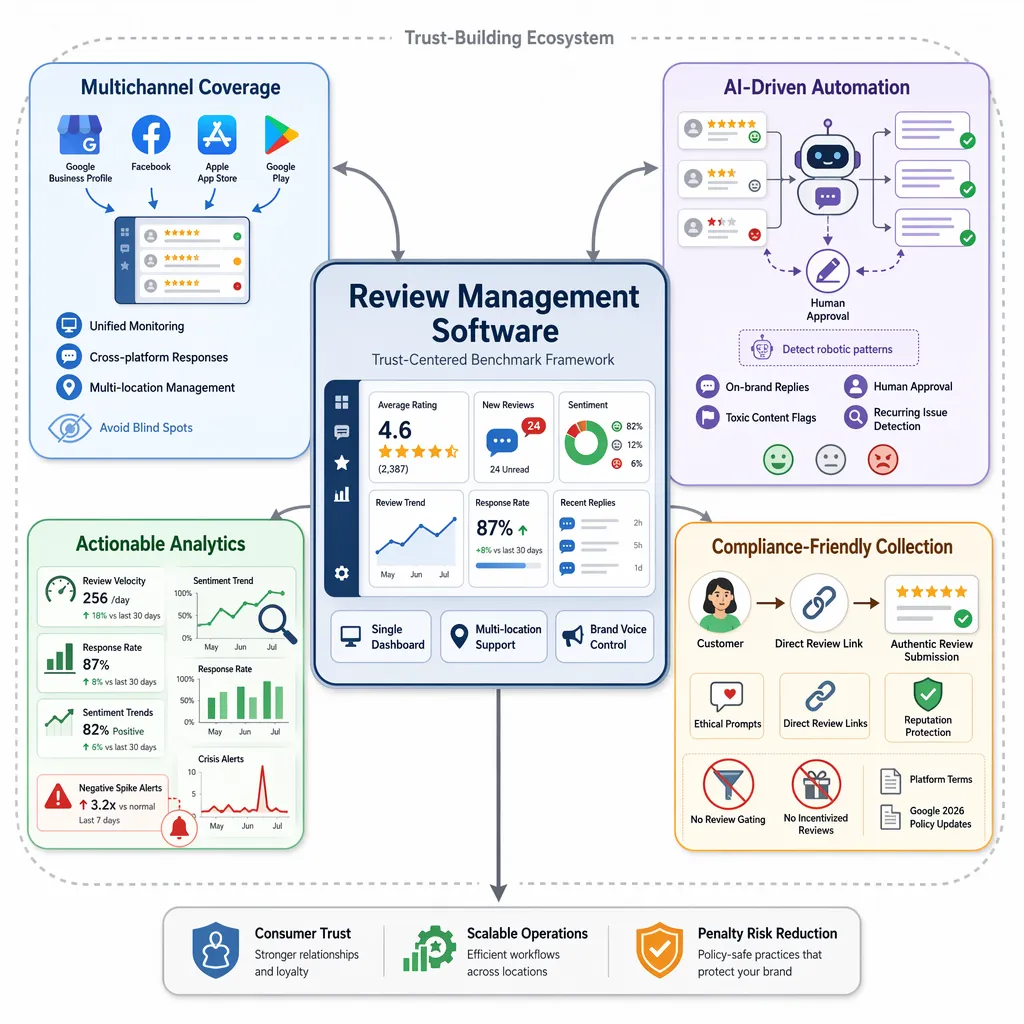
With the feedback management software market valued at $19.56 billion in 2026 and growing at 16.9% CAGR, the definition of 'best' has shifted. It’s no longer a one-size-fits-all label. Tightening platform policies — like Google’s April 2026 crackdown on review gating — and hyper-skeptical consumers wary of AI-generated content demand a new framework. When evaluating the best review management software for businesses 2026, these benchmarks separate tools that build trust from those that risk penalties.
| Criterion | Why It Matters in 2026 |
|---|---|
| Multichannel coverage | Must support Google Business Profile, Facebook, Apple App Store, Google Play — no gaps |
| AI-driven automation | Generates on-brand replies and flags toxic content without manual effort |
| Actionable analytics | Tracks sentiment trends, response rates, and crisis signals, not just raw numbers |
| Compliance-friendly collection | Avoids gating tactics that violate platform terms |
Multichannel coverage is non-negotiable. Consumers leave feedback across Google, Facebook, and app stores. A tool that misses any of these creates blind spots. You need a single dashboard to monitor and respond everywhere. This is especially critical for businesses managing multiple locations.
AI-driven automation must feel human. Over 30% of reviews are now estimated synthetic. Consumers can spot robotic replies. The best tools generate personalised, on-brand responses in seconds while letting you approve or edit before posting. Sentiment analysis should flag recurring issues, not just positive or negative labels.
Actionable analytics go beyond vanity metrics. Look for tools that track review velocity, response rates, and sentiment trends. Crisis alerts for negative spikes let teams act fast.
Compliance-friendly collection methods protect your reputation. Avoid tools that encourage review gating or incentivised feedback. Google’s 2026 policy updates penalise these tactics. Choose software that helps you get more 5-star Google reviews through ethical prompts and direct links, like a Google review link generator.
This framework helps you cut through the noise. The right tool scales from a single shop to a multi-location enterprise, offering collaboration features and custom brand voice. It’s about building trust, not gaming the system.
Comparison Criteria: Features That Actually Move the Needle
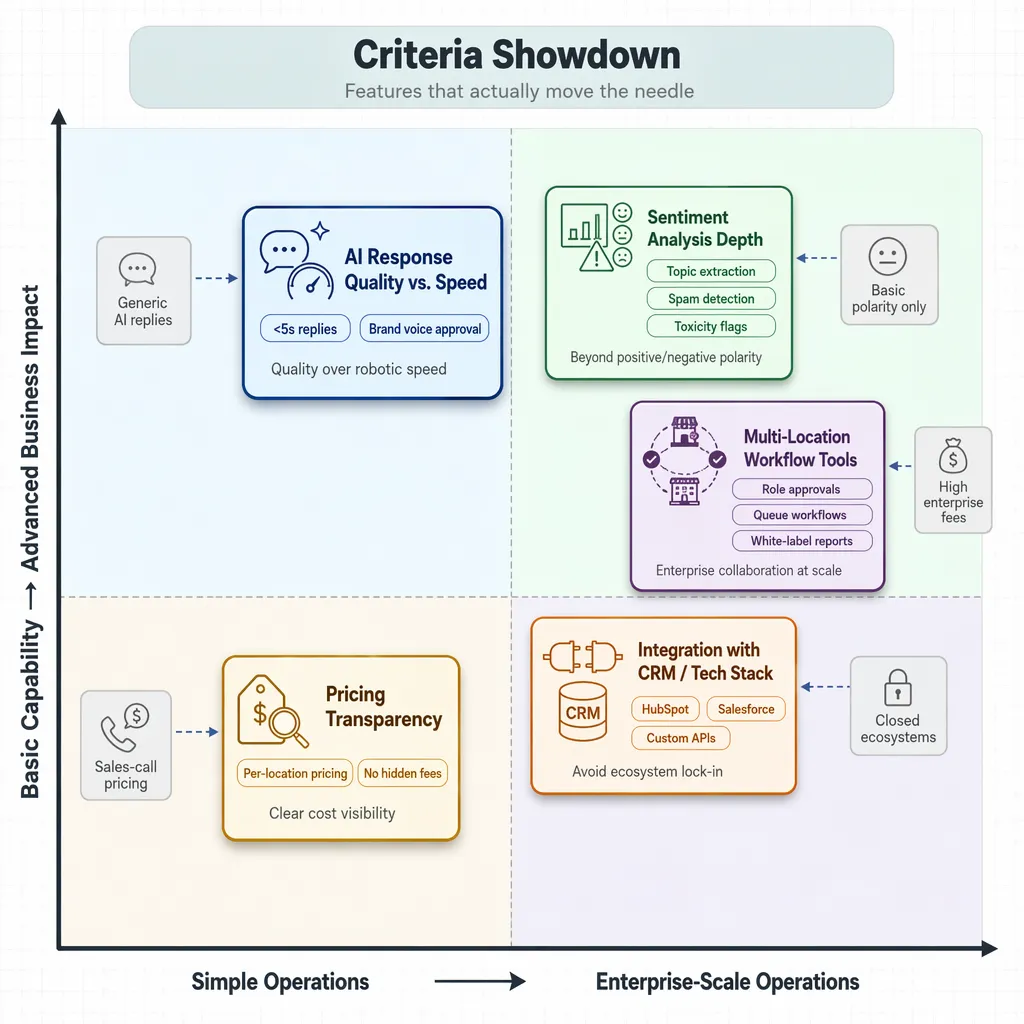
Building on that framework, the real test is how each tool performs on features that directly affect your bottom line. Not all features are equal. Here’s how the market stacks up on the criteria that actually move the needle.
| Feature | What to Look For | Market Reality |
|---|---|---|
| AI Response Quality vs. Speed | Personalised, on-brand replies that pass human review. Speed under 5 seconds. | Many tools prioritise speed over tone. Generic AI replies damage trust. |
| Sentiment Analysis Depth | Tracks topics, recurring issues, and spam. Not just positive/negative labels. | Most tools offer basic polarity. Few flag toxic content or detect spam. |
| Multi-Location Workflow Tools | Role-based approvals, queue workflows, white-label reporting. | Enterprise suites bundle these but charge high per-location fees. |
| Integration with CRM/Tech Stack | Native connectors for HubSpot, Salesforce, or custom APIs. | All-in-one platforms often lock you into their ecosystem. |
| Pricing Transparency | Clear per-location or per-month pricing. No hidden fees. | Most vendors hide pricing behind sales calls. |
2026 Vendor Pricing Comparison
Here's how the named vendors actually stack up on price, as of July 2026:
| Vendor | Best For | Starting Price | Pricing Model |
|---|---|---|---|
| ReviewSense | Small/growing businesses | ~$14.99/month | Transparent flat rate, no per-location fees |
| Praising.ai | SMBs | $19–$29/month | Transparent tiers, per-location fees included in base |
| BrightLocal | Multi-location tracking | $41–$989/month | Track/Manage/Grow tiers, scales by location count |
| Birdeye | Multi-location franchises | Custom quote (~$299+/location) | Quote-gated, trial only, no published free tier |
| Podium | Local service businesses | Custom quote (~$400–$1,200+/mo total) | Quote-gated |
| Thryv | All-in-one bundles | $646–$1,475+/month | Bundle-based (Kickstart/Ignite/Accelerate), free tier limited to Command Center |
Transparent, flat-rate tools like ReviewSense and Praising.ai sit at one end of the market. Quote-gated suites like Birdeye and Podium sit at the other, where the real monthly cost only shows up after a sales call. BrightLocal and Thryv land in between, with published prices that still scale steeply once you add locations.
AI Response Quality vs. Speed
Speed is table stakes. Quality is the differentiator. ** But a robotic reply can do more harm than silence. The best tools generate responses that match your brand voice and let you approve before posting. ReviewSense’s AI response generator does this in seconds, with custom brand voice settings.
Sentiment Analysis Depth
Basic sentiment analysis tells you if a review is positive or negative. That’s not enough. You need to know why customers are unhappy. Are they complaining about wait times, product quality, or staff behaviour? ReviewSense extracts key topics and flags recurring issues. It also detects spam and toxic content, so your team focuses on genuine feedback.
Multi-Location Workflow Tools
For agencies and enterprises, managing reviews across dozens of locations is a logistical challenge. You need role-based approvals, queue workflows, and white-label reporting. All-in-one suites like Thryv offer these but at $646+/mo. ReviewSense provides collaboration tools at a fraction of that cost, scaling from single shops to large enterprises.
How to Match Software to Your Business Profile
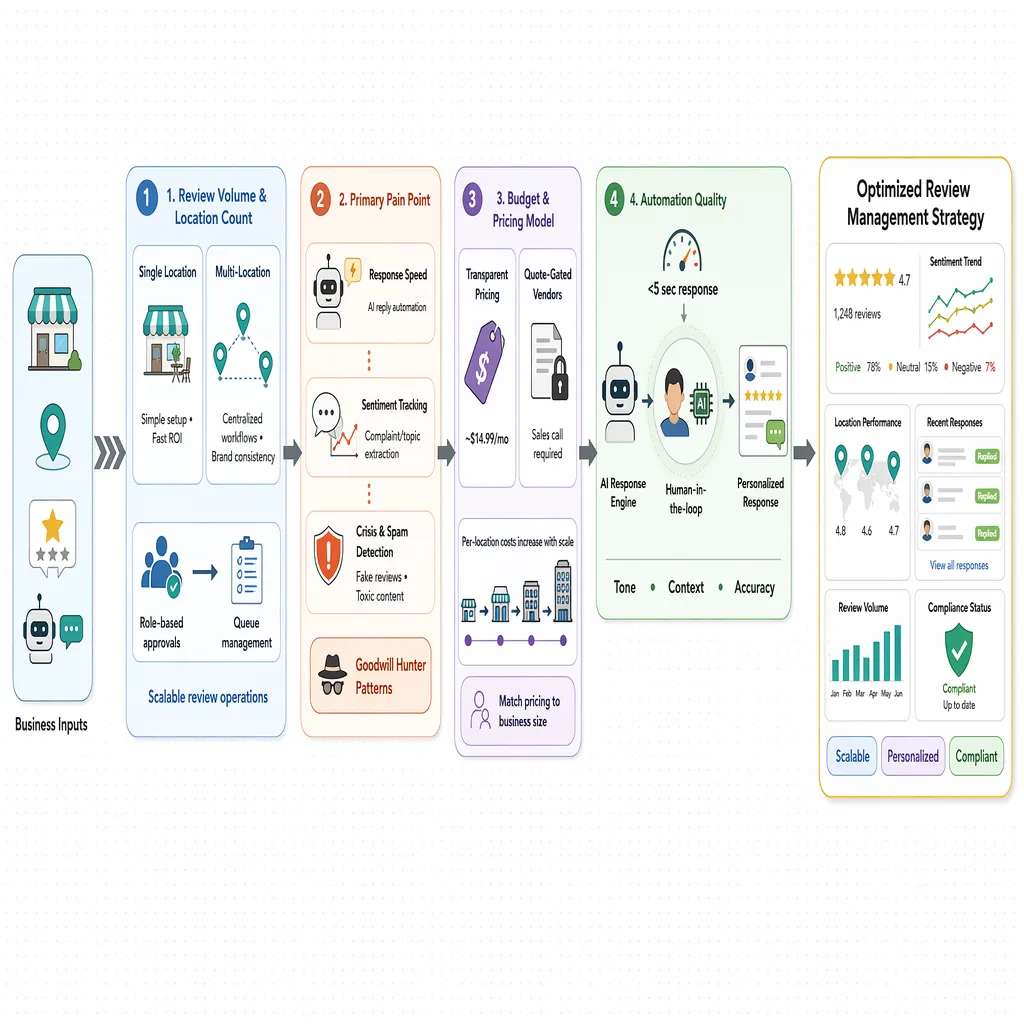
Once you’ve defined your evaluation framework, the next step is matching software to your specific business profile. No single tool fits every scenario. Here’s how to find yours.
| Step | What to Evaluate | Key Question |
|---|---|---|
| 1 | Review volume & location count | Single shop or multi-location enterprise? |
| 2 | Primary pain point | Response speed, sentiment tracking, or crisis detection? |
| 3 | Budget & pricing model | Transparent pricing or quote-gated? |
| 4 | Automation quality | Human-in-the-loop or robotic replies? |
| 5 | Compliance readiness | Does it align with Google’s 2026 policies? |
Step 1: Assess your review volume and location count
A single-location café needs simplicity and immediate ROI. A 50-location retail chain needs centralisation and brand consistency. If you manage multiple sites, look for tools with role-based approvals and queue workflows. The best review management software for businesses 2026 will scale with you.
Step 2: Identify your primary pain point
Are you drowning in responses? Focus on AI reply speed. Struggling with recurring complaints? Prioritise sentiment analysis that extracts key topics. Worried about fake feedback? You need spam and toxic content detection. The ‘Goodwill Hunter’ problem — where customers leave negative reviews to get freebies — requires tools that flag suspicious patterns.
Step 3: Evaluate your budget against pricing models
Many vendors hide pricing behind sales calls. ReviewSense offers transparent pricing at ~$14.99/mo. For agencies managing dozens of clients, per-location fees add up fast. Choose a model that matches your scale.
Step 4: Test automation quality
By mid-2026, approximately 78% of businesses are using AI for review responses. But consumers can spot robotic replies. Look for ‘human-in-the-loop’ tools that surface context — like order details or past interactions — so your team can personalise replies. Speed under 5 seconds is table stakes; tone and accuracy are the differentiators.
Step 5: Verify compliance with Google’s updated policies
Google’s April 2026 crackdown on review gating means you need ethical collection methods. Avoid tools that incentivise feedback or filter reviews before posting. Use a Google review link generator to direct customers to leave honest feedback.
The best review management software for businesses 2026 will align with your operational reality, not just your marketing wish list. Start with these five steps, and you’ll narrow the field fast.
The Hidden Costs of Choosing the Wrong Platform
Those five steps will narrow your shortlist, but the wrong platform can still cost you in ways that don't show up on a feature checklist. Here are three hidden costs that often surface after sign-up.
| Hidden Cost | What It Looks Like | Real-World Impact |
|---|---|---|
| Robotic AI replies | Generic, tone-deaf responses that consumers spot instantly | Erodes the trust the reply was meant to build |
| Compliance penalties | Review gating tactics that violate Google's April 2026 policy | Risk of manual penalties or listing suspension |
| Budget waste from unused features | Paying for social media scheduling or payment tools you never touch | Per-location fees inflate without delivering value |
Reputation risk from robotic replies
Speed matters, but tone matters more. Many platforms prioritise velocity over authenticity, churning out replies that sound like a script. Consumers are savvy — they can spot a template. The result? A reply that was meant to build trust actually erodes it. You need a tool that lets you set brand voice and review every response before it goes live.
Compliance penalties from review gating
Google's April 2026 policy update explicitly bans quotas and specific content solicitation. Some platforms still encourage review gating — filtering customers before they can leave feedback. That's a direct path to penalties. Choose a tool that uses ethical collection methods, like a simple Google review link generator that directs customers to leave honest feedback.
Budget waste from all-in-one suites
All-in-one platforms bundle social media scheduling, payment processing, and email marketing. If you only need review management, you're paying for features you'll never use. Industry reports suggest a starting point of approximately $299–$349 per location per month for these suites. Compare that to focused tools like BrightLocal, where the "Track" plan starts at $41/month for 1 location and scales to $524/month for 91–100 locations, with annual billing typically offering a ~25% discount. ReviewSense goes further still, holding a flat ~$14.99/mo regardless of location count — a significant saving when you're not subsidising modules you don't need.
The freshness factor in SEO
Search algorithms favour recent reviews. Bulk-blasting old feedback does little for your rankings. Automated drip requests — sending review invitations at the right moment — keep your profile active. Focused tools prioritise this listening workflow over marketing blasts.
The free-tier trap
Free tiers look tempting, but read the fine print before you count on one. WiserReview and Stamped.io advertise free plans, but they're typically capped on the number of review requests or the depth of analytics you can access — enough to test the waters, not enough to run a real program. Bigger suites like Birdeye don't offer a genuine free tier at all, only a trial, and Thryv's free option is limited to its own Command Center. If the free plan can't handle your actual review volume, you're not saving money — you're just delaying the cost until you outgrow it.
Strategic Advice for Selecting Your 2026 Solution
Those hidden costs make one thing clear: choosing a review platform is a strategic decision, not a feature hunt. For businesses seeking the best review management software for businesses 2026, these five filters cut through the marketing noise.
| Strategic Filter | What to Look For | What to Avoid |
|---|---|---|
| Authentic engagement | Tools that encourage detailed, organic feedback | Platforms pushing 5-star rating boxes only |
| Actionable analytics | Insights that link to operations, like checkout issues | Dashboards full of vanity metrics |
| Transparent pricing | Clear per-location costs with no hidden fees | Quote-gated models with surprise add-ons |
| AI voice quality | Custom brand voice settings and human review | Generic, robotic reply templates |
| Crisis alerts | Real-time notifications for negative spikes | Delayed or no alerts for reputation threats |
Prioritise authentic engagement over volume. Choose a platform that surfaces genuine feedback, not just star ratings. Google’s 2026 policies penalise review gating, so ethical collection matters.
Demand analytics that connect to operations. If recurring complaints about slow checkout appear, your tool should flag that pattern. AI-Powered Review Management: Strategies for Streamlining Customer Feedback Oversight explains how to turn insights into action.
Insist on transparent pricing. Third-party analysis indicates base plans often start around $399/month, with total costs for multi-location businesses frequently exceeding $800–$1,200/month when add-ons are included. Compare that to platforms where bundles start at $646/month and can scale to over $1,475/month depending on the package. You need clarity before you sign.
Test the AI response generator with your brand voice. A generic reply can damage trust. Use a Negative Review Response Generator to check tone and accuracy.
Evaluate crisis alert capabilities. In hospitality or professional services, a negative spike can cost you bookings. Real-time alerts let you respond fast.
The best way to validate fit is a trial. ReviewSense offers a 7-day free trial so you can test these filters before committing.
Conclusion
Choosing the right review management software for 2026 comes down to avoiding hidden costs, compliance traps, and generic AI that damages trust. Prioritise authentic engagement, transparent pricing, and analytics that connect to real operations. Test the AI response generator with your actual brand voice, and ensure crisis alerts are instant—not delayed. The best tool validates itself through use, not marketing claims. Turn scattered reviews into actionable insights that drive growth. Start your 7-day free trial