Is your mobile app generating hundreds of reviews daily whilst your team struggles to read even a fraction of them? Traditional customer feedback methods collapse under the weight of high-volume app store data. When you hit a certain growth threshold, manually tagging bugs and feature requests becomes impossible. You need a systematic approach to sort the noise from the critical insights. Learning how to manage app store reviews at scale requires a total shift from manual reading to automated triage. Triage only pays off if the automated half still reads well, so it is worth pairing this with our guide to automating responses without losing quality.
Implementing dedicated Apple App Store review management software like ReviewSense instantly routes critical feedback to your developers whilst automating routine replies. For teams shipping both iOS and Android, our dedicated mobile app review management page covers the cross-store workflow end-to-end.
The New Reality of App Store Optimisation and AI Summaries
Mastering how to manage app store reviews at scale is not just a customer support function. It's a critical driver of App Store Optimisation and user conversion. The days of treating feedback as a ticketing queue are over. Today, your public responses directly influence search visibility and download rates.
Apple's introduction of AI-generated review summaries in iOS 18.4 changes everything. This feature effectively kills the long tail of individual reviews. Users no longer scroll through dozens of single comments. Instead, they read a synthesised overview. This means teams must focus on managing LLM training data. You are feeding keywords to an algorithm rather than satisfying a single user.
The stakes for app developers are massive. Consumers rely on recent feedback before downloading any software. Moving your app from an average rating to a great one yields conversion increases. Falling below a three-star floor means many users won't even consider installing your application.
To stay competitive, enterprise apps now aim for a 90% or higher response rate across all review types. The global average across all industries remains low at 14%. This gap creates a competitive advantage for those who scale their efforts. You can outpace rivals by adopting proper Customer Review Management strategies.
Responding quickly also triggers the reply effect among your user base. Users are 3x more likely to update a negative rating after receiving a developer response. Teams can learn How to Use Free AI review Response Generators to Improve Customer Communication to maintain this velocity. Fast replies turn frustrated users into loyal advocates.
Why Traditional Review Management Fails High-Volume Apps
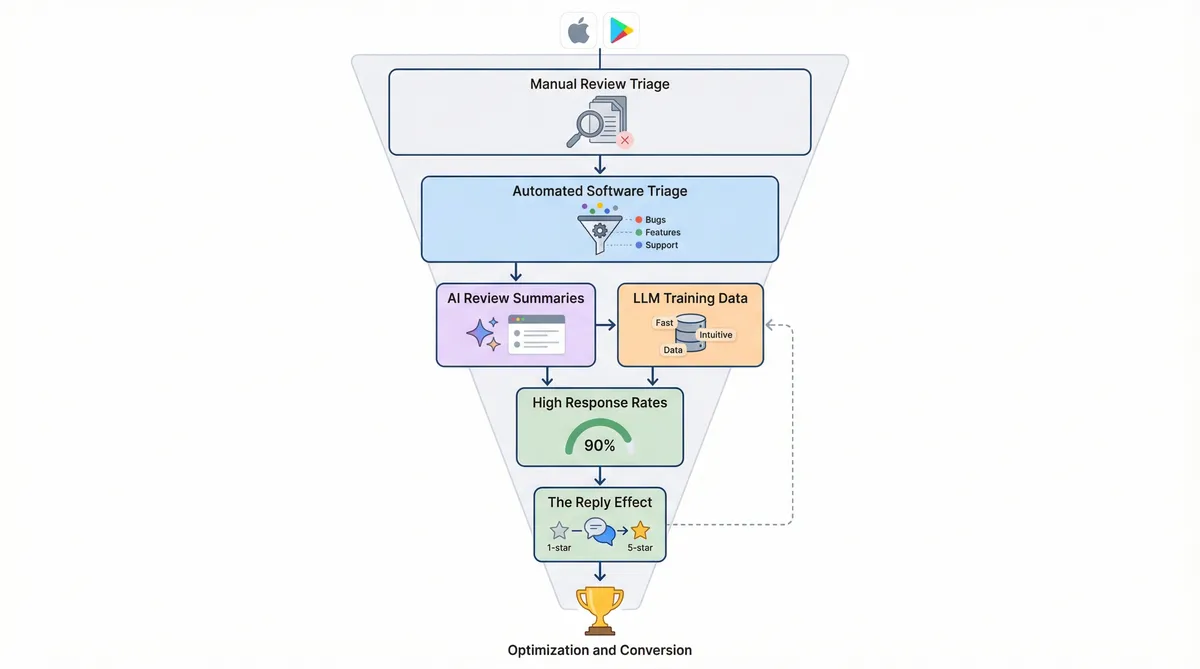
Fast replies turn frustrated users into loyal advocates, but achieving this velocity requires abandoning outdated workflows. When learning How to Manage App Store Reviews at Scale: Workflows, Triage, and Automation, teams face the Scale Paradox. Reading every single comment isn't sustainable. High-volume apps must rely on impact-based sampling instead.
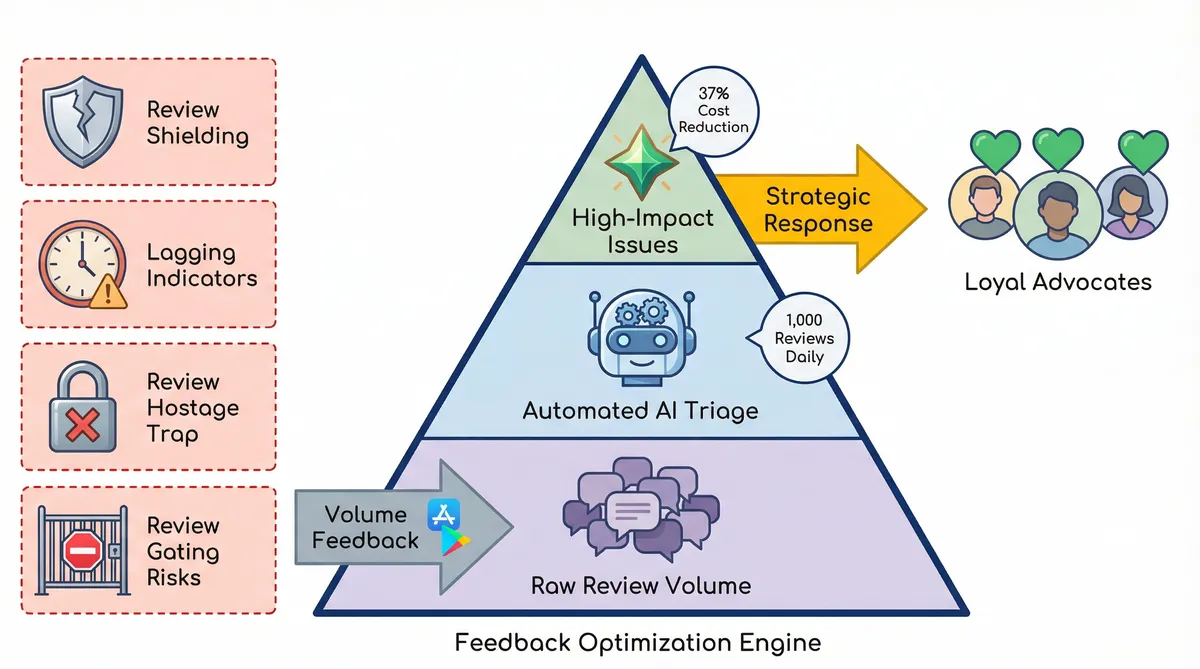
Manual processing fails under pressure. Over 57% of mobile marketers use AI agents for reputation management. Around 32% deploy autonomous agents. These tools draft responses 50% faster than manual typing. A single agent oversees 500–1,000 reviews per day, beating the 100–150 limit of 2023. This enterprise implementation drives a 37% reduction in operational costs.
Relying on human agents for raw volume creates specific pitfalls for growing brands:
- Review Shielding: Support teams face severe burnout reading thousands of 1-star insults. Automated triage shields human staff from toxic content.
- Lagging Indicators: App store feedback isn't a real-time metric. Treating it as a QA tool for bug hunting delays critical fixes.
- The Review Hostage Trap: Some users hold ratings hostage for feature requests. Giving in sets a dangerous precedent for future interactions.
- Review Gating Risks: Filtering negative feedback before it reaches the Apple App Store violates platform policies and risks account suspension.
Ignoring these principles causes catastrophic failures. Tinder ignored 83.2% of negative reviews regarding its monetisation changes, damaging its search visibility. Another major gaming publisher received a direct warning from Apple after ignoring user sentiment.
You must select Choosing the Right Customer Review Management Software for Multi-Platform Businesses to avoid these exact traps. Proper triage ensures your team focuses only on high-impact issues.
Building a Three-Step AI Triage System That Works
To avoid these traps and focus on high-impact issues, teams need a structured funnel. Learning how to manage app store reviews at scale requires moving past manual sorting. An automated triage system filters noise and highlights genuine feedback. This approach directly impacts growth. Moving an app's average rating from 3 stars to 4 stars produces an 89% increase in conversion rate. You must treat feedback as a primary acquisition channel.
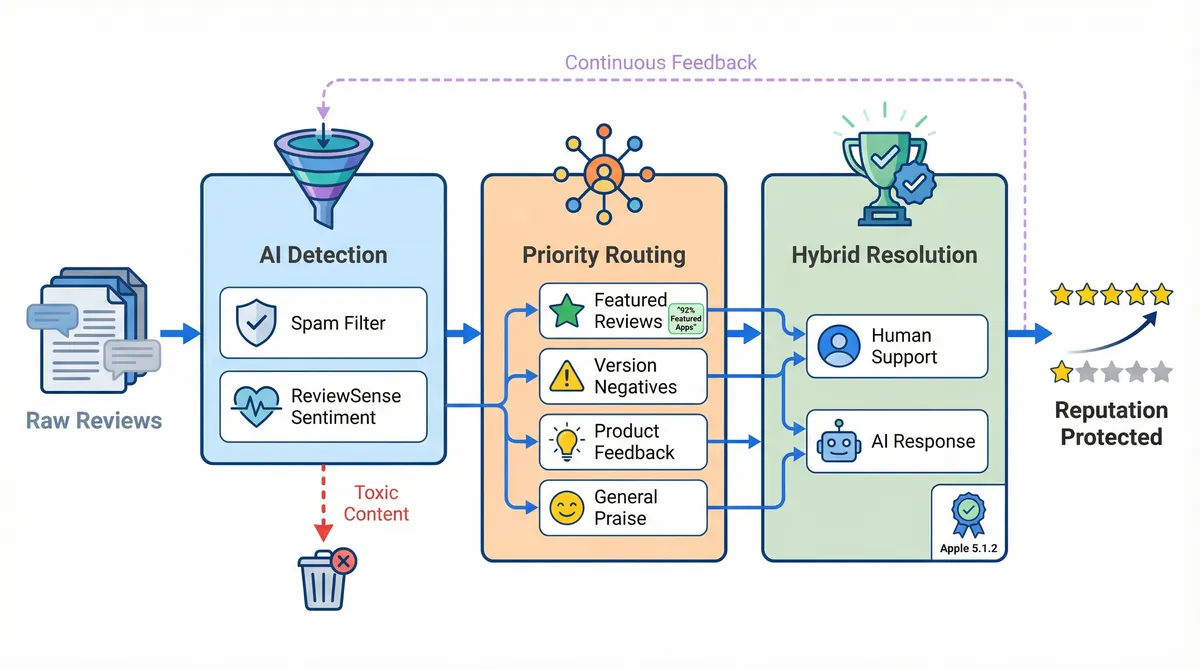
Detection: The first phase relies on artificial intelligence to identify anomalies. AI filters out bot campaigns and spam before they reach human agents. This improves the signal-to-noise ratio. Google blocked millions of spam ratings using similar detection methods. ReviewSense uses built-in sentiment analysis to flag toxic content. Catching these anomalies early prevents wasted support hours.
Routing: Once cleaned, the system categorises feedback into four distinct priority tiers. Tier 1 handles featured reviews. This is vital because 92% of featured apps on the App Store maintain a rating of 4.0 or higher. Tier 2 catches recent version negatives. Tier 3 routes constructive criticism to product teams. Tier 4 groups generic positive feedback. Proper routing ensures critical bugs reach developers fast.
Resolution: The final step involves a human-in-the-loop approach. Apple's App Review Guidelines (Section 5.1.2) require transparency when using AI. Complex issues need human empathy to resolve. Routine praise can be handled by an AI review Response Generator. This balance maintains compliance while boosting efficiency. Your team focuses only on users who need real help.
Even small improvements yield massive returns. A 0.5-star increase in overall rating can double install conversion rates for organic traffic. Because 91% of consumers rely on recent reviews to evaluate an app, speed is critical. Teams might also explore Investigating Google Review Management Software: Capabilities, Limitations, and ROI to align their multi-platform strategy. Consistent monitoring protects your brand reputation across all digital storefronts.
Industry Benchmarks: What Does 'Good' Look Like?
Protecting your brand reputation requires knowing which performance metrics matter most. Many development teams chase a flawless score, but a perfect 5.0 rating looks suspicious to Gen Z buyers. They don't trust perfection. The actual conversion sweet spot sits between 4.2 and 4.5 stars. Modern consumers seek out authentic feedback before downloading.
Hitting this sweet spot depends on response speed. The 'Golden Hour' is the new industry standard. AI handles initial triage under one hour, while human agents resolve complex issues within 24 hours. The fastest support teams are trending toward 30-minute resolutions.
This rapid speed triggers the 'Reply Effect'. When you engage fast, frustrated users update their negative scores. This proactive approach yields an average +0.7-star improvement per updated rating.
| Industry | Response Rate | Avg. Response Time | Rating Impact |
|---|---|---|---|
| Finance | 70.3% | 23h | +1.21 stars |
| Health & Fitness | 57.0% | 36h | +0.85 stars |
| Gaming | 31.6% | 48h | +0.40 stars |
| Shopping | 6.9% | 108h | -0.08 stars |
Figuring out how to manage app store reviews at scale means matching these top-tier benchmarks. By automating the initial triage, teams see a 24% reduction in time spent on repetitive tasks. Human agents then focus entirely on high-priority complaints instead of manual sorting.
While the global baseline hovers around 14%, elite apps target a 90% response rate. ReviewSense helps bridge this gap by centralising feedback from the Apple App Store and Google Play into one dashboard. To reach these heights, consider using a How Many 5-Star Reviews Calculator to set realistic targets. You can explore AI-Powered Review Management: Strategies for Streamlining Customer Feedback Oversight to build your ideal workflow.
Scaling Operations with the Right Tech Stack
Matching those top-tier benchmarks requires moving beyond manual spreadsheets. Research shows that 60% of organisations supplement traditional surveys with these always-on signals to identify friction points before surveys allow. Figuring out how to manage app store reviews at scale means adopting tools that filter the noise. Smart teams ignore loud volume and look for expensive problems. These are issues mentioned by only 5% of users that correlate with a 50% drop in Day-7 retention.
It's clear that executing this strategy relies on AI automation. Automation saves four hours each day per agent. It increases agent capacity to 500-1,000 reviews per day, up from a manual limit of 100-150. AI cuts drafting time by 50%, reducing overall operational costs by 37%. Forrester found that customer-obsessed brands acting on this feedback experience 41% higher revenue growth than their peers.
Real-world results prove this model works. Treeplla tripled their response rates, hitting 3,000 replies monthly per agent. Roku centralised their global feedback into one unified view. Miro closed the loop by routing critical app issues through Zendesk. Proper customer review monitoring tools make these workflows possible.
ReviewSense provides the exact infrastructure needed for this high-speed triage. The platform centralises Apple App Store and Google Play feedback into a single dashboard. You can also embed your app ratings on your website with a free App Store review badge or Play Store review badge. For omnichannel brands, it pulls in Google Business Profile and Facebook review management.
You get an AI response generator and auto-reply workflows to handle routine praise. Built-in sentiment analysis extracts key topics and flags recurring bugs. This lets your team focus on genuine feedback that impacts retention. You can test these tools with a 7-day free trial to see the immediate value.
Conclusion
Managing app store feedback at scale doesn't mean drowning in manual spreadsheets. By adopting a rapid triage system, your team can hit "Golden Hour" response benchmarks, trigger the "Reply Effect" to boost ratings, and free up human agents to resolve complex, retention-killing bugs.
AI automation bridges the gap between overwhelming review volume and streamlined operations. ReviewSense centralises your Apple App Store, Google Play, Google Business Profile, and Facebook reviews into a single dashboard. By automatically drafting on-brand replies and flagging recurring issues through sentiment analysis, your team can focus entirely on genuine feedback rather than administrative tasks.
Stop letting critical user feedback slip through the cracks. Turn scattered reviews into actionable insights that improve customer experience and Start your 7-day free trial.