
Products with five reviews have a 270% greater purchase likelihood than those with none. That’s a compelling reason to centralise your review data—but simply knowing your average star rating isn’t enough. A basic star rating calculator tells you where you stand; a strategic approach tells you how to climb. This guide shows you how to use an online rating calculator to analyse your current score and, more importantly, calculate exactly what you need to reach your target rating.
Managing this manually is hard. ReviewSense automates it.
Why a Star Rating Calculator Is Only the Start
A raw star rating average is a blunt instrument. It tells you the mean, but it hides the story. [Recent industry research](https://www. com/research/local-consumer-review-survey/) shows that 68% of consumers require at least a 4.0-star rating to consider a business. Yet 74% also want to see reviews from the last three months. A high average from stale feedback can mislead you. You need more than a number.
Volume matters just as much. A Northwestern University study found that products with five reviews had a 270% greater purchase likelihood than products with no reviews. A perfect 5.0 from a single review carries less weight than a 4.5 from fifty. The average rating calculator gives you one data point. It doesn't show distribution, count, or recency.
Here is the contrarian thesis: a higher rating is not necessarily a better business metric. A more informative distribution is. Consider two businesses. One has a 4.8 average from 10 reviews. Another has a 4.3 from 200 reviews. The second business likely has more reliable data and stronger social proof. A simple star rating calculator can't tell you that.
| Metric | What it shows | What it hides |
|---|---|---|
| Average rating | Mean score | Distribution, volume, recency |
| Review count | Total feedback | Sentiment trends, response rates |
| Recency filter | New vs old reviews | Velocity of feedback |
| Sentiment score | Positive vs negative | Specific recurring issues |
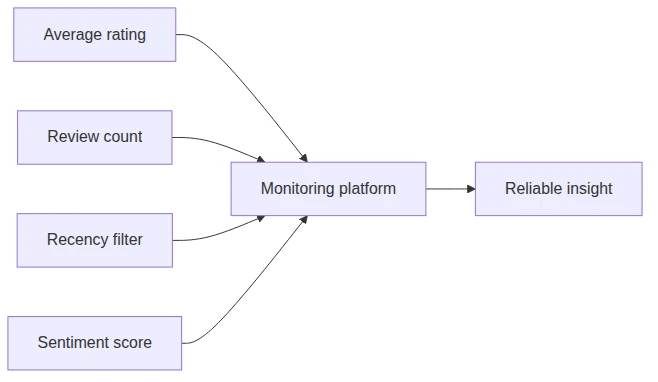
A basic calculator gives you a number. What you actually need is a tool that shows distribution, count, recency, and trend. That is where a proper customer review monitoring platform comes in. It centralises feedback from Google Business Profile, Facebook, Apple App Store, and Google Play into one dashboard. You get instant alerts for new reviews. You can generate personalised replies in seconds. Built-in sentiment analysis flags recurring issues and detects spam. This transforms scattered data into actionable insight.
This article will show you how to use a rating calculator properly. It will also explain what to look for in a platform that goes beyond simple math. You'll learn to analyse distribution, track recency, and spot trends. That is how you turn a number into a strategy.
What a True Rating Calculator Should Reveal
A basic average rating calculator gives you a single number. That number can mislead. You need a tool that reveals the full picture. Here is what a sophisticated star rating calculator should show you.
| Element | What It Reveals | Why It Matters |
|---|---|---|
| Weighted average with transparent formula | Exact calculation method | Prevents manipulation of scores |
| Full distribution (count per star level) | How many 1s, 2s, 3s, 4s, 5s | Shows where your real risk sits |
| Review count with confidence interval | Reliability of the average | Small samples are unreliable |
| Median and mode | Central tendency beyond mean | Mean can be skewed by outliers |
| Top-box percentage (4-5 stars) | Share of positive reviews | Key metric for conversion |
| Dissatisfaction rate (1-2 stars) | Share of negative feedback | Early warning for churn |
| Recency trend | Are recent ratings improving? | Stale data hides current reality |
| Scenario modelling | Reviews needed to hit a target | Actionable planning tool |
| Reverse calculation | How many 1-stars you can absorb | Stress-test your rating |
| Bayesian-smoothed score | Adjusted rating for small samples | Fair comparison across businesses |
Weighted Average and Transparent Formula
Most free tools hide their math. A proper rating calculator online should show you the exact formula. This prevents you from being misled by a simple mean.
Full Distribution per Star Level
A 4.5 average could come from 90% five-star reviews and 10% one-star reviews. Or it could come from 50% five-star and 50% four-star. Those two scenarios demand different responses. You need the breakdown.
Review Count with Confidence Interval
The Wilson method provides a statistical confidence interval for small samples. A 5.0 from three reviews is less reliable than a 4.5 from 200. Your calculator should flag this.
Median and Mode
Mean averages get pulled by extreme scores. A single one-star review drops a 5.0 to 4.0. The median and mode tell you what most customers actually think.
Top-Box and Dissatisfaction Rates
Top-box percentage (4-5 stars) drives purchase decisions. Dissatisfaction rate (1-2 stars) predicts churn. Both matter more than the mean. com/research/local-consumer-review-survey/) confirms consumers want recent reviews. Your calculator should show if ratings are trending up or down over the last 90 days.

How to Calculate What You Need to Reach Your Target Rating
That average rating calculator gives you a single number, but it doesn't tell you how to change it. Here is a practical method to calculate exactly what you need.
| Step | Action | Example |
|---|---|---|
| 1 | Enter your current distribution | 120 reviews, 4.2 average |
| 2 | Set your target rating | 4.5 |
| 3 | Apply the reverse formula | (Target × (Total + X) - Current Stars) / 5 = X |
| 4 | Factor in recency and velocity | 74% want reviews from last 3 months |
| 5 | Add a compliance check | Google and FTC rules apply |
| 6 | Consider distribution improvement | Moving 1-star to 3-star often works better |
Step 1: Gather Your Current Numbers
You need two figures: your total review count and your current total star points. A business with 120 reviews at 4.2 has 504 total star points (120 × 4.2).
Step 2: Set Your Target
Pick a realistic target. For this example, the goal is 4.5.
Step 3: Run the Reverse Calculation
The formula works like this: (Target × (Current Reviews + X) - Current Stars) / 5 = X. Plug in the numbers: (4.5 × (120 + X) - 504) / 5 = X. Solve for X. You need 72 consecutive 5-star reviews to hit 4.5. That is a steep climb. com/research/local-consumer-review-survey/) confirms that 83% of consumers used Google to read reviews. Many of those people want recent feedback. You need to project how long 72 reviews will take. If you earn 10 reviews per month, that is over seven months. Your rating calculator online should model this timeline.
Step 5: Add a Compliance Warning
Google's policy requires reviews to reflect genuine experiences. The FTC rule prohibits fake or incentivised reviews. Artificially engineering a 5-star result can get reviews removed. Do not attempt it.

Common Pitfalls When Using an Average Rating Calculator
That reverse calculation is useful, but it only works if you avoid the common traps that make most rating calculators misleading. Here are eight pitfalls to watch for.
| Pitfall | What Goes Wrong | The Fix |
|---|---|---|
| Confusing average with quality | A 4.5 hides a 90% 5-star / 10% 1-star split | Use a star rating calculator that shows full distribution |
| Treating scales as equal | Ordinal data (1-5) isn't interval data | Apply median and mode alongside the mean |
| Ignoring sample size | A 5.0 from 2 reviews is meaningless | Use Wilson score confidence intervals |
| Trusting platform averages blindly | Google and others use weighted or delayed scores | Check platform documentation |
| Chasing 5-star volume only | Fixing the experience prevents recurring 1-stars | Remove the root cause, not just the symptom |
| Failing to validate inputs | Negative counts or impossible targets break the math | Add input validation to your calculator |
| Overproducing SEO fluff | Thin content around a tiny tool hurts credibility | Build a genuinely useful tool first |
| Omitting reverse calculations | You don't know how many 1-stars you can absorb | Include a stress-test scenario |
Confusing average rating with true quality. A single number hides distribution. A 4.5 average could mean 90% five-star reviews and 10% one-star reviews. That 10% signals a recurring problem. You need a star rating calculator that shows the count per star level, not just the mean.
Treating all rating scales as interchangeable. Star ratings are ordinal, not interval. The gap between 1 and 2 stars isn't the same as the gap between 4 and 5. A simple average treats them as equal. That's a mathematical error. Use median and mode to get a truer picture.
Ignoring sample size. A 5.0 from two reviews is statistically meaningless. The Wilson score method provides a confidence interval for small samples. Your average rating calculator should flag low-confidence scores. Don't act on a rating that could flip with one new review.
Pretending platform ratings are simple averages. Google's displayed score may take time to update, as noted in their support documentation. Some platforms use weighted models that give more weight to newer reviews. A raw average won't match what customers see.
What to Look for in a Review Management Platform
Those pitfalls make one thing clear: a basic average rating calculator online won't cut it. You need a platform that turns raw numbers into action. Here is what separates a simple tool from a sophisticated review management system.
| Feature a Basic Calculator Offers | What a Sophisticated Tool Should Offer | Why It Matters |
|---|---|---|
| Average calculation | Full distribution + trend analysis | A single mean hides whether ratings are improving or declining. |
| Manual data entry | Automated import from Google, Facebook, Apple App Store, Google Play | Manual entry wastes time and introduces errors. com/research/local-consumer-review-survey/) shows consumers want recent reviews. |
| No compliance guidance | Built-in policy checks and response templates | The FTC rule prohibits fake reviews; non-compliance risks removal. |
| No team collaboration | Approval workflows and role-based access | Multiple staff need to coordinate replies without chaos. |
| No sentiment analysis | Topic extraction and spam detection | Trustpilot reports 90% of fake reviews are caught automatically. |
| No forecasting | Review velocity projections and crisis alerts | A sudden spike in 1-star reviews demands immediate action. |
Distribution and Trend Analysis
A star rating calculator gives you a single number. A sophisticated platform shows the count per star level and how that distribution shifts over time. You see if a 4.2 average hides a growing cluster of 1-star reviews. That insight drives real fixes.
Automated Import from Supported Platforms
Manual data entry is slow and error-prone. A proper tool pulls reviews automatically from Google Business Profile, Facebook, Apple App Store, and Google Play. Your team gets a single dashboard without copy-pasting.
Recency-Weighted Scoring and Alerts
Not all reviews matter equally. A platform that weights recent feedback more heavily gives you a truer picture. It also sends alerts when a new negative review drops, so you can respond fast.
Compliance and Response Templates
Google and the FTC have strict rules. A good platform includes policy checks and pre-approved response templates. You avoid accidentally violating guidelines that could get reviews removed.
Collaboration and Approval Workflows
When multiple people handle reviews, you need role-based access and approval queues. One person drafts a reply; a manager approves it. No conflicting messages or missed responses.
Conclusion
A basic rating calculator gives you a number. ReviewSense gives you the full picture: distribution trends, recency-weighted scores, and automated imports from Google, Facebook, Apple App Store, and Google Play. You spot the hidden 1-star cluster before it becomes a crisis. You respond to new negative reviews within minutes, not days. Your team collaborates without chaos using approval workflows. Stop guessing at what your star rating actually means. Start your 7-day free trial to turn scattered reviews into actionable insights that improve customer experience and drive growth.