
Here’s the brutal truth: 88% of organisations now use AI in at least one business function, yet only 25% of contact centres have fully integrated it into daily operations. That gap isn’t a tech problem — it’s a trust problem. Leaders fear that faster replies mean sloppier service. The fix isn’t more automation; it’s smarter orchestration. This guide shows you how to automate responses while maintaining quality by building a hybrid system that prioritises resolution over speed.
Managing this manually is hard. ReviewSense automates it.
The Automation Paradox: Why Speed Often Kills Quality
This tension between speed and quality is not a reason to abandon automation. The data shows a clear gap: 88% of organisations now use AI in at least one business function, yet only 25% of contact centres have fully integrated it into daily operations. That gap exists because many leaders fear the 'Automation Backlash' — the moment customers feel they are talking to a machine, not a person. The same worry applies to outbound requests, and our review generation email playbook covers keeping automated asks personal.
The stakes are high. A generic, automated reply to a negative review can do more harm than good — it signals that you did not care enough to read what was written.
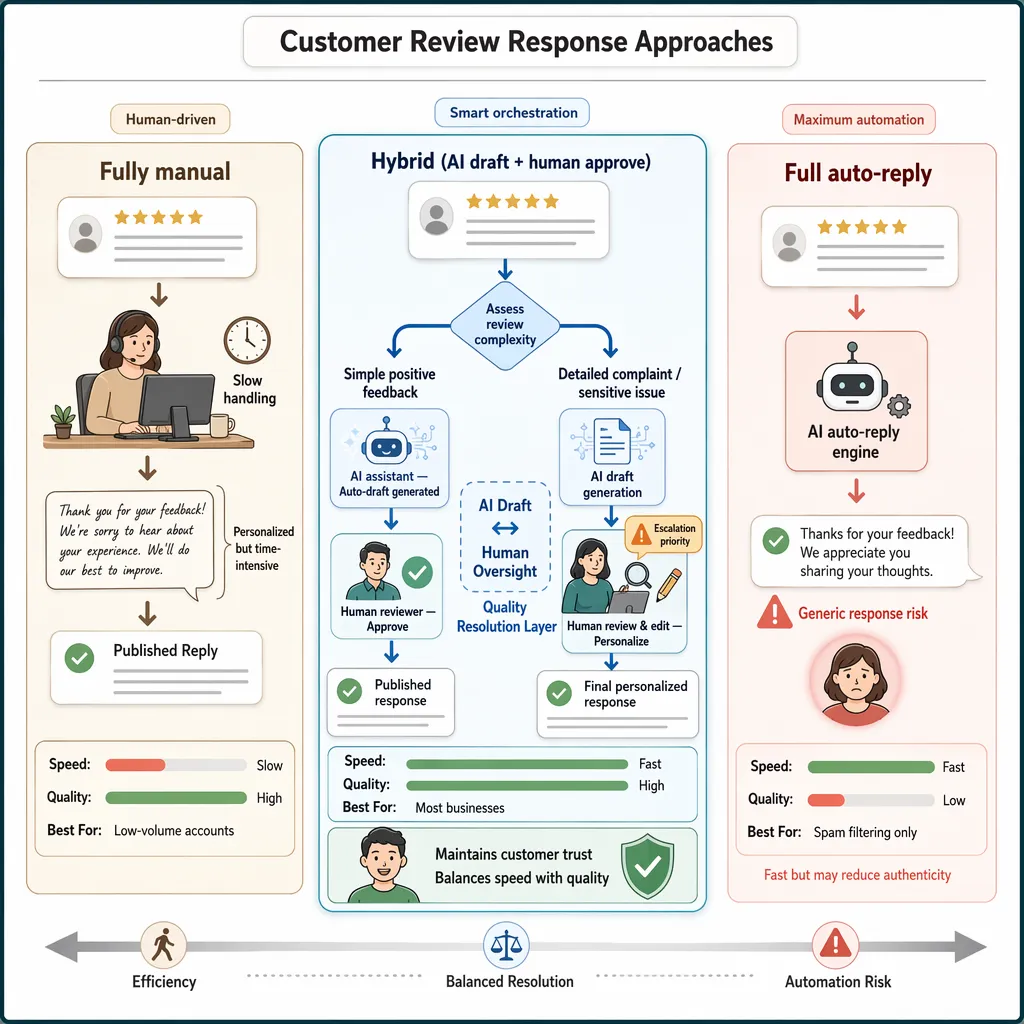
So how do you automate responses while maintaining quality? The answer is a hybrid model. Speed comes from automation. Quality comes from human oversight. The best approach uses AI to draft replies, then lets a person review and approve before publishing. This is not about maximum deflection. It is about quality resolution.
| Approach | Speed | Quality | Best For |
|---|---|---|---|
| Fully manual | Slow | High | Low-volume accounts |
| Full auto-reply | Fast | Low | Spam filtering only |
| Hybrid (AI draft + human approve) | Fast | High | Most businesses |
Many UK businesses already use this model for managing Google reviews. A step-by-step guide to managing Google reviews effectively shows how to set up alerts and templates without losing the personal touch. The same logic applies to Facebook and app store feedback.
The goal is not to replace human interaction. It is to remove the friction of repetitive tasks. When a customer leaves a detailed complaint, they deserve a reply that addresses their specific issue. A hybrid system can flag that review for priority handling, while auto-replying to simple positive feedback. This balance protects your reputation and builds trust.
How to Build a Hybrid Response System That Scales
Building on that hybrid model, you need a repeatable system. Here is a practical framework to automate responses while maintaining quality, even as review volume grows.
The Hybrid Workflow at a Glance
| Step | Action | Outcome |
|---|---|---|
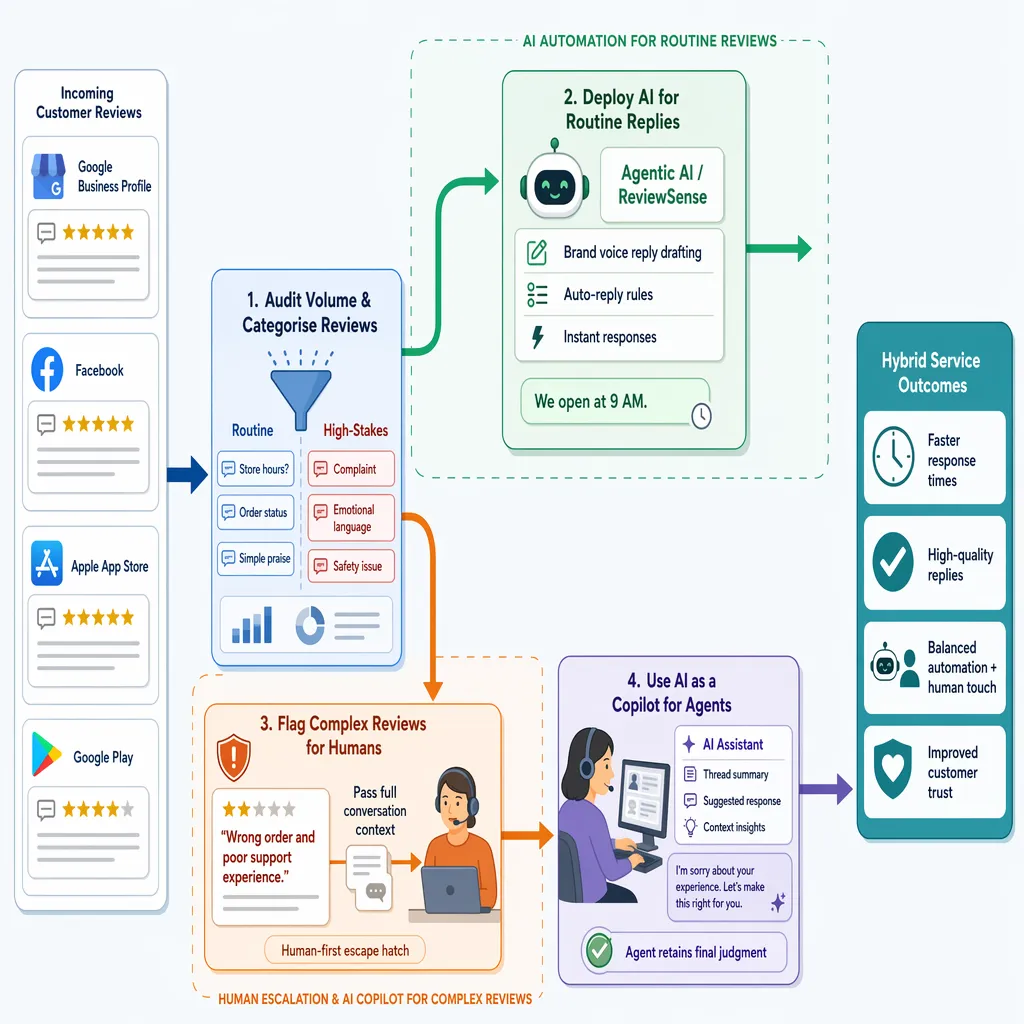
| 1 | Audit volume and categorise reviews | Separate routine from high-stakes |
| 2 | Deploy AI for routine replies | Speed for simple queries |
| 3 | Flag complex reviews for humans | Quality where it matters |
| 4 | Use AI as a copilot for agents | Context without replacing judgment |
Step 1: Audit Your Current Feedback Volume
Start by reviewing your recent feedback. Sort reviews into two buckets: routine and high-stakes. Routine includes order status, hours, or simple praise. High-stakes covers complaints, emotional language, or mentions of safety. This audit tells you where automation can help most.
Step 2: Implement Agentic AI for Routine Tasks
Use AI to handle the routine bucket autonomously. A platform like ReviewSense can centralise feedback from Google Business Profile, Facebook, Apple App Store, and Google Play. It drafts replies based on your brand voice. The AI handles simple queries like 'When do you open?' without human input. This frees your team for complex issues.
Step 3: Design a Human-First Escape Hatch
Every review that contains emotion or complexity must escalate to a person. The system should pass full conversation context. No one wants to repeat themselves. This escape hatch ensures that no customer has to repeat information they already gave — a primary driver of frustration and trust erosion.
Step 4: Use AI as a Copilot for Human Agents
For escalated reviews, AI should summarise the thread and suggest a response. The agent retains final judgment. This copilot model aligns with the 89% of professionals who agree that positive service needs a balance of automation and human touch. It speeds up resolution without sacrificing quality.
ReviewSense supports this hybrid model with instant alerts and queue workflows. You can set auto-reply rules for routine reviews and flag complex ones for team review. The result is faster response times and higher quality replies. For deeper guidance, the guide to managing app store reviews at scale walks through triage and automation steps.
The Contrarian Take: Stop Polishing Outputs, Fix Your Inputs
The hybrid model works, but it hides a deeper problem. Reviewing every AI draft creates a bottleneck. Your team still reads, edits, and approves each reply. That defeats the purpose of automation. The real fix is not polishing outputs. It is fixing your inputs.
The Input Quality Problem
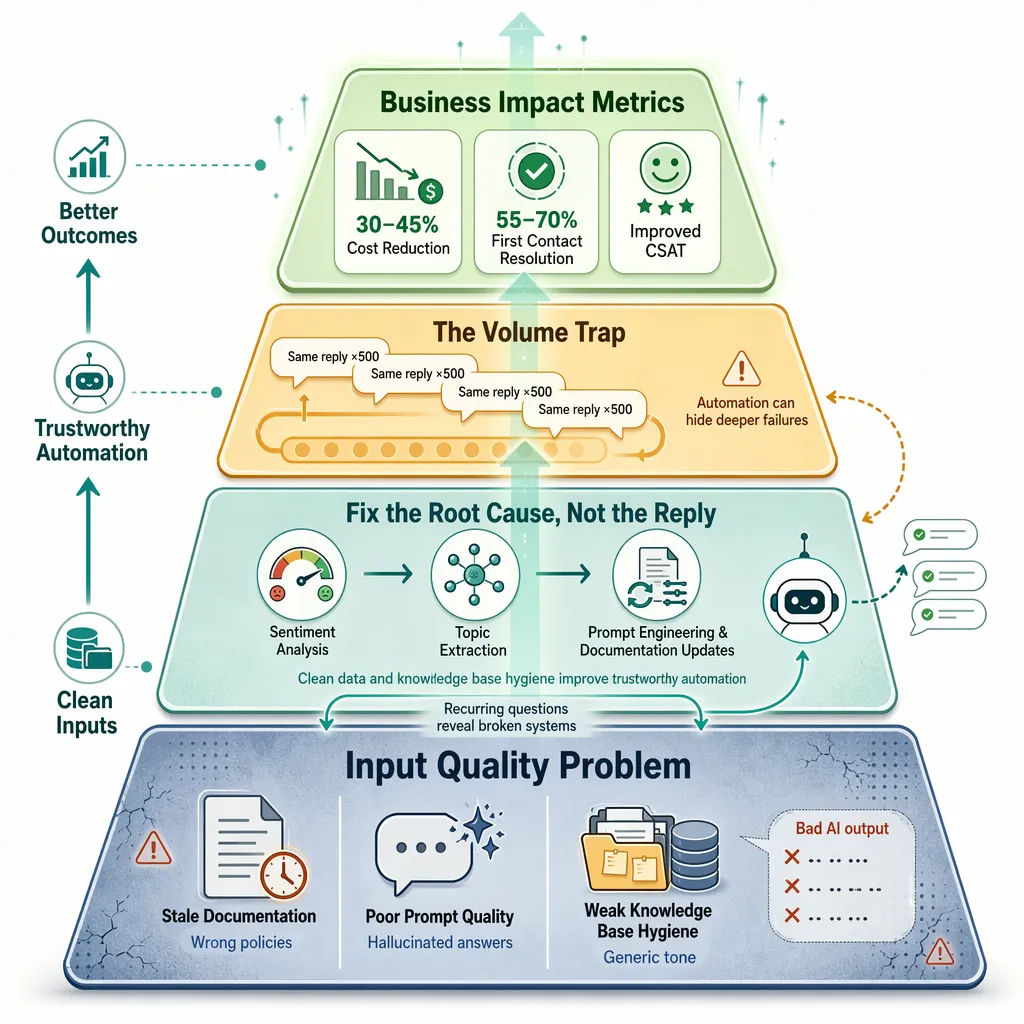
Thin or stale documentation leads to confident but incorrect AI answers. These errors are more costly than no automation at all. Customers spot a generic reply instantly. Trust erodes faster than if you had stayed silent.
| Input Problem | AI Output | Cost to Business |
|---|---|---|
| Outdated FAQ | Wrong hours or policy | Lost footfall |
| Missing product info | Hallucinated features | Returns and complaints |
| No brand voice guide | Robotic tone | Brand dilution |
Fix the Root Cause, Not the Reply
Companies deploying AI effectively can reduce costs by 30–45% while improving CSAT. The secret is rigorous input quality control. ReviewSense’s built-in sentiment analysis and topic extraction help identify recurring issues. If the same question appears 500 times a day, your product or documentation is broken. Fix that, and you reduce the need for replies entirely.
High-performing AI-native platforms achieve 55–70% First Contact Resolution rates. That comes from clean data, not better editing. Invest in prompt engineering and knowledge base hygiene. Your automation becomes trustworthy enough to send without review.
The Volume Trap
Automating the same response 500 times is a trap. It masks a deeper failure. The highest quality response is the one the customer never had to ask for. Use tools like a Google Review Link Generator to make leaving feedback easy, but focus your energy on fixing the issues customers report. For deeper guidance on building a clean input system, read the AI-Powered Review Management: Strategies for Streamlining Customer Feedback Oversight.
Stop polishing drafts. Start fixing the source.
Measuring What Matters: Beyond Deflection to Resolution Quality
Fixing your inputs is the first step. But how do you know if your automation is actually working? The wrong metrics can fool you into thinking you're winning.
Traditional measures like deflection rate and CSAT are lagging indicators. They tell you what happened, not why. A high deflection rate might mean your chatbot is useless, so customers give up. A good CSAT score could reflect politeness, not problem-solving.
You need metrics that measure resolution quality. Here are the ones that matter.
| Old Metric | What It Misses | New Metric | What It Reveals |
|---|---|---|---|
| Deflection rate | Customers who gave up | First Contact Resolution (FCR) rate | Did we solve it the first time? |
| CSAT score | Politeness vs. problem-solving | Re-open rate | How often do customers return with the same issue? |
| Average handle time | Rushed, incomplete replies | Resolution velocity | Time to first resolution, not first reply |
Resolution velocity measures the time from when a customer reports an issue to when it is actually fixed. It exposes delays in your escalation process. Re-open rate catches the hidden cost of quick fixes that don't stick. If a customer returns with the same complaint, your automation failed.
Companies deploying AI effectively can reduce costs by 30–45% while improving CSAT. But that only happens when they focus on resolution, not deflection. As McKinsey research shows, the winners measure outcomes, not activity.
How to Track These
ReviewSense's analytics track sentiment trends, response rates, and review velocity. You can spot a negative spike in hours, not weeks. Crisis alerts notify your team when the re-open rate climbs. This turns scattered feedback into a clear picture of service quality.
The concept is 'Proof of Performance'. Use verifiable operational data to demonstrate quality, not marketing promises. Automated quality assurance now monitors 100% of interactions. That data is your proof.
For a deeper look at how to measure response effectiveness, the guide to managing Facebook reviews covers tracking resolution rates on that platform. And the star rating calculator helps you compute the impact of each resolved issue on your overall score.
Common Pitfalls Across High-Stakes Industries and How to Avoid Them
These measurement principles apply unevenly across industries. High-stakes sectors face distinct pitfalls when automation replaces human judgement. The common thread is a failure to design for context.
| Industry | Pitfall | Consequence | Mitigation |
|---|---|---|---|
| Healthcare | Empathy Gap | Missed emotional distress, patient distrust | Sentiment analysis flags negative tone for human escalation |
| B2B SaaS | Context Collapse | Rigid replies fail for unique user setups | Custom brand voice + topic extraction for nuanced triage |
| Luxury Retail | Perception of Devaluation | Automation signals cost-cutting, not care | On-brand templates + human review for high-value interactions |
The Empathy Gap in Healthcare
Automated systems struggle to detect emotional subtext. A patient leaving a one-star review about a long wait may actually be anxious about a diagnosis. Without human intervention, a generic apology feels dismissive. Recent research on AI in customer service shows that sentiment analysis can flag emotional interactions for human escalation. ReviewSense's spam and toxic content detection serves this purpose, routing sensitive cases to a qualified team member.
Context Collapse in B2B SaaS
Technical B2B environments involve idiosyncratic user configurations. A rigid decision tree cannot handle a customer whose issue stems from a custom API integration. The reply becomes irrelevant. Using ReviewSense's topic extraction, teams can identify recurring technical themes and route them to product specialists. The Online Review Management Guide covers how to build these escalation rules.
Perception of Devaluation in Luxury Retail
In premium contexts, every interaction signals brand values. An automated reply can feel like a cost-cutting measure. The fix is custom brand voice settings that maintain a concierge tone. ReviewSense allows teams to set brand-specific language, then have a human approve the final draft. This hybrid approach preserves quality at scale.
The common thread is a human-in-the-loop model. Automation handles data synthesis and drafting. A human reviews and authorises final communication for high-stakes scenarios. This is how to automate responses while maintaining quality without losing trust.
Conclusion
The key takeaway is clear: automation and quality are not opposites. By using sentiment analysis to flag emotional cues, topic extraction to route complex issues, and custom brand voice to maintain tone, you can scale responses without sacrificing trust. The human-in-the-loop model—where automation handles drafting and humans authorize high-stakes replies—ensures every interaction reflects your standards. ReviewSense gives you the tools to implement this hybrid approach, turning scattered reviews into actionable insights that protect your reputation and drive growth. Start your 7-day free trial