
Did you know an app rated three stars loses roughly half its potential downloads compared to a four-star competitor? If you rely on organic discovery alone, you're leaving money on the table. User feedback dictates your visibility in the highly competitive iOS ecosystem. Sifting through thousands of comments manually isn't just inefficient—it's a rapid way to burn out your team.
ReviewSense automates this entire process, turning scattered feedback into actionable growth data.
Implementing proper customer review management builds user trust, protects your brand reputation, and directly impacts your bottom line.
The New Reality of Apple App Store Review Management
The App Store environment now hosts nearly 2 million apps and drives $185 billion in annual consumer spending. This massive scale changes how developers must handle user feedback. You can't just reply to isolated complaints. The focus has shifted toward macro-level trend management. Finding the right customer review management software is critical for long-term survival.
The recent iOS 18.4 update completely alters the user experience. Apple Intelligence now reads thousands of user comments and generates a single summary paragraph. This AI-generated text sits at the very top of your app page. It dictates first impressions before a potential customer scrolls down.
The stakes for maintaining high ratings are clear. Apps rated below the 3.5-star threshold rank for 3x fewer top keywords. Improving your rating from 3.6 to 4.2 stars yields a 60% conversion lift. A poor AI summary will damage these metrics. You must catch negative sentiment early.
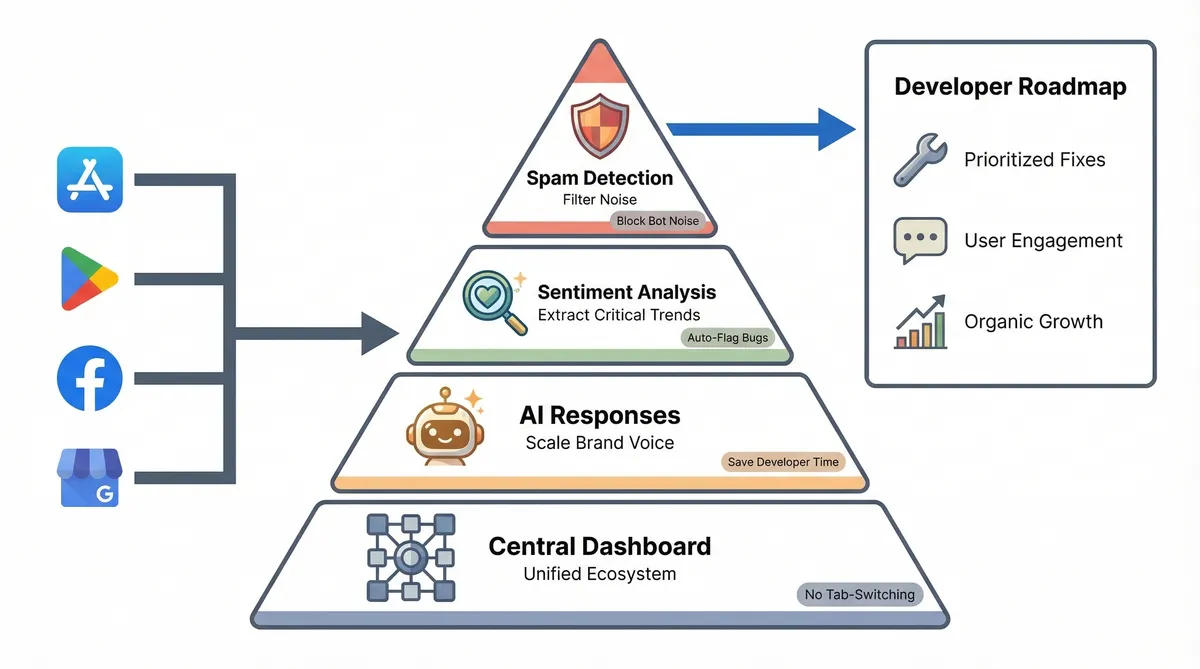
Centralised platforms like ReviewSense help teams track these vital sentiment shifts. The software extracts key topics from incoming feedback across major platforms. You get instant alerts when negative spikes occur. This allows you to address core issues before they permanently shape your AI summary.
Effective apple app store review management software turns scattered comments into clear action plans. You fix the underlying product flaws without delay. This proactive approach ensures your overall rating remains high. It protects your brand reputation and keeps your download numbers growing.
The global feedback management market is valued at $16.73 billion in 2025. It will reach $19.56 billion by 2026. This rapid growth highlights how seriously companies take their online reputation. Investing in the right tools is essential for serious developers.
Debunking Common App Store Optimisation (ASO) Myths
To capitalise on these investments, developers must first discard outdated strategies. Many teams waste resources chasing metrics that don't influence iOS visibility.
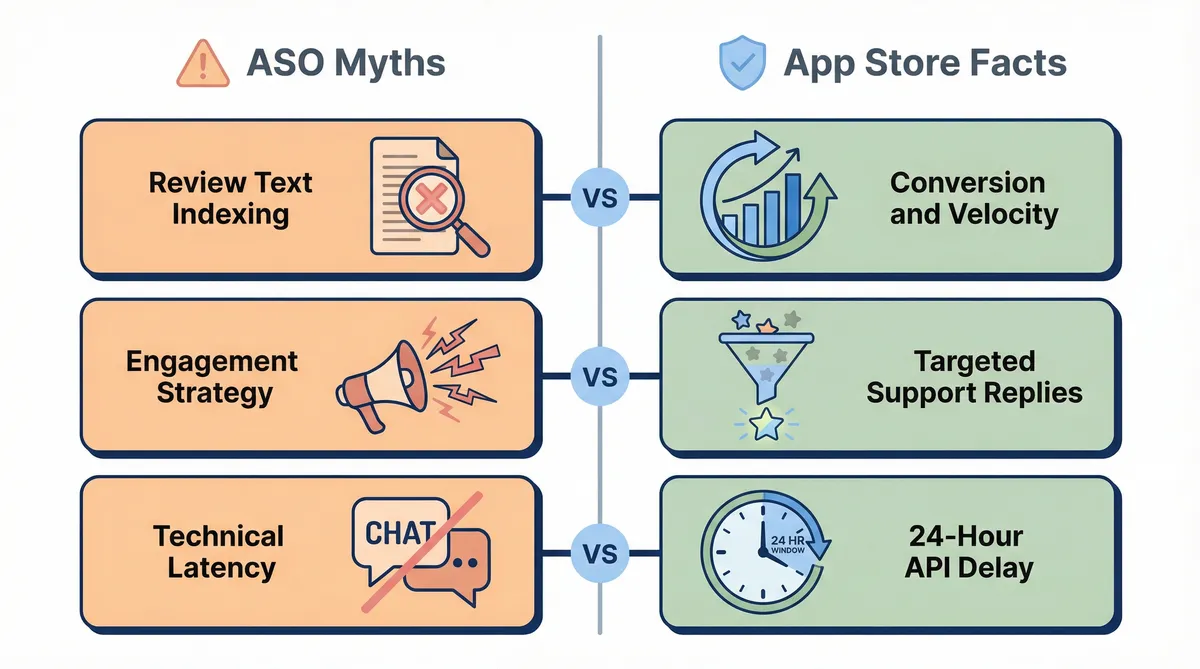
| Common Myth | App Store Reality |
|---|---|
| Apple indexes review text for search rankings | Apple ignores review text for ASO. Visibility relies purely on conversion rates and review velocity. |
| A 100% response rate boosts app performance | Replying to every 5-star rating creates a wall of noise. It buries helpful interactions. |
| App Store Connect allows real-time support | The API has an inherent 12-to-24-hour delay. Instant replies are technically impossible. |
The belief that Apple scans review text for keywords is entirely false. Unlike Google Play, iOS search algorithms ignore user comments. Your ranking depends on conversion rates and the speed at which you acquire new ratings.
Chasing a perfect response rate is another costly mistake. Replying to every generic compliment buries critical support interactions under a wall of noise. Instead, teams should target the three- and four-star swing votes. These users often provide actionable product feedback.
The illusion of real-time support also frustrates many developers. The App Store Connect API enforces a 12-to-24-hour delay on incoming data. You can't treat app reviews like a live chat channel.
This is why 35% of top-charting app developers and 25% of Fortune 100 companies now use specialised tools. Effective apple app store review management software filters out the noise. ReviewSense uses built-in sentiment analysis to flag recurring issues. This helps your team find the specific reviews that require a response.
By 2025, 75% of brands have integrated AI-based strategies into their customer engagement. Using AI review Response Generators to Improve Online Reputation helps teams manage this delayed feedback efficiently. Successful apps are active managers. Today, 73% of high-performing iOS apps perform weekly metadata or response updates. You can track your progress using a Star Rating Calculator to measure the impact of these targeted replies.
Essential Features for Apple App Store Review Management Software
To execute these active management strategies, developers need more than basic notification tools. The best review management software 2026 must handle complex workflows at scale.
Selecting the right apple app store review management software requires evaluating specific capabilities designed for high-volume feedback. Teams shipping on both stores should compare against mobile app review management, which covers the Apple and Google Play workflow from one dashboard rather than one store at a time.
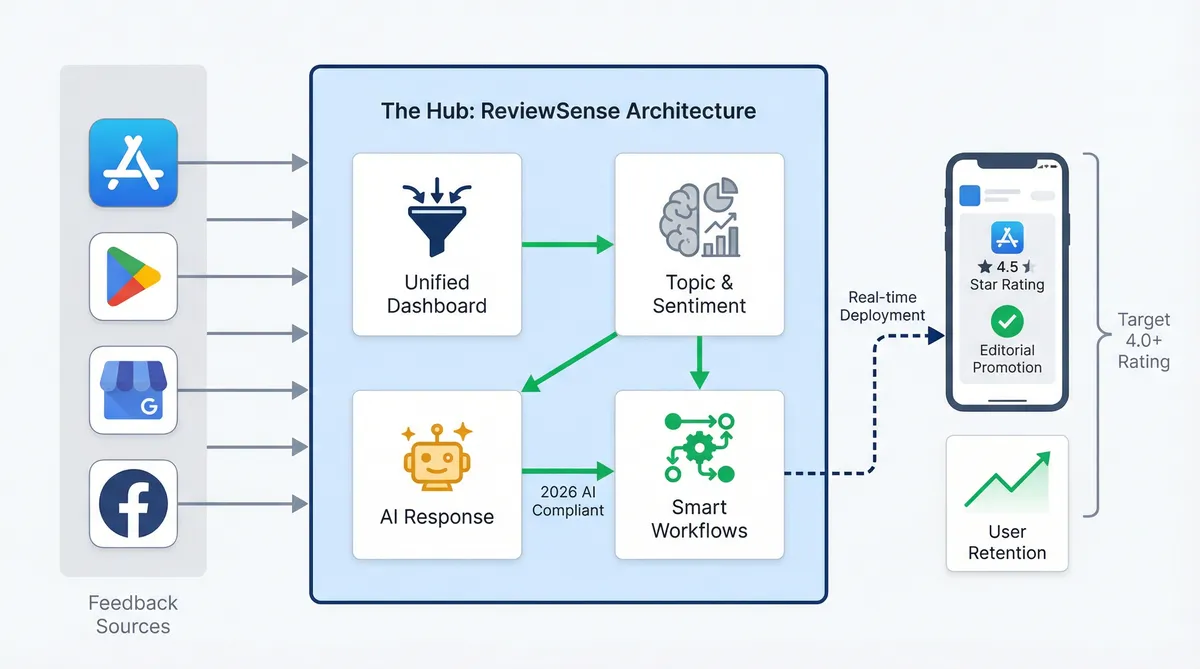
- Cross-Platform Centralisation: You can't afford to jump between different browser tabs. A unified dashboard brings the Apple App Store, Google Play, Google Business Profile, and Facebook review management together. This eliminates platform-hopping and keeps your team focused.
- Agentic AI Execution: Drafting manual replies drains resources. ReviewSense uses an AI response generator to create on-brand replies in seconds. This complies with 2026 AI transparency guidelines while ensuring your tone remains consistent.
- Topic Clustering & Sentiment Analysis: Reading every comment is impossible. Built-in sentiment analysis automatically categorises feedback. It extracts specific intents, separating a critical 'Bug' from a minor 'UI Issue'. This helps teams prioritise genuine feedback.
- Automated Workflows: Speed matters when handling complaints. Auto-reply and queue workflows route critical reviews directly to the right department. Responding to a user review within 24 hours can increase that specific user's long-term retention by up to 40%.
These features directly impact your visibility. Currently, 90% of all featured apps on the Apple App Store maintain a rating of 4.0 or higher. This makes review management a prerequisite for editorial promotion.
By automating the heavy lifting, ReviewSense transforms scattered reviews into actionable insights. Your team can fix underlying product flaws quickly. This protects your brand reputation and drives sustainable growth.
Steps to Evaluate and Implement Your Review Strategy
Transitioning from automated features to practical deployment requires a clear plan. Implementing your apple app store review management software demands a structured approach. Follow these steps to ensure a smooth rollout.
Audit your current analytics. use the new March 2026 App Store Connect cohort data. This reveals how specific user groups review your app. You can then tailor your communication strategy for different demographics.
Ensure strict compliance with Apple guidelines. Avoid 'black hat' manipulation. The infamous Bogdan Popescu Dash incident serves as a stark warning. In that case, 1,000 fake reviews led to a permanent developer ban. Always play by the rules.
Set up triage workflows. Align these processes with Apple's October 2025 Independent App Review Submissions. This update helps support teams close the loop on bug fixes. You don't need to wait for full version releases to resolve user complaints.
Run a targeted pilot programme. Start with a 7-day trial, like the one ReviewSense offers. Test custom brand voice settings and collaboration tools before a full enterprise rollout.
During this pilot, consider testing regional settings. In 2025, 75% of top apps use software to localise their review responses into at least 5+ languages. This practice increases regional installs by an average of 49%.
Before committing your entire team, evaluate your options. Reading about Choosing the Right Customer Review Management Software for Multi-Platform Businesses provides helpful context. Use a How Many 5-Star Reviews Calculator to set realistic rating goals for your new strategy. This preparation ensures your investment yields measurable results.
The ROI of Active App Review Management
Moving from preparation to execution reveals the financial impact of your strategy. The ASO software market reflects this shift. According to DataHorizzon Research, this sector was valued at approximately $1.7 billion in 2024. It's projected to reach $6.5 billion by 2033, growing at a 16.2% CAGR. Developers realise that active engagement drives revenue.
Dedicated apple app store review management software delivers a clear return on investment. Travel brands like Sykes Holiday Cottages used AppTweak to achieve 100% review response coverage. Other app developers have seen positive ratings surge simply by increasing their reply rates. Leading audio platforms have also decreased their Cost Per Install by extracting pain points through sentiment analysis.
Ignoring feedback carries severe penalties. Unaddressed negative ratings harm your conversion rates. Consider the developer TinyLab. They were flagged for using fleeceware tactics. They relied on fake 5-star reviews to drown out legitimate complaints about their $156/year hidden subscription fees. Genuine users quickly abandon apps that ignore their concerns. Fast replies build trust and secure long-term retention.
ReviewSense helps teams avoid these pitfalls by scaling effortlessly. It supports single-location shops and multi-location enterprises alike. You can learn How to Manage App Store Reviews at Scale: Workflows, Triage, and Automation to handle high volumes. The platform transforms scattered feedback into actionable insights. This allows your team to focus on improvements that drive organic growth.
Using an AI review Response Generator ensures you catch every critical complaint. Teams receive instant alerts for new reviews across supported platforms. This unified approach streamlines approvals and auto-reply workflows. By centralising your data, ReviewSense turns customer feedback into your strongest acquisition tool.
Conclusion
Effectively managing your Apple App Store reviews goes beyond simply replying to users. It requires a strategic approach that includes analyzing cohort data, maintaining strict compliance with Apple's guidelines, and establishing efficient triage workflows. As the data shows, active engagement directly impacts your ROI by improving app store optimization, lowering acquisition costs, and building long-term user trust.
However, handling high review volumes manually can quickly overwhelm your support team. Managing this feedback at scale demands the right software to monitor sentiment, flag recurring bugs, and ensure no critical complaint slips through the cracks.
Stop letting valuable user feedback go to waste and transform scattered reviews into actionable insights that improve customer experience and drive growth when you Start your 7-day free trial.