
Consumers read an average of ten online reviews before trusting a business. Yet, asking clients for glowing testimonials often feels awkward and forced. If you're tired of chasing down feedback or sounding desperate, you need a smarter approach. Figuring out how to get more 5 star google reviews relies on perfect timing and removing friction, rather than begging. Even your replies matter, which is why a 5-Star Review Response Generator is essential for maintaining momentum.
Managing these requests manually is tedious, but ReviewSense automates the entire collection process so you can focus on growth.
The New ROI of a 5-Star Google Review Strategy in 2026
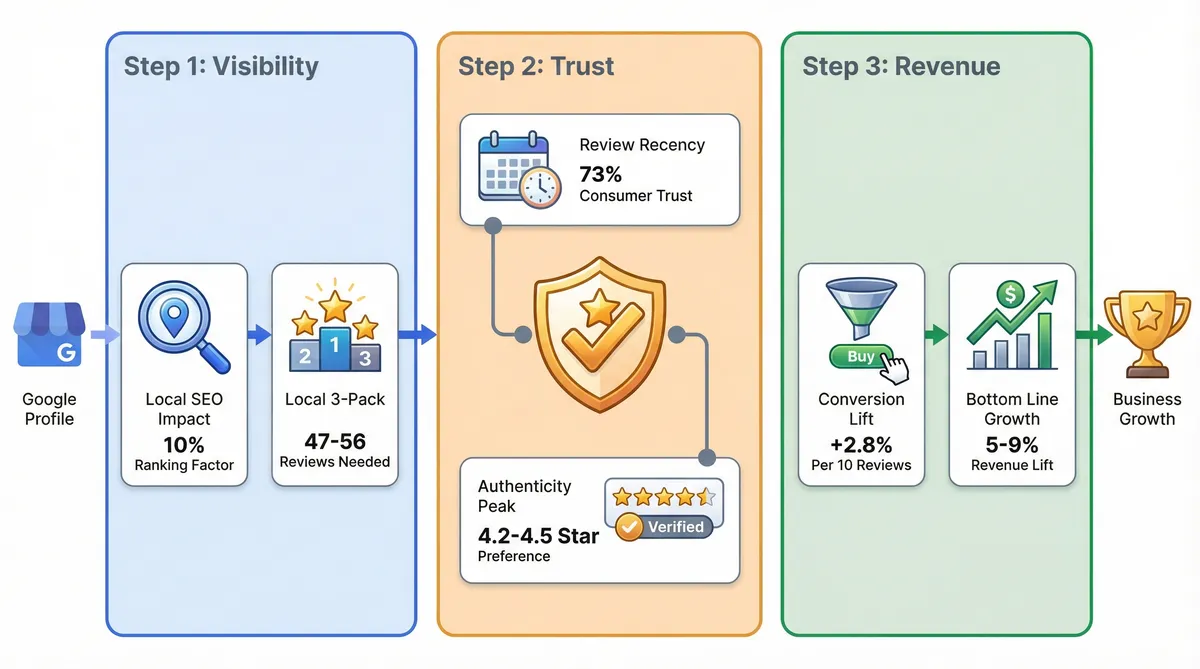
Understanding how to get more 5 star google reviews directly impacts your bottom line. It's no longer just a vanity metric for marketing teams. Research shows a one-star increase yields a 5% to 9% revenue lift. This financial gain makes active reputation management a core revenue driver.
The financial return stems from higher visibility and better conversion rates. Reviews account for 10% of local SEO ranking factors. Getting found is only half the battle. Every 10 new reviews boosts a Google Business Profile's conversion rate by 2.8%. Shoppers trust active profiles over quiet ones.
Securing a spot in the Local 3-Pack requires consistent effort. Businesses featured here average 47 to 56 reviews. You can't rely on old feedback. Right now, 73% of consumers only trust reviews written in the last 30 days. Stale profiles lose potential buyers.
The modern consumer is critical of perfect scores. In fact, buyers prefer ratings between 4.5 and 4.9 over a perfect 5.0. A flawless score looks fake. You need genuine feedback to build trust. They want to see how you handle minor issues.
Managing this influx of feedback requires proper tools. ReviewSense offers a centralised dashboard to track these crucial metrics. You can monitor review velocity across Google Business Profile, Facebook, Apple App Store, and Google Play. A single interface saves hours of manual work each week. It prevents negative spikes from damaging your rating.
Tracking response rates ensures you never miss a customer interaction. You can explore customer review management techniques to streamline this process. Teams can use a star rating calculator to see how many new ratings they need. Consistent monitoring protects your brand reputation. This turns scattered feedback into measurable growth.
Why Chasing a "Perfect 5.0" Actually Hurts Your Business
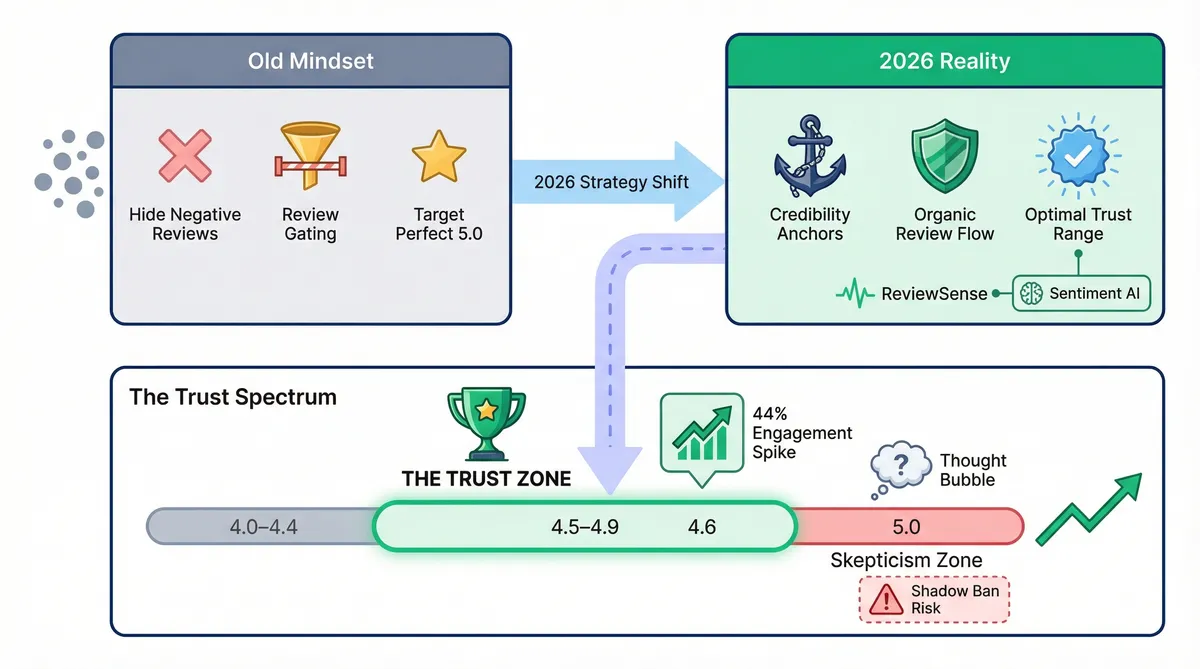
While turning feedback into growth is the goal, obsessing over a flawless score backfires. A natural distribution of ratings is healthier for conversion and algorithm protection. Consumers prefer a rating between 4.5 and 4.9 over a perfect 5.0 due to scepticism.
| Old Review Mindset | 2026 Reality |
|---|---|
| Delete or hide all negative feedback | Negative reviews act as credibility anchors |
| Filter customers before asking for reviews | Review gating triggers Google Shadow Bans |
| Aim for a flawless 5.0 rating | 4.5 to 4.9 is the optimal trust zone |
The FTC enforces strict rules against review gating. Filtering unhappy customers before sending a review link violates guidelines. This deceptive practice causes severe penalties. You might face a shadow ban on search results. If you need help, reading a Google Business Profile Suspended? How to Appeal and Get Reinstated (2026 Guide) provides clarity.
Less-than-perfect scores serve as credibility anchors. They prove your feedback is real. Improving your rating by one full star results in 44% more clicks to your website or calls to your business. You don't need a perfect five to see this engagement spike. A 4.6 rating outperforms a sterile 5.0.
You must learn how to get more 5 star google reviews without manipulating the system. ReviewSense includes built-in sentiment analysis to help teams extract insights from mixed feedback. The platform detects spam and toxic content. This allows your team to focus on genuine experiences rather than inflating scores.
Embracing honest feedback builds lasting trust. You can read more about balancing these strategies by Investigating Google Review Management Software: Capabilities, Limitations, and ROI. Stop chasing an impossible standard. Focus on delivering excellent service and letting the natural reviews flow.
4 Proven Ways to Get More 5-Star Google Reviews (Without the Awkward Ask)
Letting natural feedback flow requires a system that removes friction for your buyers. When you want to know how to get more 5 star google reviews, the secret lies in making the process effortless.
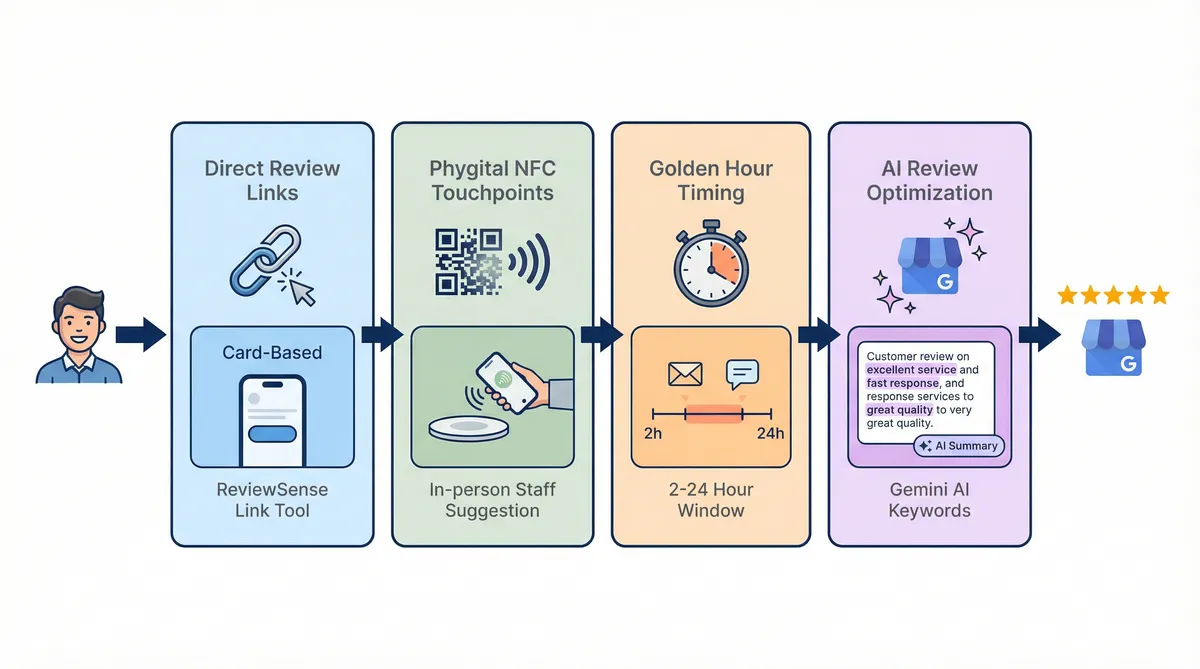
Here are four proven methods to capture high-quality feedback:
- Use frictionless direct links: Eliminate the multi-step search process. Send buyers straight to the feedback form. You can use the free Google review link generator from ReviewSense to create a direct path. This simple tool removes technical barriers immediately, and our guide to using a Google review generator tool explains how to keep the requests compliant.
- Embrace the 'phygital' approach: Blend physical and digital touchpoints using NFC plates, dynamic QR codes, or a printable review request flyer. You can even program these codes to show a brief thank-you video before the form loads. Research shows 57% of consumers are "highly likely" to leave a review if a staff member suggests it in person at the moment of peak satisfaction.
- Time the 'golden hour': Send your requests via SMS or email within 2 to 24 hours of a positive experience. Timing is everything. In fact, 68% of customers will leave a review if they are simply asked. If you struggle with wording, try a Review Request Email Generator to craft the perfect message, or work through our review generation email playbook for the timing and segmentation behind it.
- Adapt to Google's 'Ask Maps': Google's Gemini AI now summarises feedback for searchers. Ask your buyers to mention specific details about their purchase rather than just leaving a blank star rating. Detailed text helps you rank higher.
Collecting feedback is only the first step. You can't ignore replies. Data shows 88% of consumers are more likely to use a business that responds to all reviews.
Even negative feedback offers an opportunity. Responding to a negative review within 24 hours increases the likelihood of that customer upgrading their rating to 5 stars by 33%. If you need to track your progress, a How Many 5-Star Reviews Calculator helps set clear targets.
Real-World Examples: Automation vs. Manual Review Collection
Work out the target first: our Google review calculator shows how many 5-star reviews move you from your current Google rating to the one you want, and what that shift is worth in revenue. Setting targets means little if your collection method relies on sporadic effort. Manual outreach often fails because staff forget to ask. Vinetrekker proved this when they abandoned manual requests. They implemented automated emails alongside a website widget. They saw a 900% increase in reviews, gaining 20 reviews in a single month (more than the previous year combined).
CLF Services took a similar path. They A/B tested a widget and sent SMS prompts at peak excitement. This specific strategy created a $30,000 revenue lift. Modern buyers want rich media. Today, 76% of US consumers now consume video content when researching local businesses. Capturing this feedback via automation is vital when learning how to get more 5 star google reviews.
Automation encourages honesty. It makes tracking individual buyers harder. However, it has led to a 15% increase in review volume as customers feel more comfortable sharing honest feedback anonymously. You must still avoid the 'spike danger'. Sudden spikes in review velocity trigger Google's spam filters to delete reviews.
ReviewSense prevents these dangerous spikes. The platform streamlines automated workflows and queue approvals. This creates a steady review velocity. It scales from single-location shops to multi-location enterprises. You don't trigger algorithm penalties while building trust.
Managing this steady flow requires proper tools. ReviewSense includes an auto-reply feature for common feedback. This allows businesses to maintain a 100% response rate, which Google's algorithm favours. Teams can use a 5-Star Review Response Generator to handle complex replies. Automation beats manual effort every time. You can also turn your best reviews into social graphics to amplify positive feedback across your marketing channels.
How Responding to Existing Reviews Fuels Your Next 5-Star Rating
While automation handles the collection, your reply strategy dictates future success. When you wonder how to get more 5 star google reviews, look at your existing feedback. BrightLocal’s 2024 survey confirms 88% of consumers choose businesses that answer all reviews. A visible reply proves you care.
Building a responsive engine requires specific steps to maintain momentum. Buyers watch how you handle praise and criticism alike.
Set up instant alerts. You can't reply to feedback you miss. The 'Recency Rule' shows 73% of consumers only trust reviews written in the last 30 days. ReviewSense provides instant notifications for new ratings across Google Business Profile, Facebook, Apple App Store, and Google Play. This ensures your profile stays active and relevant.
Generate on-brand replies instantly. Writing unique responses takes time. Use an AI review Response Generator to craft personalised replies in seconds. This tool maintains your brand voice while acknowledging specific customer details. It turns a simple thank you into a powerful marketing asset.
Deploy crisis alerts for negative spikes. Bad feedback happens to every business. Swift action changes outcomes. Responding to a negative review within 24 hours increases the likelihood of a 1-star to 5-star upgrade by 33%. ReviewSense features crisis alerts that notify your team without delay. You can resolve issues quickly and win back frustrated buyers.
Effective Customer Review Management transforms passive readers into active buyers. Your public replies show future customers exactly how you treat people. This public proof becomes your strongest acquisition tool. A consistent response habit builds a reliable review funnel. It proves your business values every customer interaction.
Conclusion
Getting more 5-star Google reviews doesn't require awkward conversations—it requires a reliable, automated system. By replacing manual requests with automated workflows, you generate a steady velocity of authentic feedback without triggering spam filters. Furthermore, when you respond to every review quickly, you prove to future buyers that their experience matters, which naturally encourages more positive ratings.
Managing this reputation engine across your Google Business Profile, Facebook, Apple App Store, and Google Play accounts doesn't have to drain your team's time. By centralizing your feedback and using an AI response generator to craft personalized, on-brand replies in seconds, you can focus on building relationships instead of chasing them. Turn scattered reviews into actionable insights that improve customer experience and drive growth when you Start your 7-day free trial.