Did you know that Google's 2026 AI moderation filters flag over 40% of legitimate local business updates as suspicious? If your google business profile suspended notice just landed in your inbox, you're not alone. The algorithm is ruthless, and a single panicked edit can permanently lock your listing. Recovering your online presence requires a precise appeal strategy rather than blindly submitting support tickets.
Once your listing is reinstated, ReviewSense automates the heavy lifting of your online review management so you can safely rebuild your reputation.
Why Is My Google Business Profile Suspended? The 2026 AI Crackdown
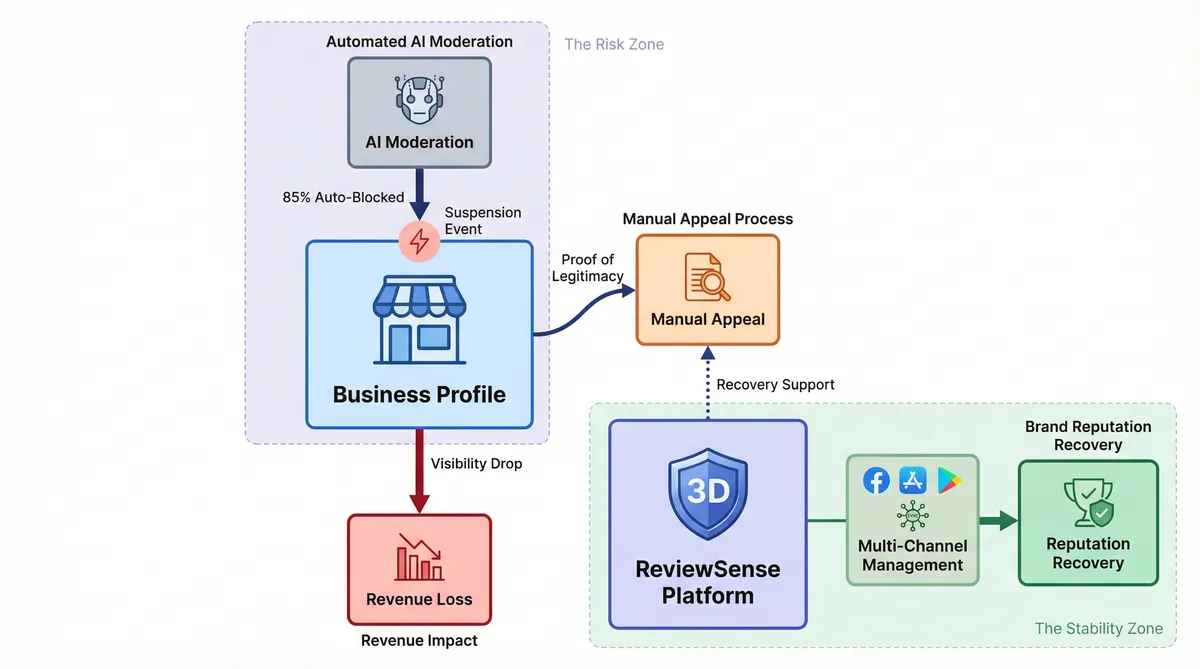
Finding your Google Business Profile suspended is a jarring experience. The enforcement environment has shifted towards automated moderation. Between the first quarter of 2023 and the second quarter of 2024, global suspension reports increased by over 80%. Google relies heavily on advanced AI models to police its platform. This aggressive approach aims to maintain data integrity but catches legitimate businesses in the crossfire.
Human reviewers do not handle the bulk of moderation. Approximately 85% of policy-violating content is blocked or removed by automated systems before it goes live. This AI-first strategy operates on a strict "guilty until proven innocent" basis. Industry reports indicate that in 2025, nearly 90% of new video verifications for high-risk industries result in an immediate "deceptive content" suspension. You'll need to submit a manual appeal to prove your legitimacy.
The business impact of these automated takedowns is severe. When a profile vanishes, many companies report an instant drop in inbound leads. This sudden visibility loss translates into a significant reduction in monthly revenue. You lose your primary source of local search traffic instantly. This vulnerability highlights why investigating Google review management software and diversifying your digital presence is critical.
Relying on a single platform puts your revenue at risk. ReviewSense helps organisations centralise feedback across Facebook, the Apple App Store, and Google Play. If you face a sudden suspension, your customer engagement doesn't halt completely. You can continue building trust through active customer review management on other channels. A diversified strategy ensures your brand reputation survives the strictest AI crackdowns.
Identifying Your Violation: Top Triggers and Reinstatement Odds
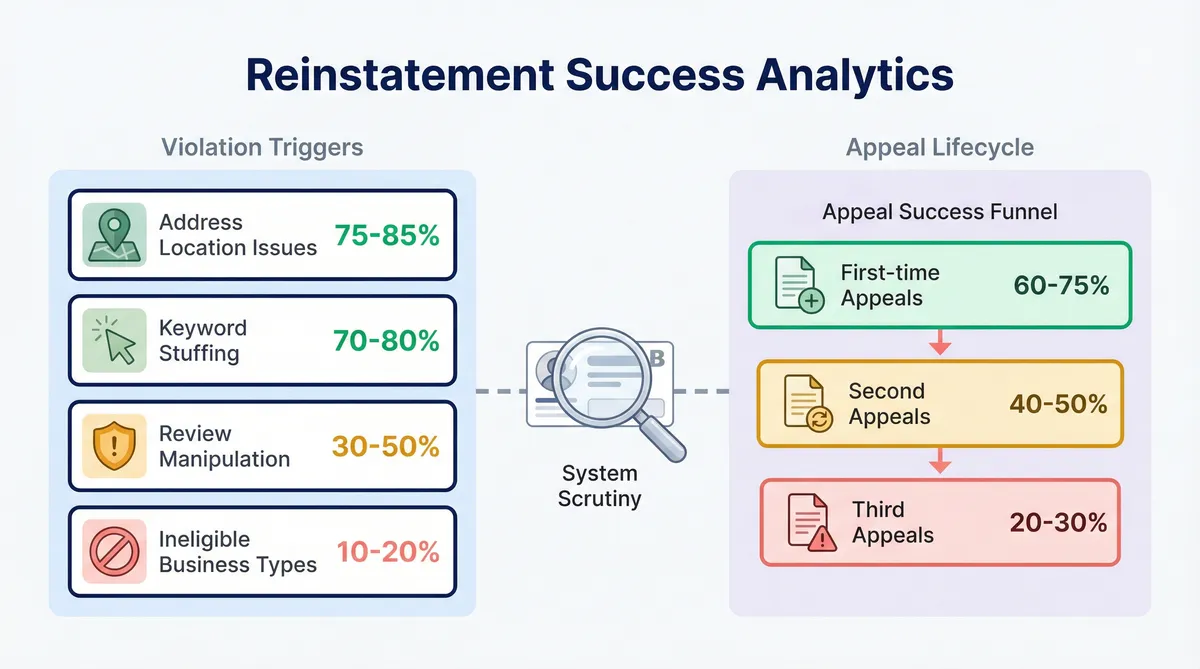
While diversifying your digital presence helps, you still need to understand why your Google Business Profile suspended status occurred. The automated systems flag specific violations, and your chances of recovery depend on the trigger. Understanding these categories is your first step toward reinstatement.
| Violation Trigger | Reinstatement Odds | Key Details |
|---|---|---|
| Address/Location Issues | 75-85% | Highest success rate for legitimate physical storefronts. |
| Keyword Stuffing | 70-80% | High success after correction of the business name. |
| Review Manipulation | 30-50% | FTC 2024 Consumer Review Rule adds fines up to $53,088 per violation. |
| Ineligible Business Types | 10-20% | Lowest success rate. |
Your overall odds decrease with each attempt. First-time appeals see a 60–75% success rate if properly documented. Second appeals drop to 40–50%. Third appeals plummet to 20–30%. You must get your first submission right to avoid a permanent ban.
High-risk sectors like home services, legal, healthcare, and lead generation face strict scrutiny. Automated filters flag minor edits in these categories, causing immediate takedowns. Recent updates introduced new traps. The August 2025 link restrictions and the January 2026 WhatsApp integration cause many businesses to trigger violations when updating contact details.
Review manipulation carries severe penalties beyond just a suspended profile. You'll need to manage feedback with care. ReviewSense helps you maintain compliance across platforms. The AI response generator creates on-brand replies, avoiding the spam flags that cause those 30-50% fail-rate suspensions. You can streamline your customer review management without risking your listing. If you need to generate authentic feedback, try the Google review link generator to guide real customers to your profile.
The 2026 Reinstatement Appeal Process (Step-by-Step)
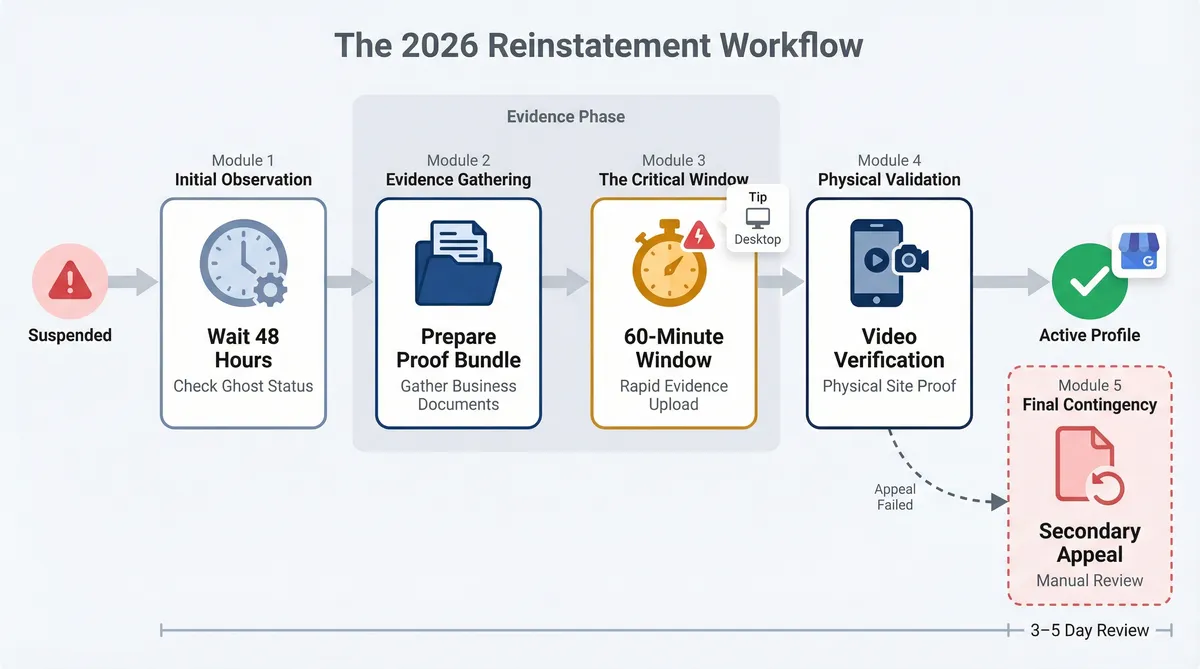
Google removed 12 million fake Business Profiles in 2024 alone. To prove you aren't one of them, you must navigate the recovery process carefully. If you find your google business profile suspended, follow this exact workflow to regain access.
Wait 24 to 48 hours. Before panicking, rule out a "ghost suspension". This is a temporary sync bug that often resolves itself without any manual intervention.
Prepare the Proof Bundle. Adopt an evidence-first approach before clicking anything in your dashboard. You need a utility bill, a business licence, and a permanent signage photo. These documents must match your profile details. If you tried to merge duplicate Google Business Profiles, ensure your paperwork reflects the primary address.
Beat the 60-Minute Suspension Death Clock. Industry expert Joy Hawkins warns about this specific time limit. Once you start the appeal, the clock ticks down. You have 60 minutes to upload your files, so keep your bundle ready on your desktop.
Prepare for Video Verification. The vast majority of new video verifications in high-risk industries initially fail without proper preparation. You must show unlocking the door, branded vehicles, and staff areas. If you manage multiple locations, managing Google reviews in the UK includes keeping these physical proof elements updated across all sites.
Use the Secondary Appeal Form. If the initial AI-reviewed appeal fails, you face the "Two-Strike Rule". You get one more chance to submit evidence. Fortunately, the four to six week appeal backlog of 2025 cleared in January 2026. Wait times are now just three to five business days.
Lessons from the Frontlines: Reinstatement Case Studies
Once you submit that final form, the waiting game begins. Real-world outcomes vary wildly based on how companies handle the process. The stakes are high. In fact, 61% of businesses reported a measurable drop in phone calls and leads within the first 48 hours of a suspension.
If you find your google business profile suspended, learning from others is vital. Here are recent examples of how businesses navigated the crisis:
- Phone Repair Center Rexom: Reinstated after six months. They audited their category and description, then provided a clean document bundle.
- Downriver Plumbers: Reinstated in seven days. They fixed a service-area guideline violation.
- Design Powers: Reinstated fast. They removed stuffed keywords to match their legal name.
- Denson Construction: Denied. They became trapped in a duplicate profile loop during a rebrand.
- Unnamed Towing Business: Received a permanent ban. The owner deleted the suspended profile in frustration to start over. Deleting a profile is a fatal error.
- Unnamed Multi-Location Plumbing Company: Suffered financial damage. They laid off 10 plumbers due to a hard suspension during peak season.
These failures highlight a grim reality. For small businesses, a five-week suspension results in an estimated 15–25% loss in monthly revenue. You lose total visibility from local Map packs.
Some suspensions trigger legal trouble. Under the FTC’s 2024 Consumer Review Rule, businesses caught in review manipulation suspensions face potential fines of up to $53,088 per violation. Knowing how to report and remove fake Google reviews keeps your profile compliant.
During downtime, you must rely on other channels. Exploring the Pricing plans helps you centralise feedback across alternative platforms. This ensures your reputation survives while you fight for reinstatement.
Expert Secrets: What Most Reinstatement Guides Get Wrong
While you rely on alternative channels during downtime, you must unlearn the bad advice that caused the crisis. Basic SEO guides spread dangerous misinformation about why a google business profile suspended status occurs. The algorithm is sensitive. As product expert Ben Fisher notes, basically breathing too hard on a GBP can trigger a takedown. Their research suggests that roughly 35% of all profiles experience a suspension at some point each year.
Many guides claim minor NAP inconsistencies cause bans. This is a myth. Using 'St.' instead of 'Street' won't penalise you. Conflicting legal databases trigger the system. Sterling Sky Data (2024) found that 42% of suspended profiles failed address verification. Another 28% involved business name issues like keyword stuffing. You'll see guides discussing 'soft' versus 'hard' suspensions. Google doesn't use these terms. Your dashboard will say 'Suspended' or 'Disabled'.
Another hidden danger is the primary owner email trap. Managing your listing with a generic @gmail.com account lowers your trust score compared to a domain-based address. You must watch out for Maps edit contamination. If you suggest spammy edits on competitor listings, Google flags your entire managing account. This takes down your real business profile as collateral damage.
Preventing these issues requires proactive reputation management. ReviewSense acts as your ultimate safeguard. ReviewSense monitors review velocity and tracks sentiment trends before a crisis hits. You can explore the FAQ to learn how it detects spam. ReviewSense offers a 7-day free trial and transparent pricing to help you build local authority. You also get access to free tools like the negative review response templates. Using AI-powered review management: strategies for streamlining customer feedback oversight keeps your profile compliant and secure.
Conclusion
A suspended Google Business Profile can severely disrupt your revenue, but a calm, evidence-based approach to the appeals process can restore your visibility. Avoiding fatal errors like deleting your profile, auditing your listing against official legal databases, and steering clear of keyword stuffing are crucial steps to successful reinstatement.
While you navigate Google's strict guidelines, maintaining a proactive, compliant approach to your online reputation is essential. ReviewSense safeguards your business by centralizing feedback from Google Business Profile, Facebook, Apple App Store, and Google Play into one secure dashboard. With built-in spam detection and crisis alerts for negative spikes, you can address toxic content before it triggers a penalty. Transform scattered reviews into actionable insights that improve customer experience and drive growth—Start your 7-day free trial.