
Are you losing thousands of pounds in revenue because of a single fabricated one-star rating? A malicious attack from a competitor or a disgruntled ex-employee can destroy your local search visibility overnight. While Google's automated systems claim to catch spam, sophisticated bot networks easily bypass their filters. If you want to protect your digital storefront, you can't rely on the standard 'flag as inappropriate' button—you need a proactive strategy to escalate and resolve these fraudulent claims.
Before you waste hours fighting Google's support maze, investigating Google review management software can reveal how tools like ReviewSense automate your defence against review spam.
What Are Fake Reviews? The Four Types Hurting UK Businesses
Fake reviews are ratings left by people who never bought from you. They fall into four patterns, and each one calls for a different response.
- Competitor sabotage. A rival floods your profile with one-star ratings to dent your local ranking. These usually arrive in clusters within a few days.
- Disgruntled ex-employees. A former staff member posts as a customer. The detail feels plausible, which makes these the hardest to flag.
- Bot and broker spam. Automated networks or paid review brokers post generic praise or criticism in bulk. Google's filters catch most, but not all.
- Extortion reviews. An attacker posts a fake one-star rating, then demands payment to remove it. Google added a dedicated reporting channel for this in late 2025.
Working out which type you face decides your next move. A textless one-star from a competitor is almost impossible to remove on policy grounds, while an extortion attempt with a clear paper trail is one of the easiest. Run anything suspicious through our free fake review checker before you decide how to act.
The 2026 Fake Review environment: What Google's New AI Means for Your Business
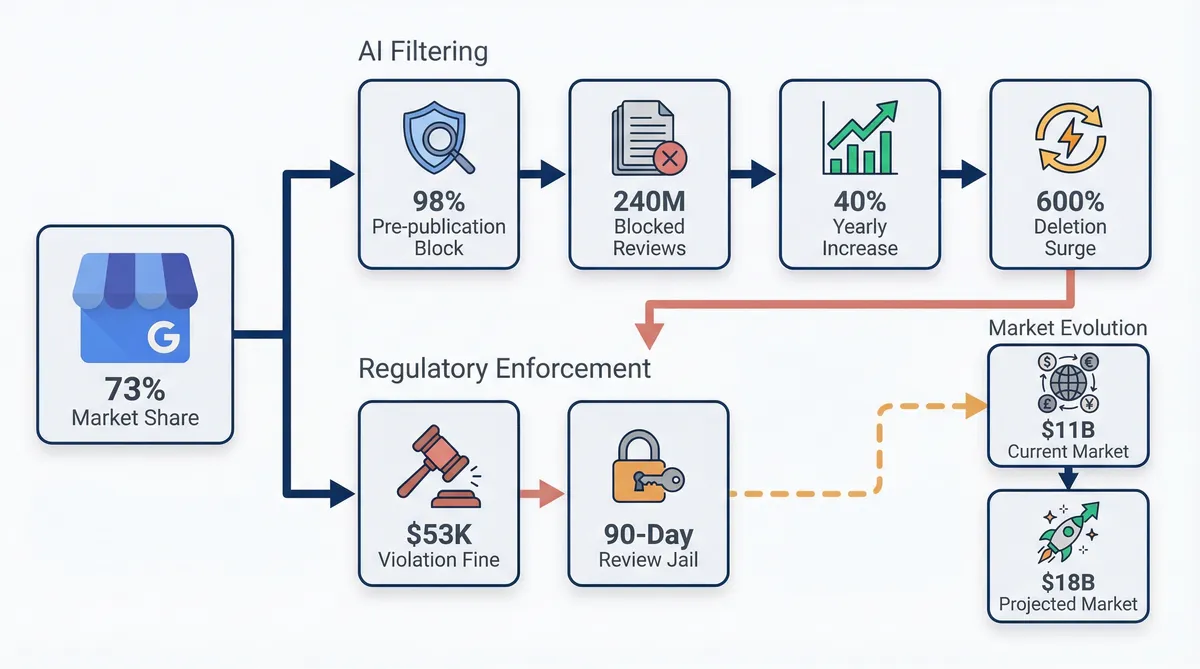
Google holds a 73% share of the total review platform market, making it a prime target for spam. The scale of moderation is massive. To combat this issue, Google deployed its Gemini AI model. This system blocked over 240 million policy-violating reviews in 2024, representing a 40% increase from previous years.
The AI blocks 85% to 98% of fakes before publication, but the system also targets older content. Early 2025 saw a 600% deletion surge during retroactive mass purges. Many UK businesses lost genuine feedback alongside the spam. Learning how to remove fake google reviews means understanding these automated filters. You can run any suspicious review through our free fake review checker to assess its authenticity.
Regulators are taking action against deceptive practices. The FTC enforces strict Consumer Review Rules across the board, and buying fake reviews triggers severe fines of $53,088 per violation. This regulatory pressure drives the $11.45 billion online reputation management software market. Companies need safe ways to gather authentic feedback before this market reaches $18.39 billion by 2032.
Aggressive review solicitation carries new risks for local shops. Spikes in review velocity trigger a penalty called 'Review Jail', which imposes a 30-to-90-day posting block on your profile. You must adopt a careful approach to customer outreach. A steady trickle of reviews is safer than sudden bursts. Organic growth protects your reputation.
ReviewSense helps you navigate these strict filters. ReviewSense connects directly to your Google Business Profile so you can monitor review velocity and catch toxic content. This ensures your online review management stays compliant. You don't want to risk a sudden suspension. ReviewSense provides the exact tools you need for safe Google review management.
How to Remove Fake Google Reviews: The Official Step-by-Step Process
Even with safe management practices, malicious attacks still slip through the cracks. Knowing exactly how to remove fake google reviews requires following a strict protocol.
Approximately 75.6% of multi-location businesses and franchises now use automated Google lead and review generation tools as of early 2025. This high volume makes spotting and reporting fakes crucial. When a coordinated attack happens, you must take immediate action. Follow these exact steps to clear your profile.
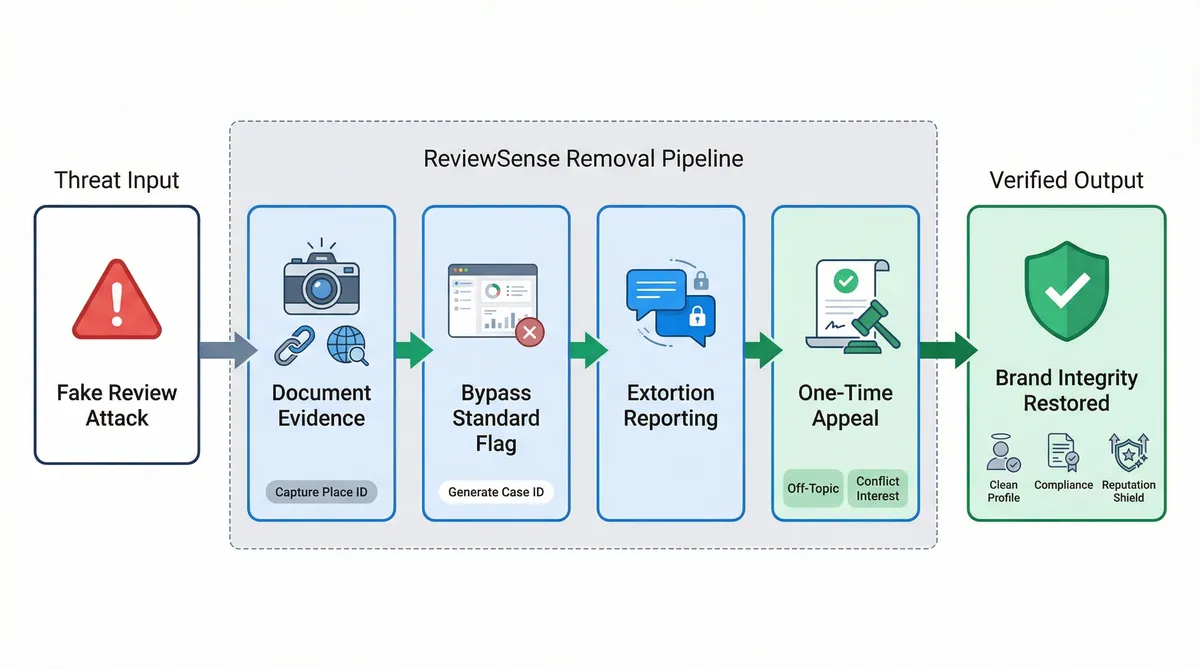
Document the evidence before taking action. Scammers frequently change their display names to avoid detection. Take clear screenshots of the review and copy the exact URL. You can use a Google Place ID Finder to ensure you have the correct profile data saved.
Bypass the standard 'Flag' button on the search results page. Instead, log directly into the Google Business Profile Reviews Management Tool. This specific portal generates a formal case number. You'll need this number to track your status.
Utilise the new Review Extortion reporting workflow. Google launched this feature in late 2025 for businesses facing digital blackmail. If attackers demand payment, submit your WhatsApp or Telegram screenshots here. This dedicated channel prioritises severe threats.
Execute the One-Time Appeal process if your initial request gets rejected. Focus your appeal on specific policy violations. Categorise the fake feedback as 'Off-Topic' or a 'Conflict of Interest' rather than generic 'Spam'. It's the only formal way to track decisions.
ReviewSense centralises this data for you. ReviewSense flags suspicious patterns early. You can export the necessary proof for your Google appeals. Taking swift action protects your brand reputation. If you manage multiple profiles, mastering the Google Place ID lookup tool streamlines this entire reporting process.
Why Standard Removal Advice Fails (And What the Experts Actually Do)
Even with a streamlined reporting process, many businesses sabotage their own appeals. They follow outdated advice found on generic marketing blogs. This misinformation actively hurts your chances when learning how to remove fake google reviews. You must understand how the moderation system actually works.
| Standard Advice | The Reality |
|---|---|
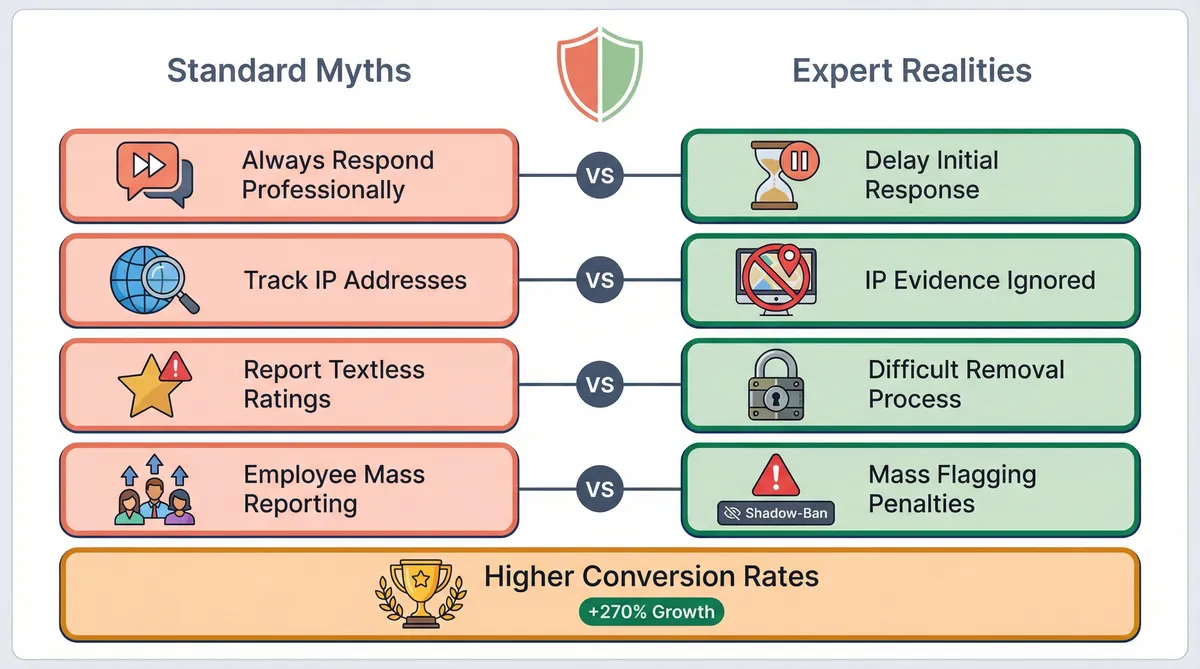
| Always respond professionally | Don't respond right away (it legitimises the review to Google's AI) |
| Track their IP address | Google ignores IP evidence due to VPNs |
| Report 1-star ratings with no text | Almost impossible to remove because there is no language violating TOS |
| Have employees mass-report the review | Mass flagging causes shadow-bans and manipulation penalties |
Let's look at the response trap. Standard guidance says you should reply to every review. But replying to a fake review signals to Google's AI that the interaction is genuine. It anchors the review to your profile. You should wait until the appeal is rejected before engaging.
IP tracking is another wasted effort. Business owners often try to prove a reviewer is based overseas. Google ignores this data entirely. Modern VPNs make location data useless for moderation purposes.
Textless 1-star ratings frustrate business owners. You might want them gone immediately. However, without text, there is no policy violation to report. You cannot prove a conflict of interest. Instead, focus on gathering genuine feedback. Displaying just 5+ recent reviews can increase website conversion rates by up to 270%. 88% of consumers read Google reviews to determine local business quality.
Avoid the mass-reporting myth. Asking your team to flag a review looks like manipulation. Google's spam filters will detect this coordinated action. Your profile might face a shadow-ban.
You need a smarter approach. Using proper customer review management software helps you track these issues safely. If you are handling Facebook review management alongside Google, centralising your strategy prevents panicked mistakes. Stick to the official channels.
Real-World Case Studies: Who Wins and Who Fails at Review Removal
Moving beyond theoretical tactics reveals how moderation actually functions in practice. Learning how to remove fake google reviews requires studying real outcomes. Mastering how to report and remove fake Google reviews (step-by-step) means understanding how Google evaluates evidence. Let's examine specific cases to see what the platform accepts as definitive proof.
- The 'Too New to Exist' Defence: An anonymous tech startup faced a sudden influx of 200 negative ratings. They won their appeal by submitting their official business license. This document proved they were not legally open during the claimed dates. Using proper Google Review Management Software helps track these timeline discrepancies. The surge in reviews improved their "Local Pack" ranking, leading to a 45% increase in website conversion rates once the fakes vanished.
- Defeating Extortion Rings: Straight Paths Moving became the target of a Pakistani blackmail syndicate. Instead of panicking, they documented the exact 'merchant extortion' pattern. They submitted chat logs directly to Google. Their swift action cleared the spam. They reported an additional $30,000 in revenue in the first month of implementation after restoring their rating.
- The 'Public Video' Blunder: A web designer created a YouTube tutorial showing his live profile. He accidentally solicited fake interactions from viewers. Google viewed the resulting troll comments as legitimate user engagement. Enforcement against offering discounts, freebies, or "10% off for a review" has reached an all-time high. The designer's profile was ruined. Proper customer review management: building trust and improving ratings requires strict privacy.
- The Streisand Effect: Prestigious Pets tried to sue a customer over a 1-star complaint. This aggressive tactic triggered massive backlash. Thousands of fake reviews flooded their page. When investigating Google review management software: capabilities, limitations, and ROI, remember that legal threats often backfire. You must understand why Google is deleting your reviews in 2026 (and how to protect them) instead of suing angry customers.
What to Do When Google Refuses to Remove a Fake Review
Even when you understand how moderation works, manual appeals fail most of the time. The harsh reality is that Google rejects most removal requests. When you cannot delete a fraudulent rating, you must change tactics. Learning how to remove fake google reviews means learning how to bury them. You need to overwhelm the fake feedback with genuine praise.
Burying bad ratings requires a systematic approach. By flooding their profile with recent, genuine reviews, they effectively diluted older negative feedback and improved their overall star rating by 2%. ReviewSense makes this process easy. It centralises your feedback from Google Business Profile, Facebook, Apple App Store, and Google Play into one dashboard.
You must address the fraudulent comments. Using the AI response generator helps you draft polite but suspicious replies. This signals to future customers that the complaint is fake. At the same time, using AI review response generators to improve online reputation automates your workflows for genuine feedback. You save hours of manual typing.
ReviewSense features built-in sentiment analysis. This tool spots toxic content before spam attacks escalate. One client used ReviewSense to fight a targeted attack. They saw a 180% increase in review volume within 30 days. They achieved a 40% increase in positive reviews over six months, which they directly credited for a 25% increase in foot traffic.
Building review velocity protects your profile from Google's 'Review Jail'. You can claim a 7-day free trial. ReviewSense provides free tools to help your business grow. Try the Google review link generator and negative review response templates. You can take control of your reputation without risk.
Conclusion
Successfully fighting fake Google reviews requires a two-pronged approach: submitting undeniable evidence for removal and maintaining a steady influx of genuine customer feedback. While documenting extortion or timeline discrepancies can win manual appeals, Google's strict moderation means some fraudulent ratings will inevitably slip through. When that happens, your most reliable defense is burying the spam under authentic praise and using strategic responses to professionally flag suspicious claims to future customers.
Managing this ongoing reputation defense doesn't have to drain your team's resources. Turn scattered reviews into actionable insights, automate your response workflows, and protect your brand across Google Business Profile, Facebook, the Apple App Store, and Google Play when you Start your 7-day free trial.