
Relying on a Google Place ID as your database's primary key is a recipe for disaster. Place IDs change over time, and hardcoding them guarantees broken integrations down the line. To maintain accurate location data mapping, you need to understand how the Google Place ID lookup tool interacts with the Google Maps API. We'll show you how to map this data without corrupting your backend.
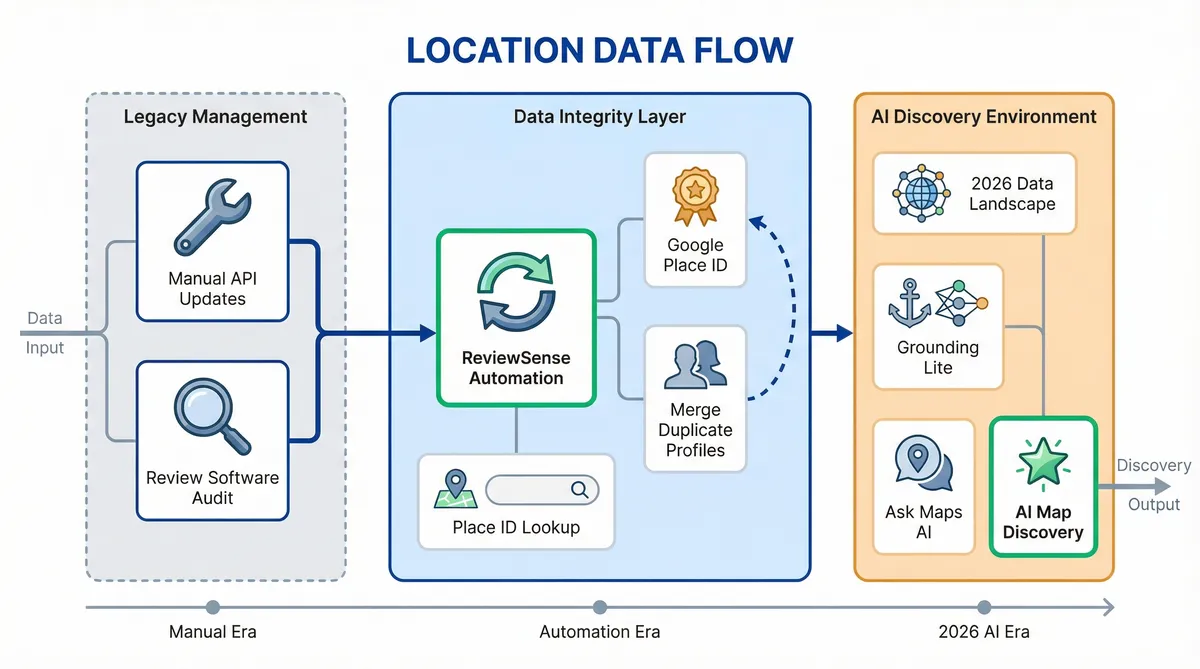
While managing API updates manually is tedious, ReviewSense automates your location syncing to ensure your reviews always match the right digital storefront.
If you're currently investigating Google review management software, understanding how these platforms handle dynamic Place IDs is crucial for long-term reliability.
The 2026 environment of Location Data Mapping
Understanding this underlying architecture becomes vital when you look at the sheer scale of modern mapping. As of early 2026, Google Maps surfaces information for over 250 million businesses and places across the globe. This vast database handles billions of daily searches from consumers seeking immediate answers. Every single location requires a unique identifier to function. This is where a reliable Google Place ID Finder proves essential for developers.
Recent AI updates changed how developers use the google place id. The launch of Grounding Lite in February 2026 shifted the focus from simple map pins to complex discovery. Ask Maps followed in March 2026. These tools anchor Large Language Models to real-world data. Users now ask conversational questions rather than typing basic keywords. This means your digital footprint must be flawless to appear in these generative results.
This shift makes accurate location data mapping crucial for visibility. An AI will not recommend a business if its foundational data is broken. If a company has overlapping profiles, the system gets confused. Teams must merge duplicate Google Business Profiles to ensure their core place id remains intact. A single source of truth allows AI models to pull correct opening hours and customer feedback. Without it, you risk losing potential foot traffic.
Manual searches cannot verify this information at scale. Using a dedicated google place id lookup tool ensures your data connects to the Google Maps API. This technical foundation supports everything from local search rankings to automated review management. When your geospatial data is precise, AI systems surface your business to the right customers. It's the first step toward building a trustworthy online presence that drives real revenue.
Step-by-Step Guide to the Google Place ID Lookup Tool
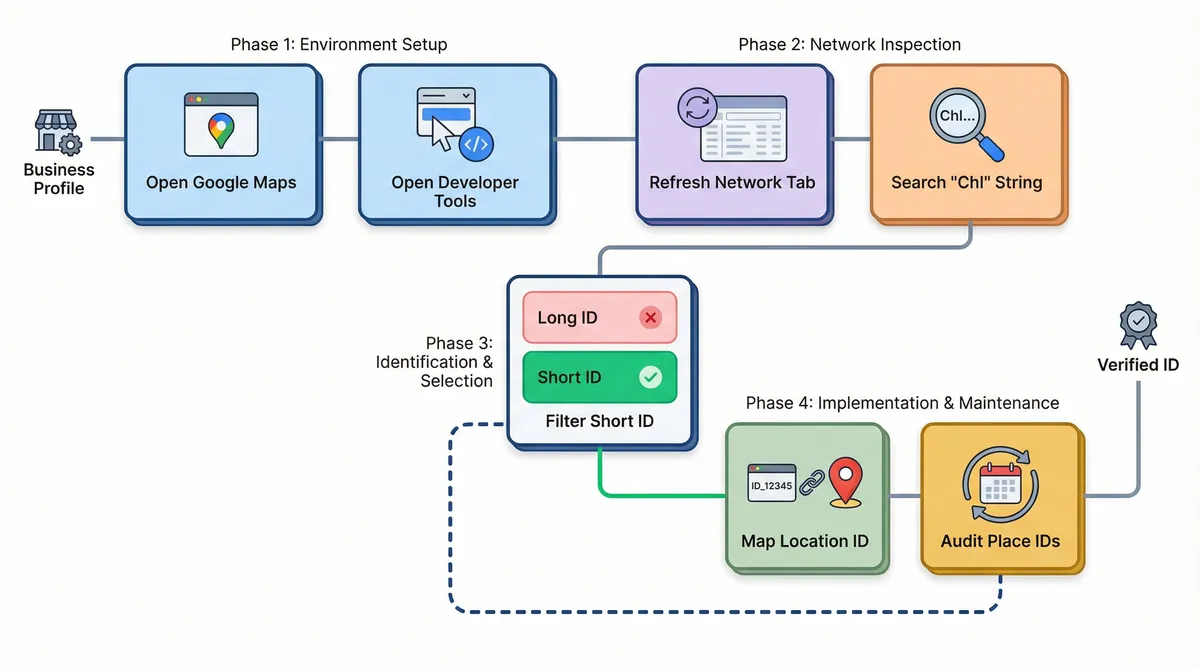
Securing that trustworthy presence starts with extracting the correct identifier. For standard locations, the official google place id lookup tool works well. You type the business name and copy the resulting string. This maps your physical location to the Google Maps API.
However, this standard place id lookup fails for Service Area Businesses (SABs). Plumbers and mobile mechanics hide their physical addresses. The official tool can't find them. You must use a technical workaround.
"When standard tools fail, inspecting the network payload is the only way to reliably snag IDs for SABs," notes local search expert Nick Pierno.
Here's how to execute this manual extraction:
- Open Google Maps in Chrome and search for your hidden business.
- Right-click the page and select 'Inspect' to open Developer Tools.
- Navigate to the 'Network' tab and refresh the page.
- Search the network payloads for the specific data string starting with 'ChI'.
During this process, you will encounter two distinct formats. You must understand the technical difference between them. Long IDs are temporary session identifiers used for specific map renders. Short IDs are the standard 27-character strings you need for permanent location data mapping. Always grab the Short ID.
Keep in mind these identifiers aren't permanent. Data shows that Place IDs can become obsolete due to business closures or database updates. Some reports suggest up to 5–10% of IDs may change or become stale annually in high-churn industries like retail and automotive dealerships. Real estate brokerages opening or closing local offices face the same issue.
Regularly auditing your IDs ensures your Customer Review Management workflows stay connected. If an ID breaks, your software can't pull new feedback. For a broader strategy on maintaining this data, consult the Online Review Management Guide.
The Cost of Bad Data: Wins and Fails in Google Maps API Integration
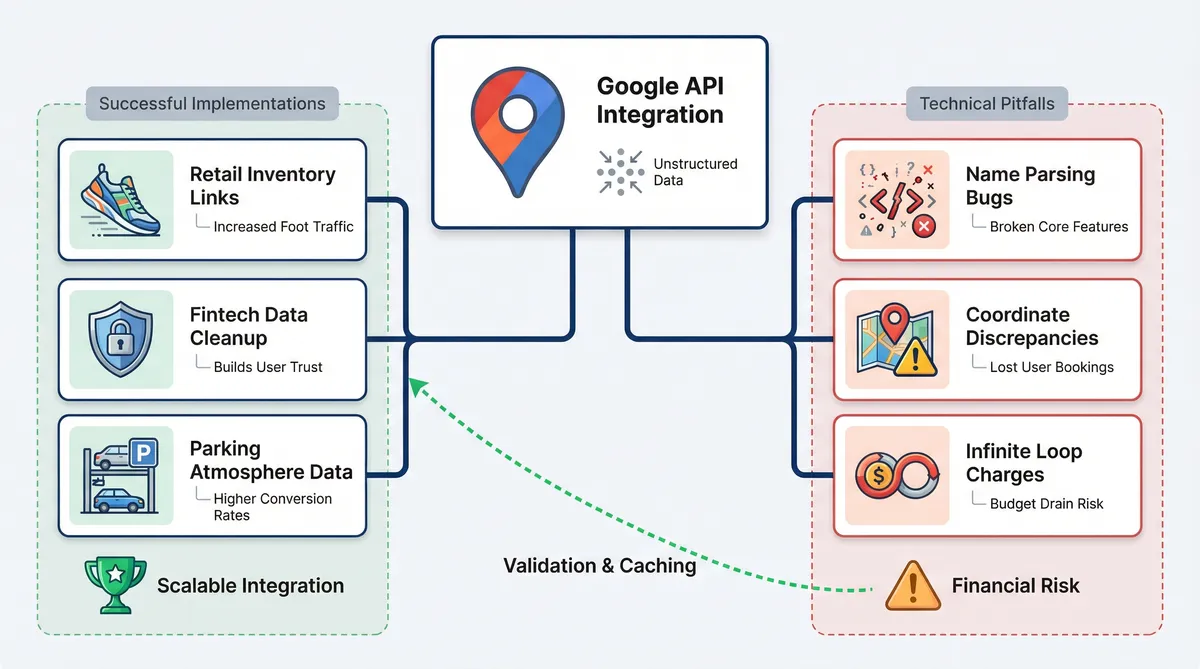
Failing to maintain these clean connections carries major financial risks. When developers mishandle the google maps api, the fallout extends beyond broken review feeds. Let's examine how different brands handled location data mapping.
| Company | Implementation Type | Outcome | Key Lesson |
|---|---|---|---|
| Fleet Feet | Retail inventory links | Success | Precise place id lookup drives foot traffic. |
| Dozens | Fintech transaction cleanup | Success | Clean data builds user trust. |
| SpotHero | Parking atmosphere data | Success | Rich context improves conversion rates. |
| Arc | Name parsing bugs | Failure | Poor string matching breaks core features. |
| Airbnb | 400-metre map discrepancies | Failure | Imprecise coordinates lead to lost bookings. |
| Savas Labs | Infinite loop charges | Failure | Poor caching drains budgets. |
The successes share a common trait. They treat the google place id lookup tool as a foundational step, not an afterthought. Fleet Feet and SpotHero mapped exact coordinates to ensure users found physical locations. Dozens used accurate identifiers to clean up messy bank statements.
The failures highlight technical negligence. Savas Labs suffered billing spikes due to infinite API loops. This mistake carries heavy financial weight. Effective March 1, 2025, Google replaced the $200 monthly flat credit with a SKU-based free tier system. Runaway API calls will drain your budget.
Airbnb's 400-metre drift shows how slight coordinate errors ruin user experience. If customers can't find your storefront, they leave angry feedback. You might need a negative review response generator to handle the resulting complaints. Arc faced similar backlash when poor string matching broke their core features.
To avoid these traps, developers must validate every google place id before deployment. Proper validation ensures your systems scale safely. If you are building feedback loops, review the guide on AI-powered review management: strategies for streamlining customer feedback oversight to maintain data integrity.
The Primary Key Trap: Why You Should Use CIDs over Place IDs
Proper validation is the beginning; relying on these strings as permanent keys creates technical debt.
Developers treat a google place id as a primary key. This is a mistake in location data mapping. Google warns that these identifiers expire after 12 months. Infinite caching causes 'ID rot'. When an ID expires, your software loses its connection to the Google Maps API. You stop receiving new customer feedback. Your dashboard goes quiet while negative reviews accumulate.
The solution is shifting your database architecture. You should use the Customer ID (CID) as your source of truth. A CID connects to the underlying Google Business Profile. It survives profile merges and map updates. You can map the place id to this CID. This structure keeps your Customer Review Management workflows intact when Google refreshes its database.
You must refresh these temporary IDs to avoid broken links. This maintenance requires API management. In March 2025, Google shifts to a SKU-based pricing model. This structure grants 10,000 free events for Essentials, 5,000 for Pro, and 1,000 for Enterprise tiers. Excessive API calls will exhaust these limits.
You can update your database without draining your budget. Programmatic lookups remain $0 (free) if a developer uses the "Place Details" service with a FieldMask that only requests the place_id field. You can run a google place id lookup tool script every month using this parameter. This method prevents ID rot while keeping your costs at zero. For monitoring strategies, explore the guide on Customer Review Monitoring: Tools and Techniques for Proactive Reputation Management.
Using Place IDs for Scalable Review Management
Once you secure your database architecture against ID rot, you can focus on growth. Proper location data mapping transforms how you collect and process customer feedback. Using the google place id lookup tool creates a direct pipeline for local SEO improvements.
Here is how accurate identifiers streamline your review strategy:
- Direct Review Links: Search expert Barry Schwartz advises giving customers a single link to jump directly to the review form. You can append your google place id to Google's specific review URL string. This removes friction. Customers bypass search results and land on your feedback page.
- AI-Powered Summaries: In May 2025, Google launched AI-Powered Summaries. These are now used by 18 million monthly users. Accurate IDs ensure your business data populates these summaries. Clean data also improves internal operations. One fintech company mapped transaction data using these IDs. They reported a 90% reduction in customer support calls related to unrecognised transactions. Users could see exactly where they spent their money on a map.
- Automated Management: Managing this influx of Google Business Profile feedback requires the right software. ReviewSense is the ideal platform to handle high review volumes. It centralises your data and features an advanced 5-Star Review Response Generator. Built-in sentiment analysis extracts key topics from customer comments. The system also provides crisis alerts for negative spikes, so your team can act quickly.
Maintaining accurate identifiers prevents your feedback loop from breaking. When you pair clean data with a strong response strategy, your local search visibility improves. You stop worrying about technical debt and start focusing on customer experience.
Conclusion
Mastering the Google Place ID lookup tool requires more than simply finding a location string. To build a scalable system, developers must avoid the primary key trap by using CIDs as the source of truth, refresh expiring IDs using zero-cost API requests, and use accurate mapping to generate friction-free review links. Securing your database architecture against ID rot ensures a continuous, unbroken pipeline of customer feedback from your Google Business Profile.
Once your location data is stable, the real work of reputation management begins. Instead of manually monitoring dashboards, you can automate your workflows, detect recurring issues with built-in sentiment analysis, and generate on-brand replies in seconds. Turn scattered reviews into actionable insights that improve customer experience and Start your 7-day free trial.