
Over 70% of consumers check a company's Facebook page before purchasing, yet most brands still treat Meta's recommendations like a neglected suggestion box.
The shift from traditional star ratings to binary options hasn't just altered social proof—it demands a completely new workflow. With Meta rolling out AI-generated summaries in 2026, a passive approach will harm your conversion rates. You'll need AI-powered review management strategies to handle this feedback effectively.
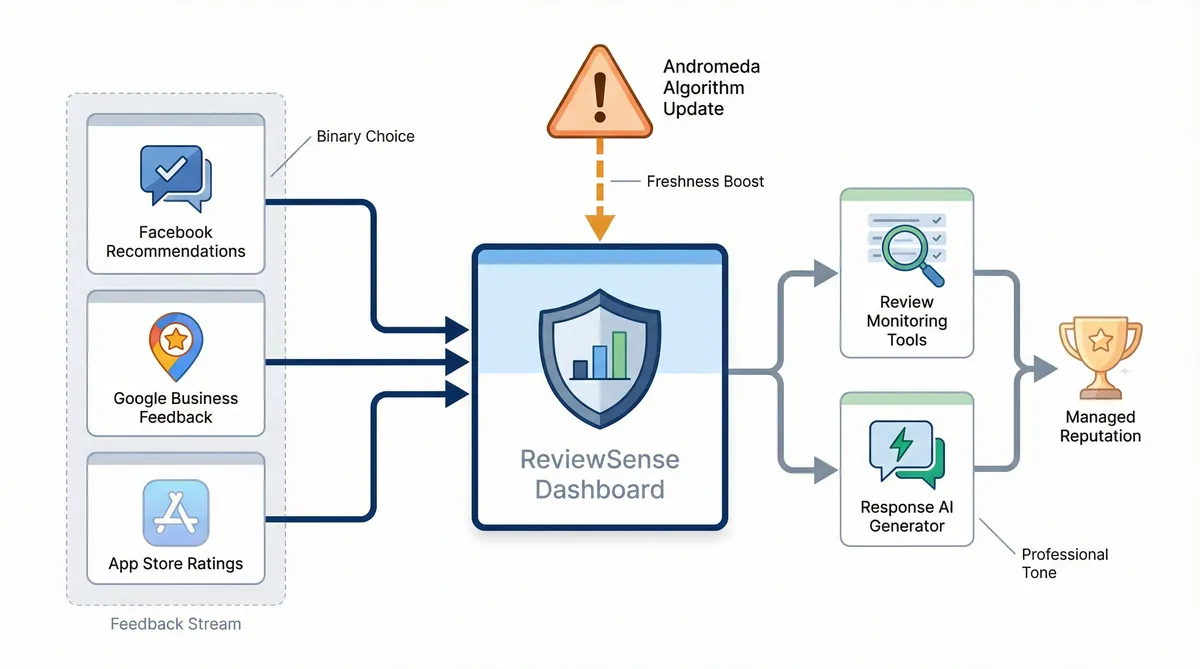
Manually tracking these recommendations across multiple pages drains resources, but ReviewSense automates the entire process. Deploying modern customer review monitoring tools ensures you never miss a vital customer interaction.
The 2026 environment: Why Facebook "Recommendations" Demand a New Strategy
To master this environment, you must first understand how the platform itself has changed. Facebook no longer uses a traditional rating system. Instead, users face a simple binary choice. Do you recommend this business, or not?
This shift kills the middle ground. The standard three-star experience is gone. Customers either love your service or they warn others away. This binary system carries immense weight for local brands. The lack of nuance forces businesses to deliver exceptional experiences every time.
Currently, 40% of consumers use Facebook to read reviews for local businesses. It's the second most trusted platform for local discovery after Google, and especially material for verticals like dental practices, law firms and real estate teams where prospect research starts on social. A massive 60% of Facebook users report their purchasing decisions are shaped by these recommendations.
The pressure intensifies with the January 2026 "Andromeda" algorithm update. This update prioritises freshness above all else. Posts under 24 hours old receive a 50% visibility boost. It uses predictive behavioural matching instead of just showing posts to a friend network. Strangers will see your recent recommendations if their interests align with your business.
Learning how to manage Facebook reviews requires speed. You can't afford to let a negative recommendation sit unanswered. Remember that 82% of shoppers seek out negative reviews to establish credibility. How you handle these visible complaints matters.
Centralising your feedback is the smartest approach. ReviewSense pulls your Facebook recommendations, Google Business Profile feedback, and app store ratings into one dashboard. This unified view helps you adapt to algorithmic shifts without missing a beat.
If you face a sudden wave of poor feedback, a negative review response generator helps you reply quickly. You maintain a professional tone while satisfying the algorithm's demand for fresh activity.
Step-by-Step: Managing Your Unified Inbox and Response Times
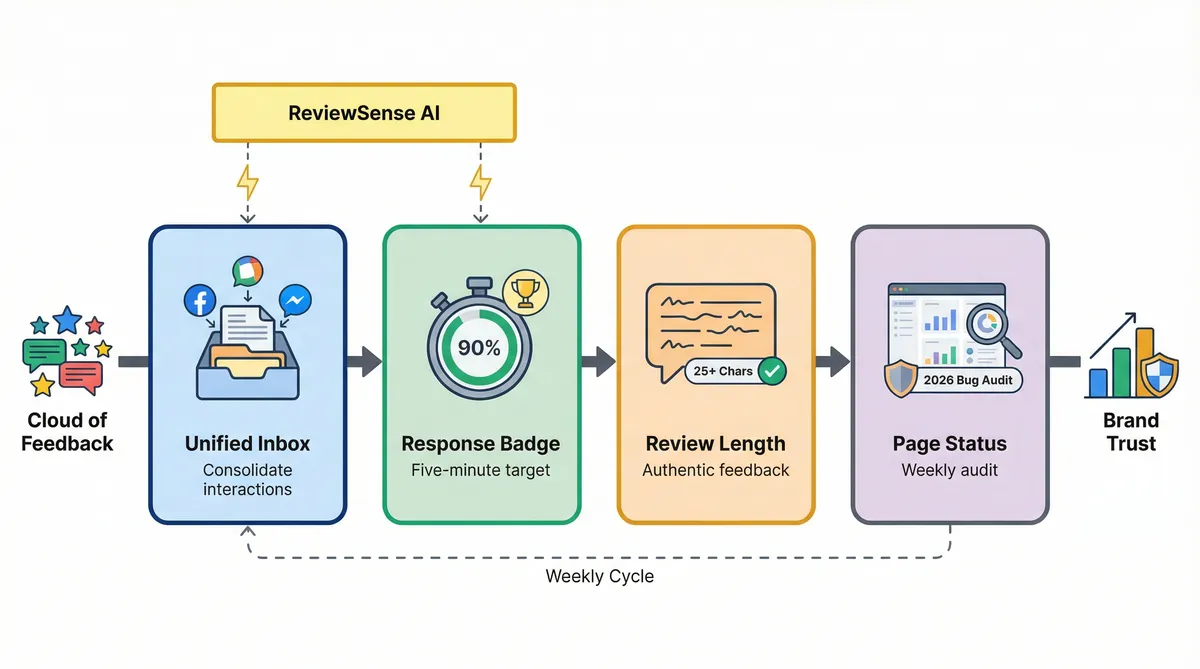
Replying quickly to feedback is just the start; you need a structured routine to keep up. Learning how to manage Facebook reviews requires mastering Meta's tools. Follow these four steps to maintain control.
Navigate to Meta's Unified Inbox. Open your Business Suite and locate the updated inbox tool. This centralises your comments and direct messages. You don't want vital interactions slipping through the cracks.
Chase the responsiveness badge. You want the "Very Responsive to Messages" badge on your profile. You must hit a 90% response rate and a five-minute response time. The global average response rate for businesses on Facebook has jumped to 73%. Ignoring messages simply damages your brand.
Enforce the 25-character rule. A simple "yes" recommendation carries little weight. Ask customers to write at least one full sentence — share a direct Facebook review link to make it easy. This ensures their feedback counts towards your overall score. Remember that 76% of consumers trust a business more if it has a mix of positive and negative reviews. They prefer this over a 5-star rating. Authentic text provides that necessary context.
Check your page status. Monitor the Page Settings then Page Status tab weekly. Watch out for the January 2026 "Recommendation Suspension Bug". This glitch can hide your page entirely. Regular checks ensure your profile remains active.
It's nearly impossible for busy teams to hit a five-minute response time manually. This is where customer review management software becomes essential. ReviewSense solves this problem with instant alerts and auto-reply workflows. You maintain pristine response rates without staring at a screen all day.
Using AI-powered review management: strategies for streamlining customer feedback oversight helps you scale. You can focus on resolving actual issues rather than refreshing a browser window.
The Dos and Don'ts of Responding to Feedback (Real-World Examples)
Scaling your oversight gives you the breathing room to craft the perfect reply. But knowing what to say when facing public criticism is a different challenge.
Learning how to manage Facebook reviews means studying the brands that get it right. You must also analyse the ones that fail publicly. A single bad response can ruin your reputation.
| Strategy | The Dos (Brand Successes) | The Don'ts (Brand Failures) |
|---|---|---|
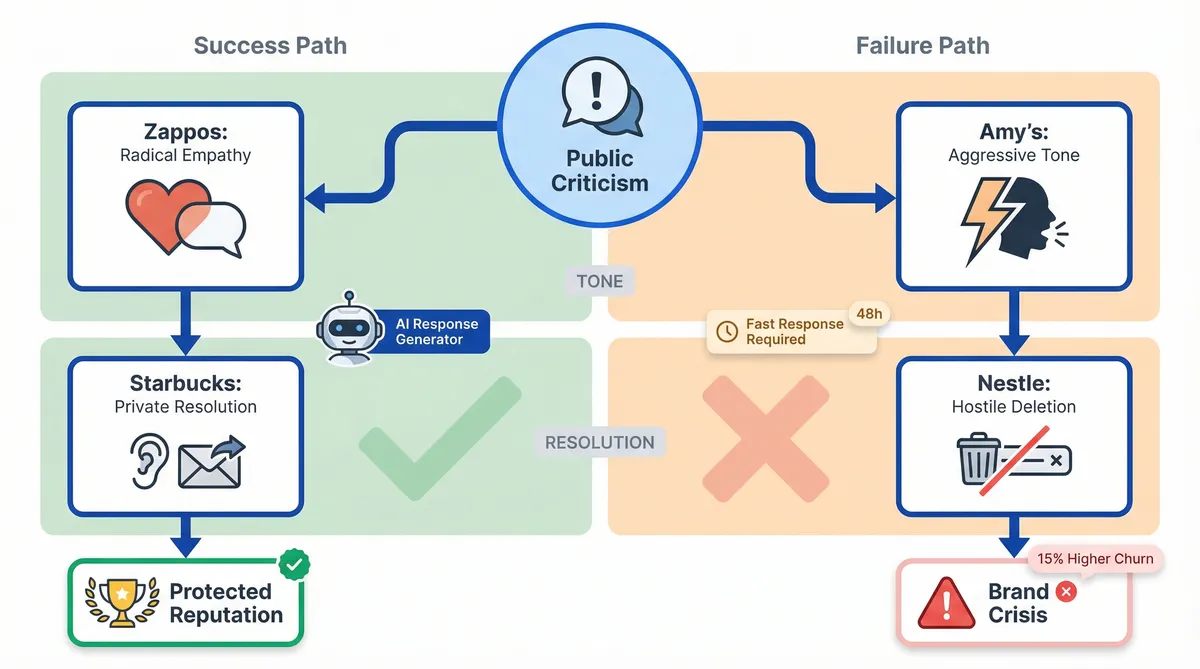
| Tone & Empathy | Zappos: Uses radical empathy. They maintain a warm tone that disarms frustrated customers. | Amy's Baking Company: Responded to criticism with aggression. They used abusive language, creating a viral disaster. |
| Issue Resolution | Starbucks: Excels at social listening. They acknowledge the public complaint and move the resolution to private messaging. | Nestle: Displayed open hostility to critics. They deleted negative comments, which fuelled further customer outrage. |
The expert consensus for handling public criticism is simple. Acknowledge the issue, apologise sincerely, and move the conversation offline. Speed is critical here. A full 52% of reviewers expect a resolution or response to a negative comment within 24 to 48 hours.
Meeting this tight deadline while maintaining composure is difficult. Failing to meet this window results in a 15% higher churn rate for that customer segment. This is where ReviewSense helps. The platform features an AI response generator that crafts personalised replies instantly.
You can mimic Zappos' human tone without risking an emotional meltdown. Using customer review monitoring: tools and techniques for proactive reputation management keeps your team grounded.
You handle disputes with care, protecting your reputation. If you need a broader strategy, read how to manage Google reviews effectively: a step-by-step UK business guide to align your cross-platform approach.
Navigating Meta's 2026 AI Updates: Summaries and Assistants
Mastering your cross-platform approach prepares you for the next major shift in social media feedback. Meta's recent updates have changed how to manage Facebook reviews. You must adapt to these automated features quickly to protect your brand reputation.
- AI-Generated Review Summaries: The March 2026 rollout introduced generative AI round-ups. These pop-ups aggregate customer sentiment at the top of your page. You can't bury bad feedback with high volume. The algorithm highlights recurring complaints instantly, making transparency mandatory for local businesses.
- Meta AI Business Assistant: Facebook now offers a native "Draft Reply" tool to help maintain a 100% response rate. Speed is crucial for page ranking. The algorithm prioritises fresh content, granting a 50% increase in visibility for recommendations posted within the last 24 hours. Fast replies keep your page active.
- Authenticity and Sentiment Tracking: Shoppers seek out negative feedback to establish credibility. They trust a mixed rating over a perfect score, which often causes a conversion dip. You need a proactive strategy. ReviewSense's built-in sentiment analysis extracts key topics and flags recurring issues. You fix operational problems before Meta's AI surfaces them to shoppers.
Displaying authentic Facebook reviews on your website can boost overall sales by 19.8%. However, you need the right tools to curate this content safely. Using an AI review response generator ensures your replies stay on-brand while handling high volumes.
If you operate across multiple channels, read the guide on choosing the right customer review management software for multi-platform businesses. It helps you centralise this data effectively. ReviewSense transforms scattered reviews into actionable insights that improve customer experience.
Contrarian Tactics for Advanced Reputation Management
While AI summaries force transparency, standard advice on handling this feedback misses the mark. Advanced marketing teams use contrarian tactics to protect their brand reputation.
The SEO Myth suggests hoarding Facebook recommendations boosts Google rankings. This assumption is false. Facebook reviews do not sway Google discovery keywords. You must focus on building trust to avoid chasing phantom search benefits. WordStream research indicates businesses that respond are perceived as 1.7 times more trustworthy.
Strategic Disabling is a smart move for specific situations. High-friction industries facing viral controversies suffer from review bombing. Disabling recommendations stops the bleeding. It prevents a sudden PR crisis from scarring your digital profile. You regain control over the public narrative.
The No-Name Response protects your search visibility during disputes. When replying to a negative review, avoid using your business name. You do not want a detailed complaint indexed by search engines alongside your brand. Using customer review management software helps enforce this strict rule across your entire team.
Burying Fake Reviews is better than fighting Meta support. Many shoppers spot fake reviews. Avoid wasting weeks pleading with automated help desks by generating new recommendations. This hides fraudulent complaints from view. A Facebook review management: strategies and tools for building trust online approach prioritises positive volume over manual deletion.
Managers can use ReviewSense's free response templates to execute the No-Name strategy. This shows you know how to manage facebook reviews without feeding algorithms bad press. Gartner and ICMI findings show 85% of consumers expect a response within six hours on Facebook. Fast, nameless replies keep your business protected.
Conclusion
Managing Facebook reviews in 2026 requires adapting to Meta's AI summaries and embracing contrarian tactics to protect your reputation. From deploying the "No-Name Response" to strategically disabling recommendations during a crisis, taking control of your public narrative is essential. Speed and proactive sentiment tracking are your best defenses against algorithmic shifts.
However, monitoring Facebook alongside Google Business Profile, the Apple App Store, and Google Play manually is unsustainable. ReviewSense centralizes your feedback into a single dashboard, using built-in sentiment analysis to flag recurring issues and crisis alerts to catch negative spikes before they escalate. Stop letting automated summaries dictate your brand's story. Turn scattered reviews into actionable insights that improve customer experience and drive growth when you Start your 7-day free trial.