
Did you know that a duplicate Google Business Profile doesn't just confuse customers, but actively cannibalises your local search rankings? When your business moves, rebrands, or inherits rogue listings, you end up splitting your hard-earned reputation across multiple pages. The process to merge duplicate google business profiles is notoriously fragile. One wrong click can permanently delete years of feedback, making it crucial to understand How to Manage Google Reviews Effectively: A Step-by-Step UK Business Guide.
Consolidating your digital footprint is stressful, but ReviewSense automates your broader reputation management strategy once your profiles are unified. Run a free Google Business Profile audit to check your listing health before and after the merge.
Why Merging Duplicate Google Business Profiles is Critical in 2026
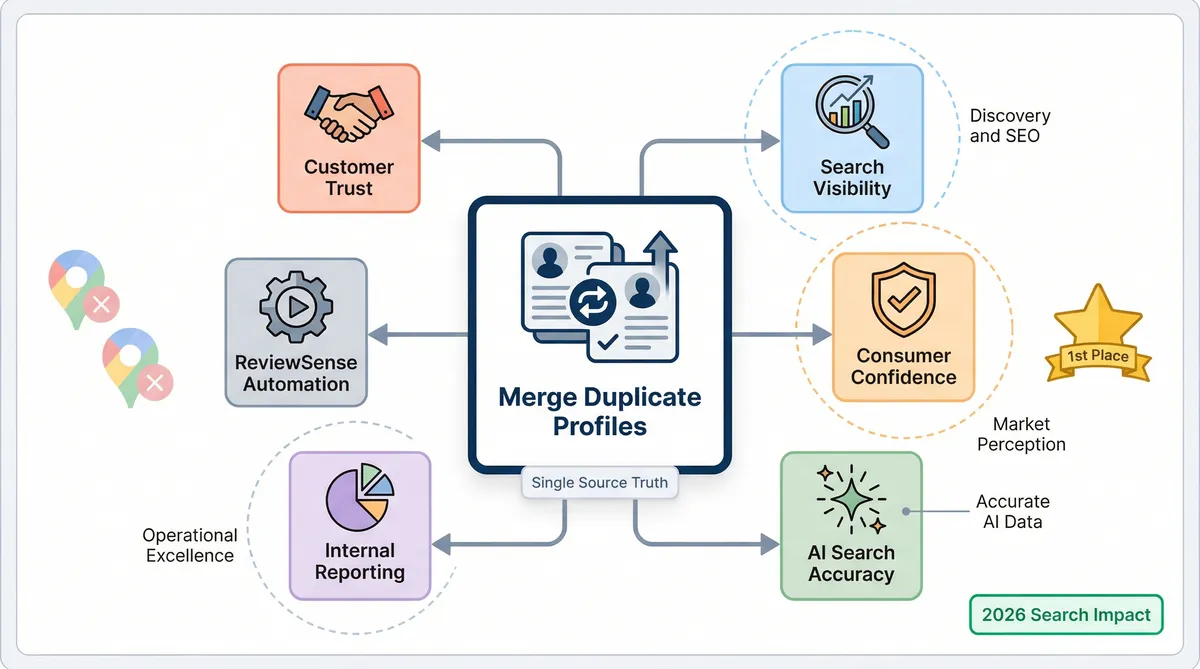
As of early 2026, there are over 200 million Google Business Profiles across the globe. Thousands of new listings appear every day, leaving a large portion unclaimed. This rapid expansion makes it easy for duplicate entries to surface. Search engines can't determine correct details when multiple listings exist for one location. You must merge duplicate google business profiles to maintain search visibility.
Name, address, and phone number inconsistencies cause severe ranking declines. Conflicting information damages consumer confidence. Most shoppers lose trust when they see mismatched details across different profiles. Many won't even contact the business. Unified profiles perform better. They generate more calls and attract higher click-through rates. A single listing reassures potential buyers. It's a clear path to purchase.
The late-2025 'Ask Maps' Gemini AI update changes how users find local services. This AI relies on consolidated data for precise answers. Split reviews give the system fragmented information. This lack of context leads to hallucinated or incomplete responses about your services. A unified profile ensures the AI reads your full customer history. You can explore a comprehensive Online Review Management Guide to understand these shifts.
Consolidating your online presence improves internal reporting. ReviewSense analytics rely on a single source of truth to track sentiment trends and review velocity. Fragmented profiles distort your data and hide recurring issues. Merging them ensures your dashboard reflects reality. It helps you monitor feedback with precision. If you're looking to boost your overall rating, read How to Get More 5-Star Google Reviews (Without Asking Awkwardly).
The Hidden Risks: What Happens When a Merge Goes Wrong?
While unified analytics provide a clear picture, the actual process of consolidating profiles carries distinct risks. Roughly 11.1% of all active profiles remain unclaimed, making them high-risk targets for ghost duplicates that confuse customers. When you merge duplicate google business profiles, the outcome is unpredictable.
| Scenario | Outcome | Impact |
|---|---|---|
| Sterling Sky Dental Case | Reclaimed aged duplicate | Massive ranking spike |
| NY Restaurant vs Bar NY | Algorithmic error merged wrong entities | Lost local visibility |
| 26-Year-Old Hotel | Profile suspended during merge | Lost 4,500 reviews for weeks |
| March 2026 Bug | 42-review profile deleted | Sparse duplicate survived |
The table above highlights how this process works. The Sterling Sky case study shows the upside of this procedure. Reclaiming an aged duplicate caused a massive ranking spike for a dental practice. Their search visibility improved in days. However, failures are common. An algorithmic error merged 'New York Restaurant' with 'Bar New York', destroying both venues' local visibility.
A 26-year-old hotel attempted a routine merge and triggered an automatic suspension. They lost 4,500 reviews for a short time, which halted their bookings. If you face a similar nightmare, the Google Business Profile Suspended? How to Appeal and Get Reinstated (2026 Guide) explains the recovery steps. A March 2026 bug caused pure chaos. Google deleted a 42-review profile while a sparse duplicate survived.
There is another hidden penalty that catches owners off guard. While 100% of customer reviews transfer during a successful merge, 65-80% of owner responses vanish. Losing years of crafted replies damages your brand voice. ReviewSense acts as a safety net. The AI review Response Generator helps you rebuild. You can generate personalised replies in seconds to replace lost responses. This ensures your profile maintains an engaging presence after a major data wipe.
Step-by-Step Guide to Merging Duplicate Profiles Safely
To avoid losing those hard-earned responses and triggering algorithmic chaos, you need a precise strategy. When you merge duplicate google business profiles, following a strict sequence protects your data. A careful approach ensures your local visibility remains intact during the transition.
Identify the Primary ID. Log into your dashboard and open the Advanced Settings menu. Find the long string of numbers assigned to your main listing. Copy this exact ID to a secure document for later use.
Navigate the 'Unverify' requirement. Between 75% and 80% of profiles are now verified, as Google has made verification mandatory for appearing in the "Local 3-Pack." Keep your primary listing verified. You must unverify and remove the duplicate from your dashboard before contacting support. This contrarian step prevents automated suspensions.
Use the Support-First path. Don't click 'Suggest an Edit' on the public map. Contact Google Support through their help portal. Tell the agent to "transfer reviews AND their associated responses" to your primary ID. This specific phrasing reduces data loss.
Manage the timeline. Expect a two-week process from start to finish. Escalate the ticket if support fails to acknowledge your request within 72 hours. Silence indicates internal system errors. Persistent follow-ups keep the process moving toward completion.
Once the profiles merge, connect your unified listing to ReviewSense. This software centralises all future feedback into a single dashboard. Effective Customer Review Management: Building Trust and Improving Ratings becomes easier with consolidated data. You can monitor other channels like Facebook Review Management without jumping between tabs. A clean profile sets the foundation for long-term growth. Your team can focus on genuine feedback and ignore administrative distractions.
Contrarian Strategies and Advanced Merge Hacks
While a clean profile sets the foundation for growth, local SEO experts bypass standard Google documentation to achieve this. Standard procedures fail. Inconsistent NAP information is now responsible for over 40% of local ranking declines for multi-location brands. Fixing this requires aggressive tactics when you merge duplicate google business profiles. You must protect your digital footprint at all costs.
Here are four contrarian strategies used by industry veterans:
The '3-Account' trick: This bypasses the manual support queue. You use three high-level Local Guide accounts to 'Suggest an Edit' on the same day. This triggers an automated system approval. It works better than waiting weeks for a human agent.
'Backdoor' reinstatements: This tactic rescues trapped data. You can merge a suspended profile containing over 100 reviews into a clean profile. This effectively washes the suspension. The reviews transfer over, and the penalty disappears.
When NOT to merge: Knowing when to stop is vital. If a medical practice and a specific doctor profile rank for different search terms, don't combine them. Merging them kills 50% of your keyword real estate. Keep them separate to dominate local search results.
Navigating video verification limits: This requires extreme caution. You only get two or three attempts before triggering a security block. Plan your recording carefully. Ensure all signage and equipment are visible before you press record.
These advanced methods require absolute precision. Missteps cause permanent data loss. If you need to adjust feedback after a complex consolidation, read the guide on Editing Google Reviews: Policies, Options, and Effective Strategies for UK Businesses. Mastering these tactics elevates your overall Customer Review Management strategy.
Navigating Google’s 2026 AI Updates During a Merge
Mastering these tactics is only the beginning. You must recognise Google's recent algorithm shifts when you merge duplicate google business profiles. The new Local Services Ads review consolidation forces auto-merges across accounts. This causes sudden rating fluctuations that confuse potential buyers. Conflicting data is dangerous. Data shows 80% of consumers report losing trust in a local business if they find conflicting information across different listings.
Timing your consolidation matters immensely. Avoid combining profiles during high-volatility periods. The February 2026 review deletion wave wiped out thousands of legitimate ratings. If you attempt a transfer during a core update, you risk permanent data loss. Wait for the algorithm to settle. If you are worried about missing feedback, read Why Google Is Deleting Your Reviews in 2026 (And How to Protect Them).
The November 2025 'Pseudonymous' shift changed how Google handles user identities. Nicknames and avatars are now standard. Don't report these reviews as fake during a transition. You might trigger a deletion of real feedback. ReviewSense helps teams navigate this confusion. Built-in sentiment analysis and spam detection distinguish genuine feedback from toxic content. This protects your reputation while keeping real voices intact.
Google's AI crackdown on 'review gating' adds another layer of risk. If you merge a gated profile, the algorithm strips those filtered reviews entirely. You need a safe platform to monitor these changes. Choosing the Right Customer Review Management Software for Multi-Platform Businesses ensures you track sentiment trends across Google Business Profile, Facebook, Apple App Store, and Google Play.
A unified dashboard keeps your team focused. You receive instant alerts for new reviews across all supported platforms. This visibility prevents minor issues from escalating into public crises. Your business maintains a strong presence despite Google's constant updates.
Conclusion
Merging duplicate Google Business Profiles requires strategic precision to protect your digital footprint and retain hard-earned feedback. By understanding when to keep listings separate, navigating verification limits, and timing your consolidation to avoid volatile algorithm updates, you safeguard your local search rankings.
However, managing this transition manually leaves room for costly errors. You need a reliable system to monitor your reputation across Google Business Profile, Facebook, Apple App Store, and Google Play before, during, and after a merge. ReviewSense centralizes your data, provides instant crisis alerts for negative spikes, and uses AI to detect spam, ensuring your team focuses on genuine feedback without getting distracted by toxic content.
Turn scattered reviews into actionable insights that improve customer experience and drive growth—Start your 7-day free trial.