
Are you still writing individual replies to every piece of customer feedback? Relying on manual typing is a fast track to burnout and inconsistent brand messaging. Today, using an AI review response generator free of charge isn't just a clever hack; it's a baseline requirement for AI-powered review management. Artificial intelligence helps you process high volumes of feedback instantly, ensuring no customer feels ignored while freeing up your team to focus on resolving actual service issues.
If you want to smoothly scale this process across all platforms, ReviewSense automates your reputation management so you never miss a review again.
The 2026 Shift: Why AI is Now Mandatory for Customer Communication
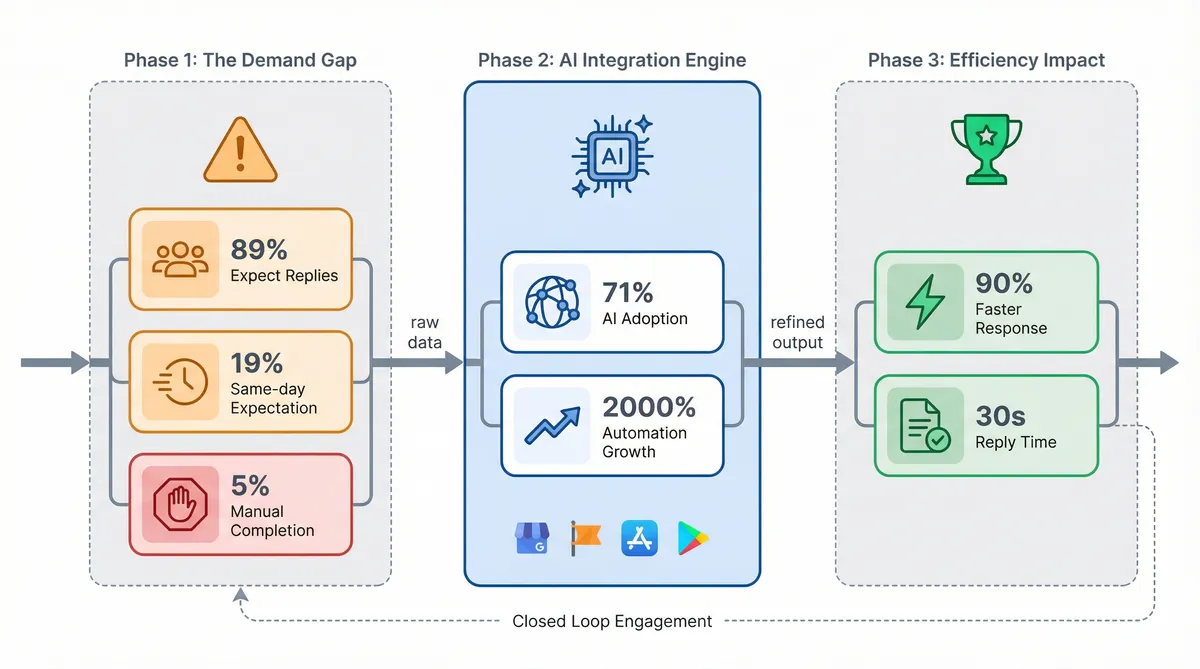
Consumers demand more from brands than ever before. A staggering 89% of buyers expect businesses to reply to their reviews. Yet, a massive disconnect exists. Only 5% of companies manage to answer all their feedback. The pressure is mounting. A full 19% of shoppers expect same-day replies. Meeting these expectations manually is impossible for busy teams.
This workload explains a major shift in business operations. As of early 2026, 71% of organisations use generative AI for daily functions. Customer service automation has seen explosive growth of over 2,000% since January 2025. Teams can't afford to ignore these tools. They need a smarter way to handle the influx of comments across platforms. Relying on manual typing simply won't scale.
The efficiency gains are clear. Using an AI review response generator free or paid solution cuts response time by 90%. Staff used to spend five to ten minutes drafting a single reply. They generate on-brand responses in under 30 seconds. This speed transforms how companies approach customer review management. It turns a tedious chore into a simple task.
Managing feedback across Google Business Profile, Facebook, Apple App Store, and Google Play requires a central dashboard. ReviewSense provides this unified workspace. It flags new comments and generates tailored replies instantly. This ensures you don't miss any crucial interaction. For businesses evaluating pricing options, starting with automated tools is the best way to protect your brand reputation. It keeps your audience engaged.
Adopting these technologies is a strict requirement. Customers judge brands by their public communication. A fast reply shows you value their business. Using intelligent software guarantees consistency across every channel. It empowers your team to focus on complex issues while the system handles routine praise and complaints.
Evaluating Your Options: Free AI Tools vs. Native Platform Features
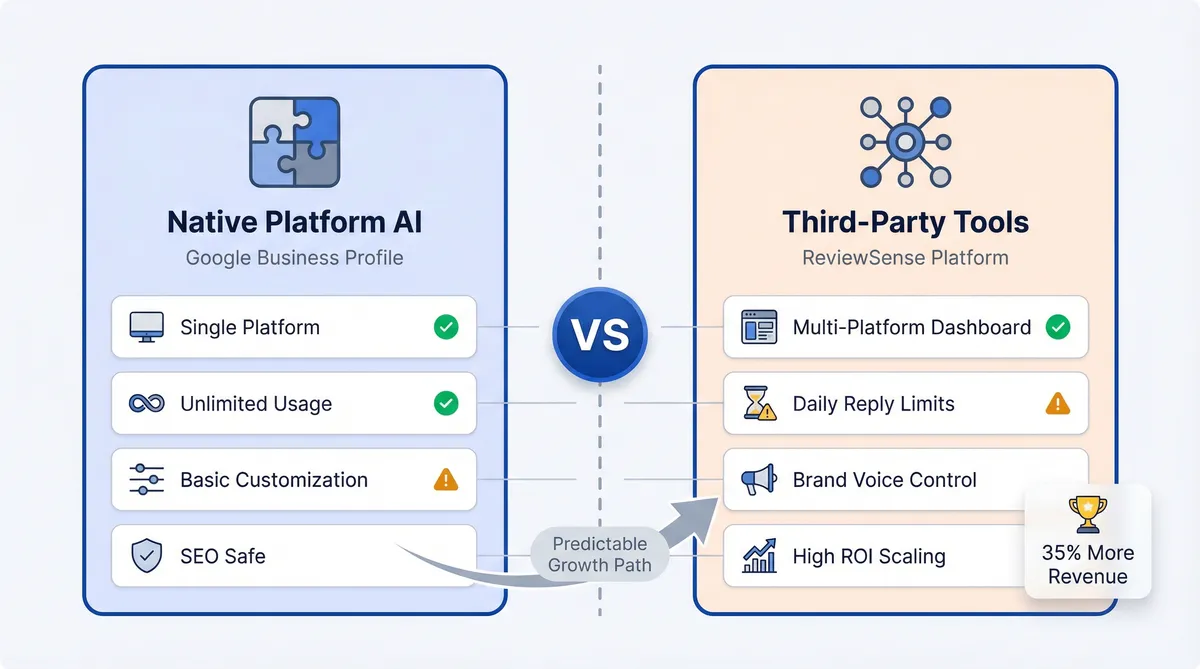
Once you decide to automate, the next step is choosing the right system. Many teams weigh native platform features against external software. For instance, the March 2026 rollout of Google Business Profile's native AI replies offers a simple starting point. Using this built-in feature carries no SEO penalty. However, it doesn't offer cross-platform capabilities for Facebook or App Store Review Management.
| Feature | Native Platform AI | Third-Party Free Tools |
|---|---|---|
| Platform Support | Single platform only | Multi-platform dashboards |
| Usage Limits | Often unlimited | Usually 3-5 replies daily |
| Customisation | Very limited | High brand voice control |
Data shows that 91% of solo entrepreneurs start with basic options. They search for an AI review response generator free of charge to test the waters. These users hit a predictable upgrade trigger within three to six months. Freemium limits of three to five daily responses become restrictive as businesses grow. Teams need more capacity to handle spikes in customer feedback.
Scaling up your operations is profitable. Businesses that respond to at least 25% of their reviews average 35% more revenue than those that ignore feedback. Investing in dedicated software pays off. For every £1 spent on generative AI tools for customer operations, companies see an average return of £3.70. This financial gain justifies moving past basic tiers.
ReviewSense offers excellent tools to solve immediate problems. You can access the Negative Review Response Generator, review response templates, or Google review reply generator at no cost. These utilities act as high-value entry points to manage difficult feedback. When you're ready for automated workflows, the ReviewSense 7-day free trial provides full access to our complete platform.
The Contrarian Playbook: Rethinking Empathy and the 'Human-in-the-Loop' Trap
Moving beyond basic trials requires a complete shift in mindset. Standard advice pushes outdated methods for handling customer feedback. To scale your operations, you must challenge these old assumptions. Clinging to manual processes will hurt your brand reputation.
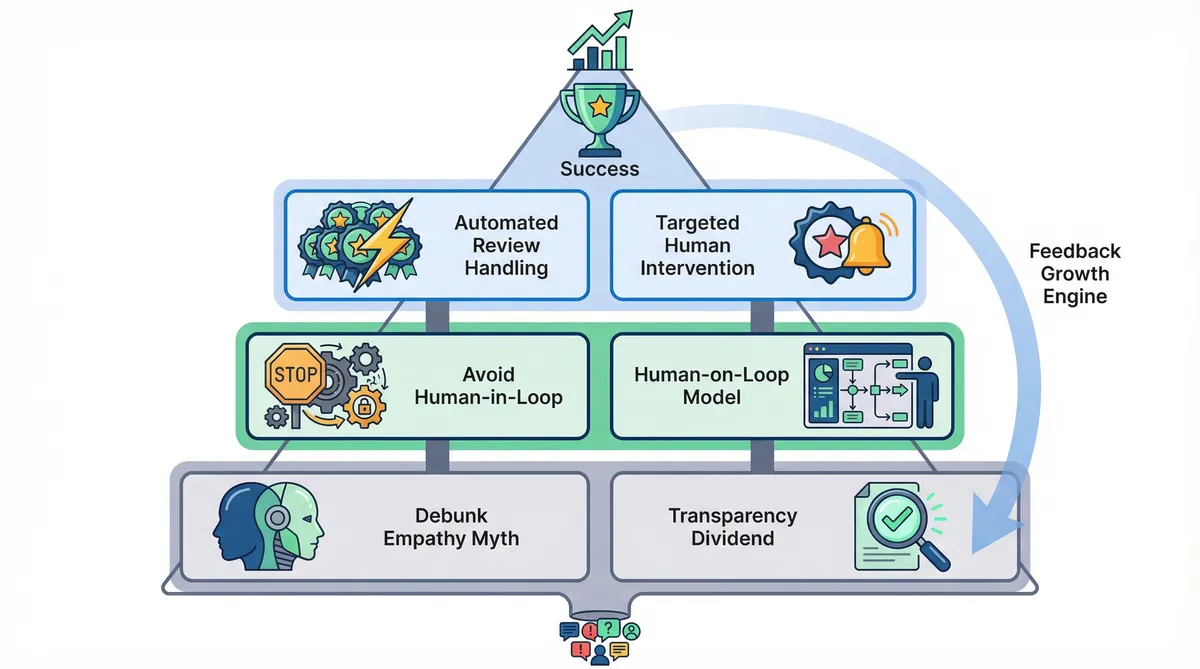
Debunk the 'Empathy Myth'. Traditional guidance insists humans alone show genuine empathy. This is false. Most readers cannot distinguish high-quality AI writing from human drafting. Customers prefer the infinite patience of an AI review response generator free or paid tool. Human staff get tired. They write defensive replies to harsh criticism. AI remains calm and helpful. It never takes negative feedback personally.
Embrace the 'Transparency Dividend'. Brands hide their automation because they fear public backlash. Yet, customer satisfaction is higher when businesses disclose their AI assistant. Honesty builds trust. People appreciate fast answers over delayed human replies. When Investigating Google Review Management Software: Capabilities, Limitations, and ROI, you'll see that speed beats forced personalisation. Customers want their problems solved quickly.
Avoid the 'Human-in-the-Loop' Trap. Many experts push for manual approval of every single message. This creates massive administrative debt. It slows down your entire operation. Adopt a 'Human-on-the-Loop' model. This modern framework keeps your team in control without the constant bottleneck of manual reviews.
ReviewSense uses auto-reply and queue workflows to handle positive feedback. The system processes perfect ratings without manual input. Staff receive alerts for 1-star complaints or specific flagged keywords. This targeted approach streamlines Facebook Review Management by filtering out the daily noise. It protects your team from notification fatigue.
Your team focuses on complex issues that require human judgement. You stop wasting time approving simple thank-you messages. This contrarian approach frees up hours of staff time. It ensures your brand maintains a professional voice across all platforms. You can finally turn customer feedback into a true growth engine.
Real-World Lessons: AI response Successes and Legal Failures
Shifting to an automated approach yields dramatic results, but it requires careful execution. Real-world examples highlight the stark difference between strategic deployment and reckless implementation.
The Pizza Shop Triumph. A local pizzeria adopted an AI review response generator free plan to manage their feedback. They used targeted templates to cut response times down to two minutes. This rapid engagement boosted their Google rating from 3.9 to 4.4 stars in a single month. Profiles with frequent, AI-assisted responses are 35% more likely to be cited as a top recommendation in AI search results.
The Right Way Garage Doors Incident. Automation without oversight invites disaster. This company faced a coordinated spam attack. Their unmonitored AI replied to fake complaints with self-defeating apologies. This validated the false claims in public. While 69% of organisations believe AI humanises digital interactions, 88% of consumers oppose fully automated systems lacking human oversight.
The Air Canada Legal Case. Chatbots left unchecked create severe liability. Air Canada faced a tribunal after their AI hallucinated a refund policy. The company was forced to honour the fabricated discount. This highlights the danger of using open-ended generative tools without strict boundaries.
You must protect your business from these costly errors. When evaluating the Best Review Management Software 2026, safety features are essential. ReviewSense prevents rogue replies through strict brand voice guardrails. ReviewSense includes spam filtering and toxic content detection.
This ensures your automated workflows process genuine customer feedback. Whether you handle local feedback or Google Play Review Management, ReviewSense keeps you safe. You don't have to risk your hard-earned reputation.
Optimizing for the Future: GEO, SEO, and Extracting Real Value
To avoid the legal pitfalls of unchecked automation, you must move beyond merely generating text. The future of reputation management requires a smarter strategy.
- Optimise for Generative Engine Optimisation. Search engines use AI to summarise local businesses. An active profile appears in these new AI overviews. You need fresh feedback to succeed. Research shows 73% of consumers only trust reviews left in the last month.
Using an AI review response generator free tool maintains this vital activity. AI tools have increased the review volume for active businesses by 77% through automated follow-up requests. This steady stream of fresh ratings signals trust to search algorithms.
- Shift focus from output to input. Many teams waste hours generating generic replies to perfect ratings. A basic 'thank you' offers little business value. The real power lies in the input data. You need to extract meaning from the noise.
ReviewSense uses built-in sentiment analysis to scan your connected platforms. It reads Google Business Profile, Facebook, Apple App Store, and Google Play. The system flags recurring operational issues like long wait times. This transforms scattered complaints into clear business insights.
If you want to master this process, read How to Manage Google Reviews Effectively: A Step-by-Step UK Business Guide. Fixing root problems drives customer retention. By focusing on operational fixes, one company reported handling 71% more reviews per hour. They achieved a net monthly savings of $48,000.
You can use the How Many 5-Star Reviews Calculator to set clear targets. Stop treating reviews as a chore. Start using them to improve your daily operations.
Conclusion
Integrating an AI review response generator can drastically reduce response times and boost your search visibility, but as real-world examples show, automation without oversight is a liability. To truly improve customer communication, you must move beyond generating quick replies. Success requires balancing speed with strict brand guardrails to prevent costly errors. It also means shifting your focus from output to input—using built-in sentiment analysis across Google Business Profile, Facebook, Apple App Store, and Google Play to identify recurring issues and improve your daily operations.
Ready to protect your reputation and turn scattered reviews into actionable insights? Start your 7-day free trial.