
You're caught between speed and sincerity. Automate too aggressively and you alienate your audience; reply manually and you drown in volume. The solution isn't a binary choice — it's a hybrid workflow that uses AI to handle the grunt work without sacrificing your brand's voice.
Managing this manually is hard. ReviewSense automates it.
Why Automating Trustpilot Responses Is Riskier Than You Think
This tension creates a real dilemma. Consumers expect speed — 89% now expect businesses to respond to their online reviews. Yet they also punish generic replies. Research shows that half of consumers are turned off by templated responses that feel impersonal. The pressure to reply fast can push brands toward full automation. But that approach carries hidden risks.
| Risk | Impact |
|---|---|
| Generic tone | 50% of consumers distrust templated replies |
| AI suspicion | 46% of consumers suspect AI-managed reviews |
| Brand damage | A poor automated reply can worsen sentiment |
| Missed context | Automation misses nuance in negative feedback |
The problem isn't volume — it's brand equity. A rushed, tone-deaf reply can do more harm than silence. Recent industry research confirms that consumers can spot automated language. When they do, trust erodes.
The hybrid solution
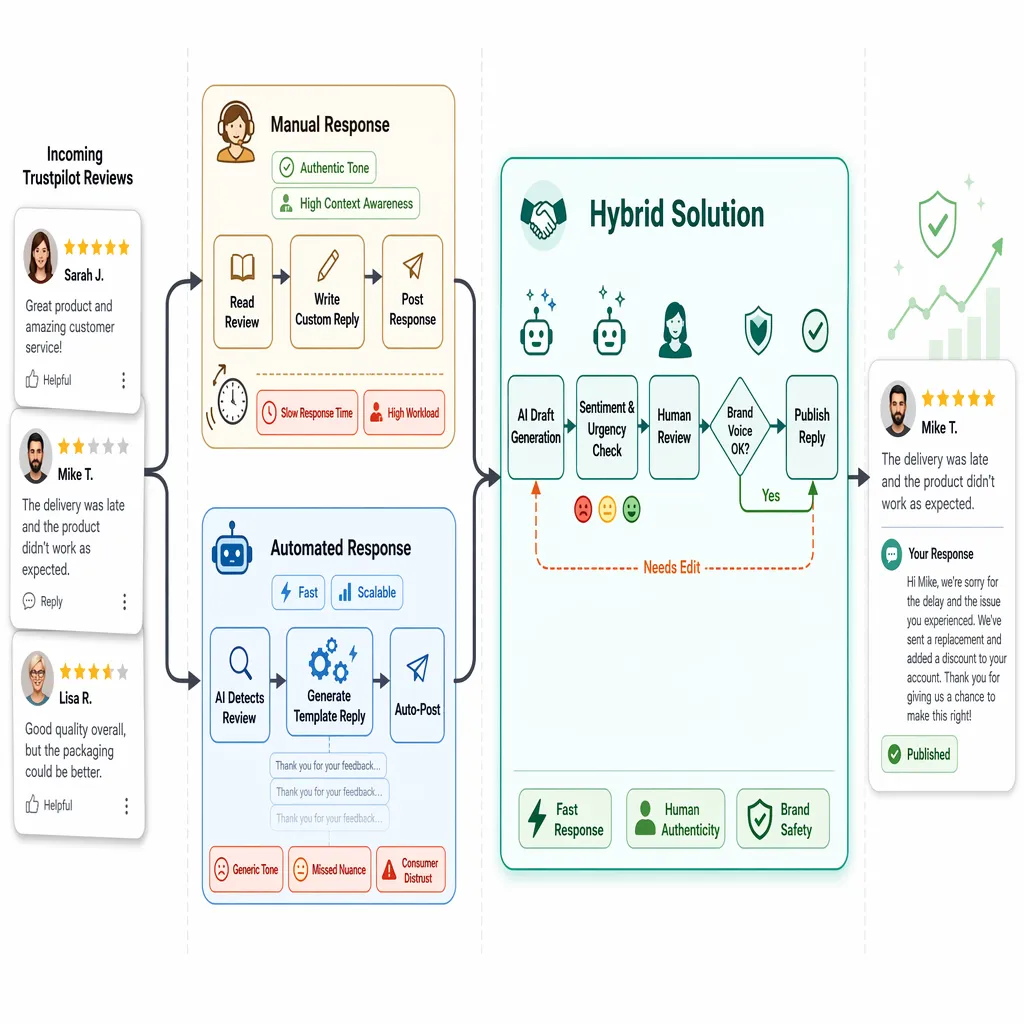
The answer isn't full automation. It's a human-in-the-loop model. You can use tools to draft replies, flag urgent reviews, and track sentiment. But a person should review and approve before anything goes live. This approach lets you manage Trustpilot reviews efficiently without sacrificing authenticity.
For businesses learning how to auto respond to trustpilot reviews, the goal should be speed with a human check. A star rating calculator can help you understand your current position. Then you can build a workflow that balances efficiency with genuine connection. Silence might feel safer than a bad automated reply. But a thoughtful, timely response — even if it takes a few extra minutes — builds lasting trust.
The Hybrid Workflow: Balancing Speed With Authenticity
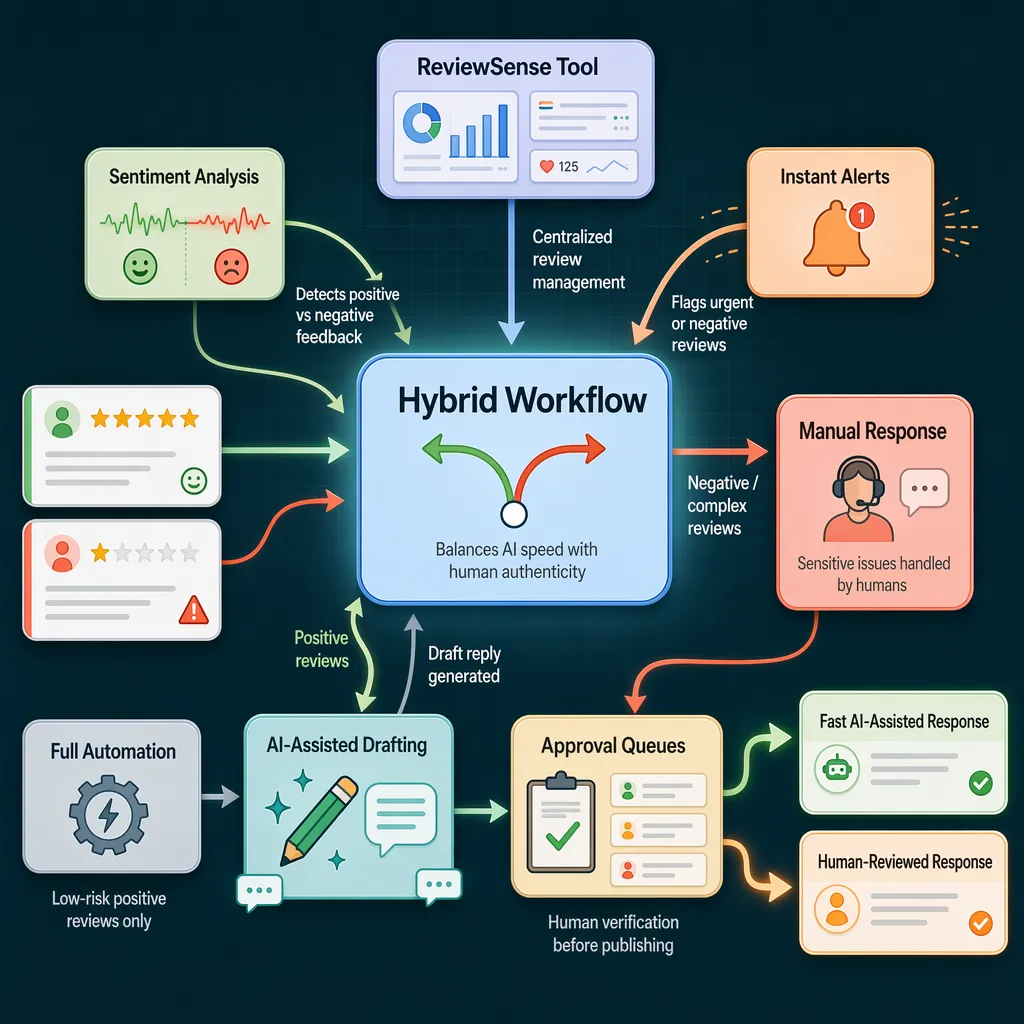
That's why the hybrid workflow has become the industry standard. It combines the speed of automation with the nuance of human judgment. The table below shows how each approach stacks up.
| Approach | When to Use | Risk |
|---|---|---|
| Full Automation | High-volume, low-risk positive reviews only | |
| AI-Assisted Drafting | Routine positive reviews; first draft for neutral feedback | Over-reliance on AI can still feel impersonal if unedited |
| Manual Response | Negative or complex reviews; sensitive issues | Slower turnaround; may miss the 24-hour response window |
The hybrid model routes positive reviews to AI drafting and negative ones to human teams. This way, you manage Trustpilot reviews without sacrificing authenticity. Tools like ReviewSense make this possible. Its sentiment analysis flags negative reviews instantly. Then instant alerts route them to the right person. Approval queues ensure nothing goes live without a human check.
Speed still matters. Over half of reviewers (51%) expect a response within 24 hours. But speed without substance backfires. A thoughtful reply beats a fast, robotic one every time.
For teams learning how to auto respond to trustpilot reviews, the hybrid workflow is the sweet spot. You can use a Google Review Management Software to centralise feedback. Then apply the same logic to Trustpilot. The Review Management Software: Key Features, Use Cases, and Selection Tips guide explains how to choose a tool that supports this model.
The goal is simple. Reply fast to the easy ones. Take time on the hard ones. Your customers will notice the difference.
What to Look for in a Trustpilot Response Automation Tool
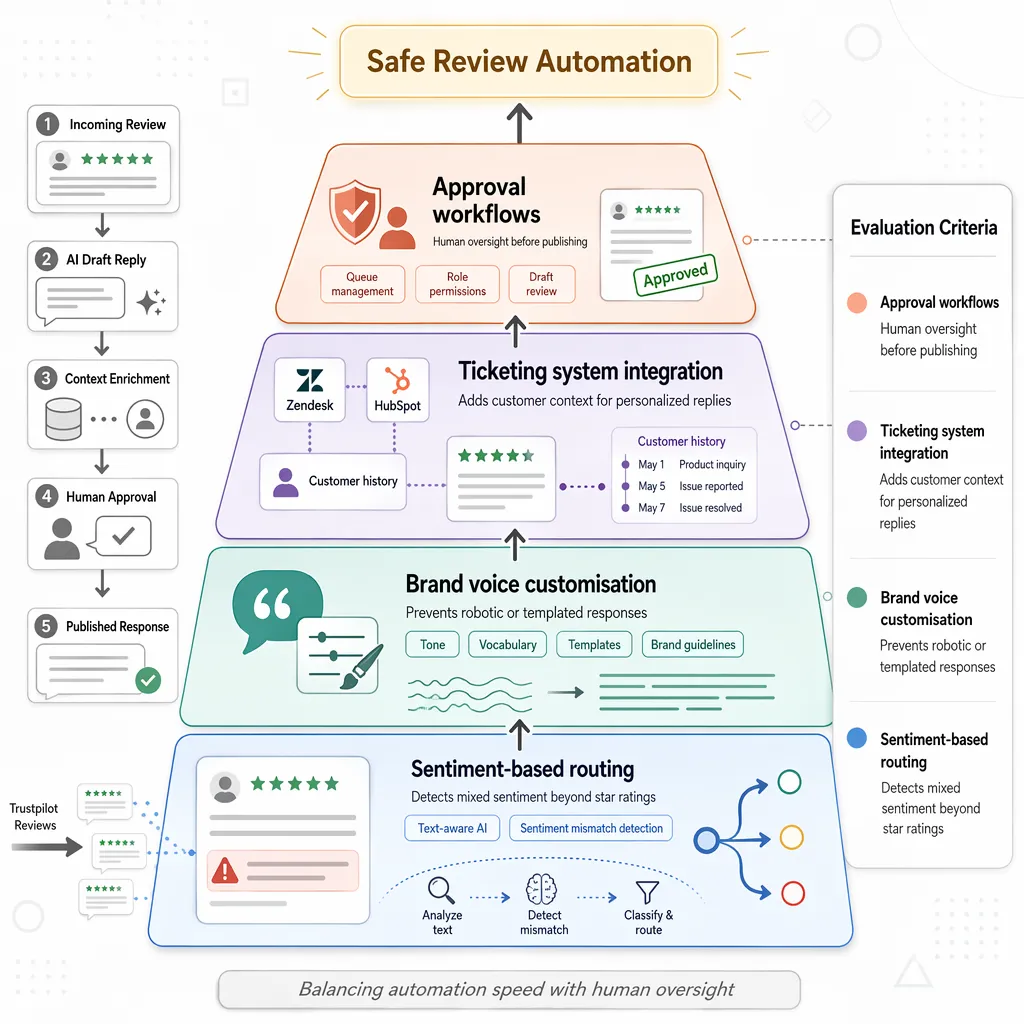
That hybrid workflow is only as good as the tool behind it. Choosing the wrong automation platform can undo all the benefits of a human-in-the-loop model. Here are four criteria to evaluate when you're learning how to auto respond to Trustpilot reviews.
| Criterion | Why It Matters | What to Look For |
|---|---|---|
| Sentiment-based routing | Catches nuanced reviews like 5-star with hidden complaints | AI that flags sentiment mismatch, not just star rating |
| Brand voice customisation | Avoids robotic patterns that erode trust | Customisable tone, saved templates, brand guidelines |
| Ticketing system integration | Provides full customer context for replies | Native connectors to Zendesk, HubSpot, or similar |
| Approval workflows | Ensures human oversight before publishing | Queue management, role-based permissions, draft review |
Sentiment-based routing catches nuance
A five-star review isn't always positive. Some customers leave high ratings but include complaints about delivery times or product quality. Standard automation misses this entirely. Research from CMSWire shows AI often misses subtle cues in mixed-sentiment reviews. You need a tool that reads the text, not just the stars.
Brand voice customisation prevents generic backlash
Remember that 50% of shoppers are turned off by templated replies. Custom brand voice settings let you define tone, vocabulary, and structure. ReviewSense offers this, so your replies sound like your team wrote them. It's a simple fix for a costly problem.
Ticketing integration gives context
Without customer history, a reply can feel disconnected. Integration with platforms like Zendesk or HubSpot pulls in past interactions. Your team can reference previous issues, making each response personal and informed.
Approval workflows keep control
Full automation is risky. Approval queues let managers review drafts before they go live. ReviewSense supports this with queue workflows and collaboration tools. You maintain speed without sacrificing oversight.
For teams that manage Trustpilot reviews effectively, these four criteria separate safe automation from risky shortcuts. A Google Place ID Finder can help you centralise location data, while ReviewSense ties everything together with custom brand voice and human oversight.
Step-by-Step: Setting Up a Trustpilot Response Automation That Builds Trust
Building on that hybrid workflow, here is a practical setup guide. These steps help you manage Trustpilot reviews with speed and authenticity. ReviewSense supports each stage, including multi-platform management for Google, Facebook, Apple, and Google Play.
| Step | Action | Why It Matters |
|---|---|---|
| 1 | Connect Trustpilot via API to a unified dashboard | Centralises all feedback in one place |
| 2 | Configure sentiment thresholds for auto-drafting | Routes positive reviews to AI, flags negatives for humans |
| 3 | Train the AI on your brand voice using past responses | Avoids generic tone that erodes trust |
| 4 | Set up approval workflows for negative reviews | Ensures human oversight before publishing |
| 5 | Enable randomised delays (15-60 minutes) | Prevents robotic timing patterns |
| 6 | Monitor analytics for response rates and crisis alerts | Catches negative spikes early |
Step 1: Connect your Trustpilot account via API
A unified dashboard pulls in reviews from all supported platforms. ReviewSense centralises Google Business Profile, Facebook, Apple App Store, and Google Play alongside Trustpilot. This single view saves hours of tab-switching. You can investigate Google review management software to see how centralisation works in practice.
Step 2: Configure sentiment thresholds
Set rules so 4-5 star reviews get an AI draft. Flag 1-3 star reviews for human review. This prevents automated replies on sensitive feedback. Recent research shows that 46% of consumers are suspicious of reviews that appear AI-managed. Sentiment routing reduces that risk.
Step 3: Train the AI on your brand voice
Upload past responses to teach the AI your tone. ReviewSense lets you save custom brand voice settings. This stops templated replies that feel impersonal. Your team can use the AI review response generator to create on-brand drafts quickly.
Step 4: Set up approval workflows for negative reviews
Negative feedback needs a human touch. Approval queues let managers review drafts before they go live. ReviewSense offers queue workflows and collaboration tools. This keeps control without slowing you down.
Step 5: Enable randomised delays
Instant replies feel robotic. Set delays between 15 and 60 minutes. This mimics natural human timing. It builds trust with customers who read your responses.
Common Pitfalls When You Manage Trustpilot Reviews With Automation
Once your automated workflows are live, a different challenge emerges. Speed can become a trap. The very efficiency you sought starts to erode the trust you're trying to build. Here are three common pitfalls when you manage Trustpilot reviews with automation, and how to avoid them.
The Efficiency Trap: Why Every Reply Doesn't Need a Robot
Automating replies to every single review dilutes your brand. A 5-star review that says "Great service" might only need a like or a quick thank you. But a 5-star review that mentions a specific employee by name deserves a personal note. Blasting a generic template at both is a missed opportunity. The corrective strategy is simple: use automation for volume, but reserve genuine, human-written replies for reviews that contain specific praise or personal details. This protects your brand equity.
Ignoring the Middle: The 2-4 Star Sweet Spot
Most teams focus on the 1-star complaints and the 5-star praise. They ignore the middle. Prospective customers watch how you handle conflict. A 3-star review that says "Good product, but delivery was late" is a chance to show accountability. If you auto-reply with a generic apology, you look indifferent. Instead, flag these middle reviews for human review. A thoughtful, specific response here can convert a sceptical browser into a buyer. It shows you care about the experience, not just the rating.
Vanity Metrics: Response Rate vs. Response Quality
Treating response rate as your only KPI is dangerous. You can reply to 100% of reviews with robotic speed, but Speed without substance is noise. Focus on high-impact responses: negative reviews, detailed positive reviews, and those middle reviews. Use sentiment analysis to prioritise. A slower, authentic reply to a complex complaint builds more trust than an instant, generic one.
ReviewSense helps you avoid these traps. Its sentiment analysis flags nuanced reviews, spam detection filters noise, and the human-in-the-loop design ensures you maintain control. You can choose the right customer review management software that prioritises quality over speed. The goal isn't to reply to everything instantly. It's to reply to the right things, authentically.
Conclusion
Automating your review responses saves time, but only if you avoid the traps of robotic replies, ignored middle ratings, and vanity metrics. The key is to use automation as a tool, not a crutch—let sentiment analysis flag sensitive reviews, reserve human replies for specific praise or complaints, and prioritise response quality over speed. With ReviewSense, you centralise reviews from Google, Facebook, Apple App Store, and Google Play, while maintaining control through custom brand voice, approval workflows, and randomised delays. Stop juggling scattered feedback and start building authentic customer relationships. Turn scattered reviews into actionable insights that drive growth with ReviewSense—Start your 7-day free trial.