
Should you respond to every review? The short answer from research is yes—but the practical answer depends on your resources. What matters more than perfection is a consistent, sustainable policy that prioritises the reviews that matter most.
For businesses managing reviews across multiple platforms, ReviewSense offers AI-powered responses that make responding to every review achievable without burning out your team.
What the Evidence Says About Responding to All Reviews
Consumer preferences on this topic are remarkably clear. According to BrightLocal's 2022 Consumer Review Survey:
- 89% of consumers would be likely to use a business that responds to all reviews
- 57% would be unlikely to use a business that doesn't respond at all
- Consumers are 41% more likely to patronise businesses with comprehensive responses
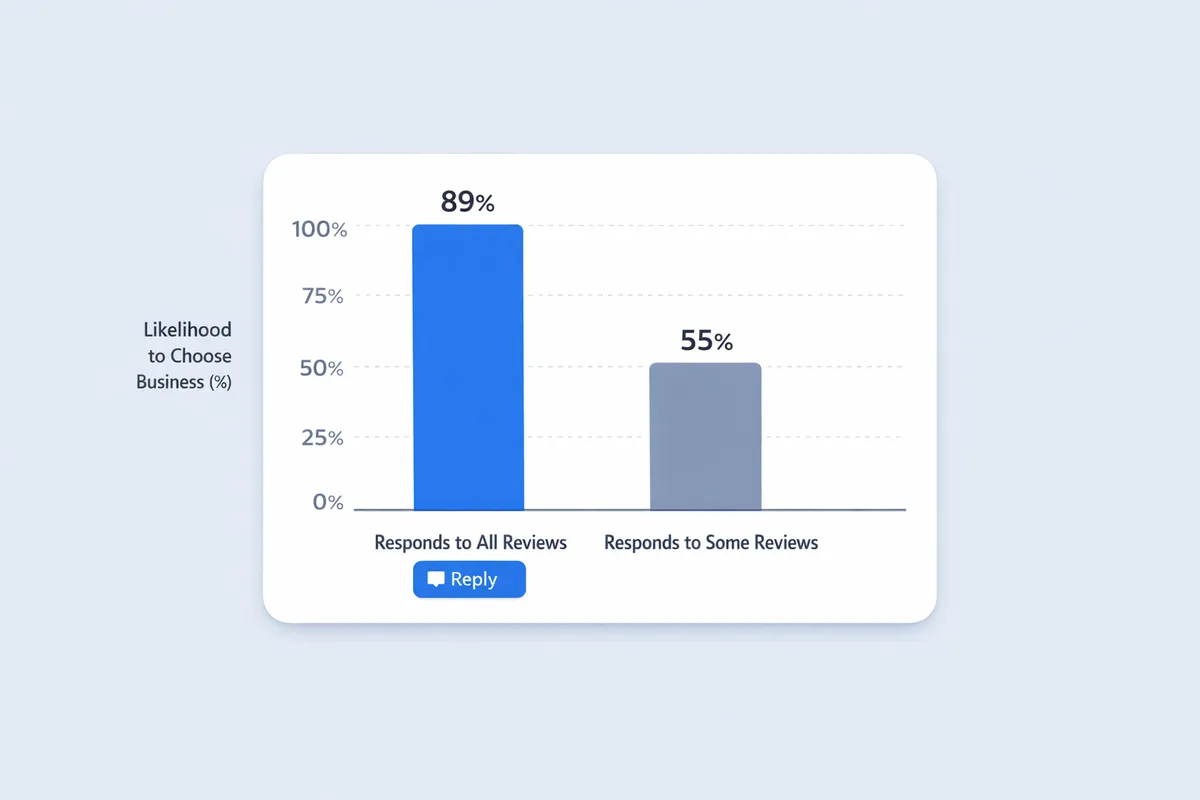
The gap is stark: responding to all reviews makes customers 32 percentage points more likely to choose you compared to not responding at all. That's not marginal—it's the difference between winning and losing customers.
But there's nuance. BrightLocal's 2023 data shows:
- 88% would use a business responding to all reviews (positive and negative)
- 60% would use one responding only to negative reviews
- 50% would use one responding only to positive reviews
Responding to negatives is more important than responding to positives—but doing both is significantly better than doing either alone.
A Pragmatic Policy That Doesn't Burn Founder Time
Knowing you should respond to everything is different from actually doing it. Here's a realistic policy framework:
Priority Tier 1: Always Respond (Within 48 Hours)
1-3 Star Reviews
Every negative or neutral review requires a response. These reviews influence potential customers most heavily and represent either:
- A problem to solve
- A misunderstanding to clarify
- An opportunity to demonstrate professionalism
Reviews Mentioning Trending Themes
If a review mentions an issue you're seeing repeatedly, it's a signal—not just feedback. Respond and note it for your theme scorecard.
Reviews With Questions
Any review where the customer asks something (even rhetorically) warrants a response. Unanswered questions look like ignored customers.
Priority Tier 2: Respond When Possible (Within 7 Days)
4-5 Star Reviews
Positive reviews deserve acknowledgment, but they're less urgent. Batch these weekly—30 minutes every Monday can handle most volumes.
Strategies for batching:
- Set a recurring calendar block
- Use templates with personalisation hooks
- Process oldest first to avoid aging out
Priority Tier 3: Consider Skipping (Unless Time Permits)
Rating-Only Reviews (No Text)
A 5-star review with no comment can receive a simple "Thank you!" if you have time. If you don't, these are the lowest priority.
Very Old Reviews
Reviews older than 30 days without responses may not be worth the effort. Focus on recent feedback first.
KPI Targets for Review Response
Set measurable targets to ensure your policy stays on track:
Response Rate
Target: 100% for Tier 1, 80%+ for Tier 2
Response Rate = (Reviews responded to / Total reviews) × 100
Track this weekly. If you're falling below targets, you need more resources or better tools.
Response Time
Target: <48 hours for negative, <7 days for positive
Avg Response Time = Sum of (response date - review date) / Number of responses
Speed matters more for negative reviews. A 1-star review sitting unanswered for a week looks worse than a 5-star without a response.
Unanswered Negative Reviews
Target: 0
This is your most critical metric. Every unanswered negative review is a potential customer deciding against you.
Unanswered Negatives = Count of 1-3 star reviews with no response
Review this daily if you receive frequent reviews.
The Response Triage Model
When time is limited, use this decision tree to prioritise:
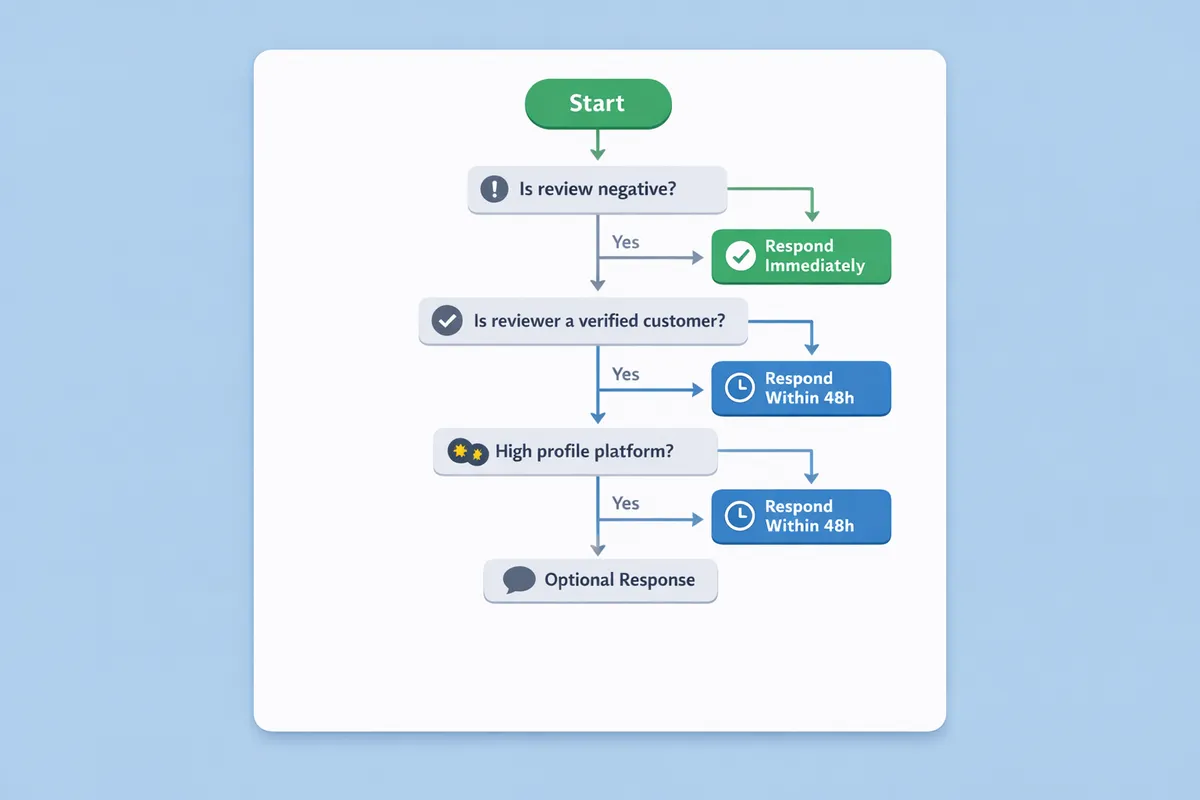
Step 1: Is It Negative (1-3 Stars)?
Yes → Respond within 24-48 hours. No exceptions.
No → Continue to Step 2.
Step 2: Does It Contain Text?
Yes → Respond within 7 days. Personalise based on what they said.
No → Low priority. Batch with other text-free reviews if time permits.
Step 3: Does It Mention a Specific Person or Experience?
Yes → Prioritise over generic positive reviews. Personal recognition matters.
No → Standard batching. Template with light personalisation.
Step 4: Is It on Google?
Yes → Prioritise over other platforms. Google reviews have the highest visibility and SEO impact.
No → Still important, but can be lower in the queue.
Templates That Scale: Variation Without Repetition
Templates save time, but identical responses across reviews look lazy. Here's how to template effectively:
Template Structure
Every template should have:
- Greeting – Use their name if available
- Acknowledgment – Reference something specific from their review
- Value statement – Reinforce what you're known for
- Invitation – Encourage return visit or further contact
Positive Review Template Variations
Variation 1 (Experience-focused):
Thank you, [Name]! We're so glad you enjoyed [specific thing]. Our team
works hard to [value proposition], and knowing it resonated with you
means a lot. We look forward to seeing you again!
Variation 2 (Team recognition):
[Name], thank you for the kind words! I'll make sure [staff/team]
sees your feedback—it'll make their day. We appreciate you choosing
us and hope to welcome you back soon.
Variation 3 (Invitation-focused):
What wonderful feedback, [Name]! Thank you for taking the time to
share your experience. We'd love to see you again—next time, ask
about [specific offer/item]!
Negative Review Template Variations
Variation 1 (Direct ownership):
[Name], I'm sorry we fell short. [Specific issue] shouldn't happen,
and I take full responsibility. Please contact me at [email] so I
can personally make this right.
Variation 2 (Action-oriented):
Thank you for this feedback, [Name]. I've already spoken with the
team about [issue]. We're committed to doing better, and I'd welcome
the chance to show you. Please reach out at [email].
Variation 3 (Investigation approach):
[Name], I appreciate you bringing this to my attention. I'm looking
into what happened with [issue] and will follow up with the team.
I'd like to hear more—please contact me at [email].
Key principle: Never copy the exact same response twice in a row. Rotate variations and always personalise the acknowledgment section.
What If You Don't Have Time?
Time constraints are real. Here's how to maintain standards when resources are limited:
Option 1: Reduce Scope Temporarily
Focus exclusively on negative reviews until you have capacity. This maintains the most critical function.
Option 2: Use AI Assistance
AI-powered tools can draft responses that you review and post. This cuts response time by 70-80% while maintaining quality.
Option 3: Delegate With Guidelines
Train a team member to handle positive reviews using approved templates. Reserve negative reviews for management review.
Option 4: Set Realistic Public Expectations
If you genuinely can't respond to everything, be consistent. Responding to some positives but not others looks arbitrary.
How ReviewSense Helps With Consistent Response Policies
Maintaining a comprehensive response policy becomes manageable with the right tools. ReviewSense supports sustainable review management:
- AI Response Generation – Draft personalised responses in seconds, maintaining variety while saving time
- Priority Queues – Automatically surface reviews that need immediate attention based on your policy
- Response Tracking – Monitor your response rate and time across all platforms
- Template Management – Store and rotate response templates with automatic variation
- Multi-Platform Dashboard – Respond to Google, Facebook, and Trustpilot reviews from one place
With ReviewSense, responding to every review becomes achievable—even for small teams managing high review volumes.
Build Your Policy This Week
The evidence is clear: responding to all reviews—positive and negative—significantly increases customer preference for your business. The question is building a sustainable system to make it happen.
Start with these steps:
- Define your priority tiers based on review type
- Set response time targets for each tier
- Create 3-5 template variations for common situations
- Schedule dedicated response time in your calendar
- Track your metrics weekly
Consistency beats perfection. A realistic policy you follow is better than an ambitious one you abandon.
Worried about responses backfiring? Learn when and how review responses can go wrong in our guide to review response strategy and avoiding common pitfalls.
![10 Best Review Management Software for 2026 [Expert Comparison]](/_next/image?url=%2Fimages%2Fposts%2Fbest-review-management-software-2026-featured.webp&w=3840&q=75 "10 Best Review Management Software for 2026 [Expert Comparison]")