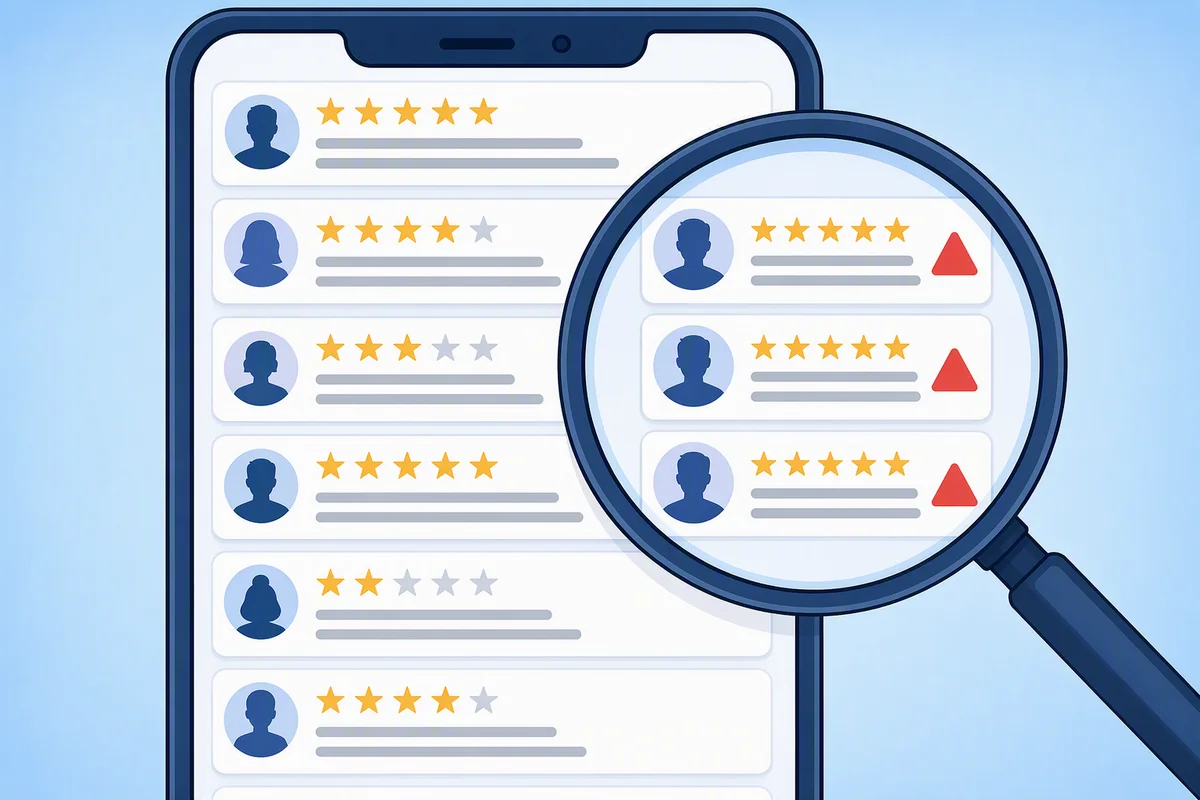
Comparing review management platforms in 2026 is a minefield. With the market hitting $16.73 billion and growing fast, vendors bundle features you don't need while hiding the costs you do. A platform with 50% fewer features that actually talks to your CRM is worth 10x more than a "feature-rich" platform requiring clunky CSV exports. So how do you compare apples to apples when every vendor speaks a different language?
Start by ignoring feature lists. Instead, ask five contrarian questions first. Then categorise your actual needs—small business budgets run $5–$50/mo, but mid-market tools like NiceJob start at $75/mo, and enterprise suites like Birdeye begin around $299/mo. Use our framework to match features to your real workflow, from AI review responses to integration readiness.
Managing this manually is hard. ReviewSense automates it.
Why Comparing Review Management Systems Is So Difficult in 2026
This complexity makes it hard to know what you're actually paying for. The market is fragmented, and your operational needs shape the real cost.
The Core Problem: One Size Doesn't Fit All
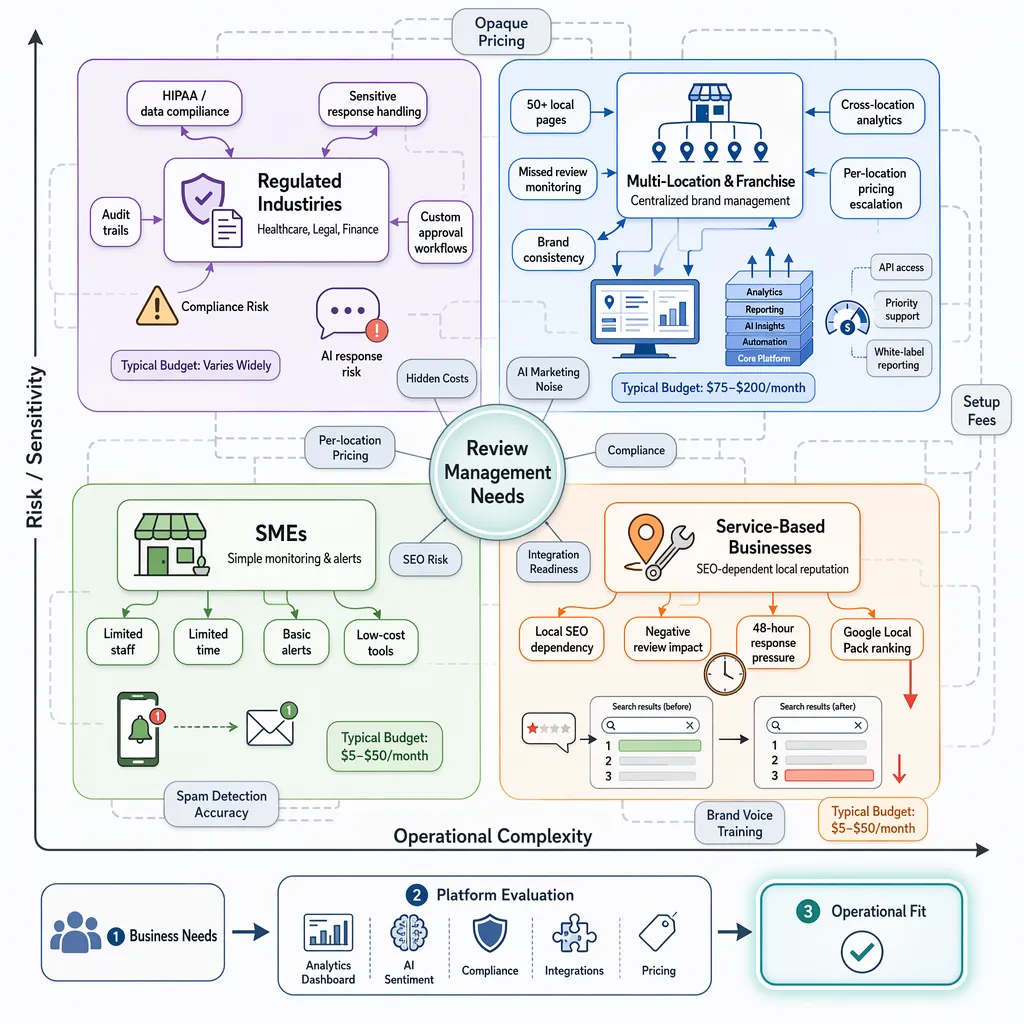
Different businesses face different pressures. Here’s how the pain points vary:
| Business Type | Primary Challenge | Typical Monthly Budget |
|---|---|---|
| Multi-Location & Franchise | Managing brand consistency across dozens of local pages | $75 – $200 |
| Regulated Industries (e.g., healthcare) | Compliance hurdles like HIPAA when responding to patient feedback | Varies widely |
| Service-Based Businesses | Local SEO dependency; a single bad review can tank rankings | $5 – $50 |
| SMEs | Limited time and staff to monitor multiple platforms | $5 – $50 |
Multi-location firms need centralised control. A franchise with 50 outlets can't afford to miss a Google review at one site. Regulated sectors face extra friction — any reply mentioning a patient's condition could breach data rules. Service businesses (plumbers, electricians) live and die by local search visibility. A negative review that goes unanswered for 48 hours can drop their Google Local Pack ranking. SMEs often just need a simple alert system without the enterprise price tag.
Why Pricing Feels Opaque
Most vendors hide real costs behind custom quotes. You'll see a headline price like $50/month, but that often covers just one location. Add multi-location support, advanced analytics, or white-label reporting, and the figure jumps. When researching how to compare pricing and features in review management systems, look for per-location costs and setup fees. Some platforms charge extra for API access or priority support. Others, like those offering podium pricing 2026, may bundle features differently.
The AI Marketing Noise
Every tool claims AI-powered sentiment analysis. But many just scan for keywords like "bad service" without understanding context. True differentiation comes from spam detection accuracy and custom brand voice training. Without a clear framework, you're comparing marketing promises against real utility.
The Contrarian Checklist: 5 Questions to Ask Before Comparing Features
That marketing noise makes it tempting to jump straight into feature comparisons. But most comparison guides miss the real differentiators. Here is a contrarian checklist to cut through the hype.
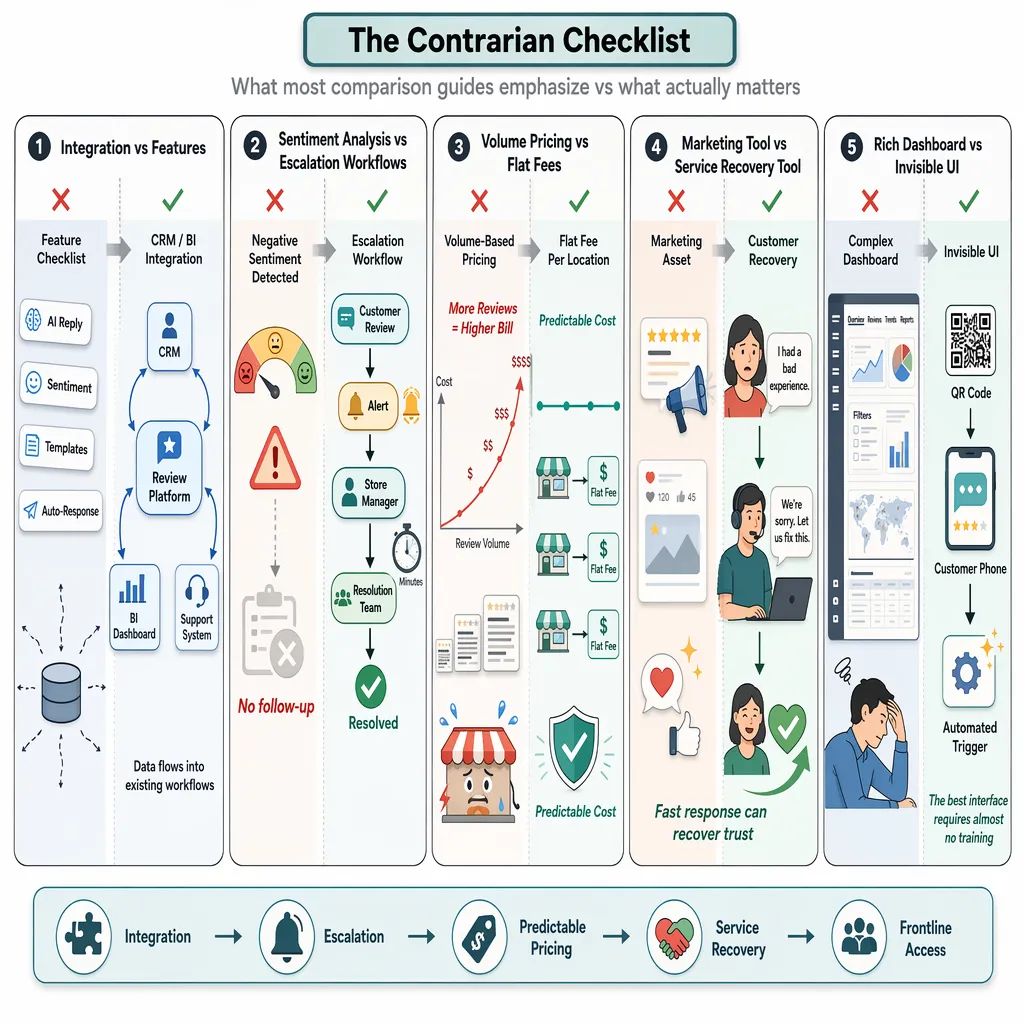
| # | The Question | What Articles Get Wrong | The Reality |
|---|---|---|---|
| 1 | Does it integrate with my CRM or BI tool? | Features like auto-reply are the main differentiator | Integration is the only real differentiator. Without it, reviews stay siloed. |
| 2 | How does it handle escalations? | Sentiment analysis is the killer feature | Sentiment is a vanity metric. Escalation workflows matter more. |
| 3 | Is pricing based on volume? | Volume-based pricing is standard | It penalises success. Look for flat fees. |
| 4 | Is this a marketing or service tool? | Reviews are a marketing asset | They are a customer service recovery tool first. |
| 5 | Is the UI invisible for frontline staff? | A rich dashboard is best | The best UI is a QR code or an automated trigger. |
1. Integration Over Features
Every vendor claims AI-powered replies. But if your review data can't flow into your CRM or BI tool, you're flying blind. Recent industry research shows that integration is the top factor for enterprise buyers. Ask: can you connect review data to your existing dashboards?
2. Sentiment Analysis vs. Escalation Workflows
Sentiment analysis sounds clever. But knowing a review is 'negative' doesn't help if no one acts on it. What matters is the escalation workflow. Can the system alert a store manager within minutes? Can it route a complaint to the right team? Without that, sentiment is just decoration.
3. Avoid the Volume Pricing Trap
Volume-based pricing punishes growth. As your review count climbs, your bill climbs too. Just like how podium pricing 2026 models can spike with volume, many platforms do the same. Look for flat fees per location. That way, success doesn't cost you more. Check Pricing for transparent options.
4. Reviews Are a Service Recovery Tool
Most articles frame reviews as a marketing asset. That's backward. A negative review is a customer crying out for help. Responding fast can turn a detractor into a promoter. Treat your review system as a frontline service tool, not a billboard.
5. The Best UI Is Invisible
How to Categorize Your Needs Before You Compare Vendors
That checklist helps you ask smarter questions. But before you dive into vendor comparisons, you need to categorise your primary need. Most businesses skip this step and end up paying for features they'll never use.
Three Categories of Review Management Tools
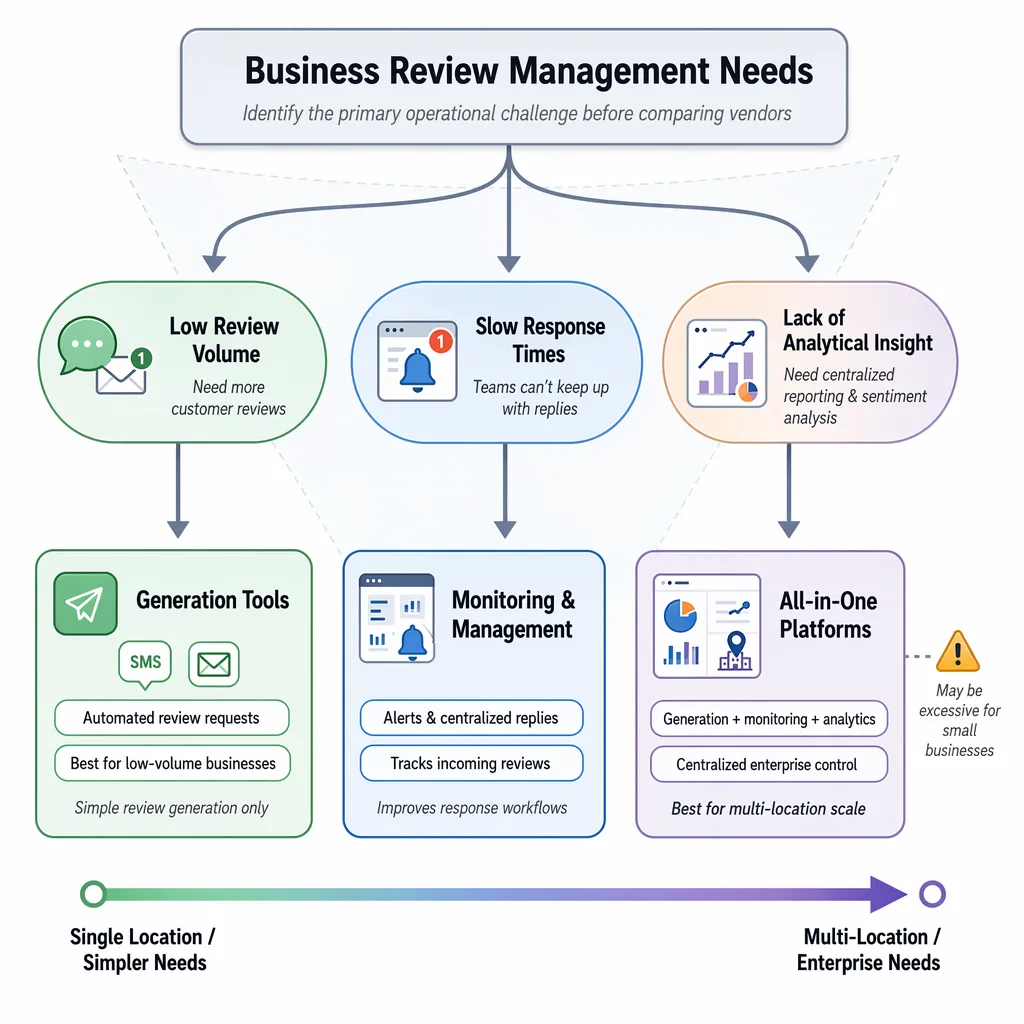
| Category | Core Function | Best For |
|---|---|---|
| Generation Tools | Automate review requests via SMS or email | Businesses with low review volume |
| Monitoring & Management | Track reviews, send alerts, enable replies | Teams with slow response times |
| All-in-One Platforms | Bundled generation, monitoring, analytics, and reporting | Multi-location firms needing centralised control |
Generation tools solve one problem: you don't have enough reviews. They send polite nudges after a purchase. That's it. No sentiment analysis, no spam detection.
Monitoring tools solve a different problem: you can't keep up with replies. They alert you when a new review lands and let you respond from one dashboard. Some offer basic analytics.
All-in-One platforms bundle everything. They generate requests, monitor platforms, analyse sentiment, and produce reports. Sounds ideal. But there's a trap.
The All-in-One Trap
You don't need enterprise features if you run a single coffee shop. Paying for multi-location governance, white-label reporting, and custom integrations is wasted budget. As noted in the Online Review Management Guide, matching the tool to your operational scale saves money and complexity.
Ask yourself: is your core challenge low review volume, slow response times, or lack of analytical insight? If volume is the issue, a generation tool like a Review Request Email Generator might be enough. If response times are slow, a monitoring tool with alert workflows solves that.
Platforms like Podium and Birdeye often require quote-based contracts. That's fine if you need multi-location governance. But for a single location, it's overkill. When researching how to compare pricing and features in review management systems, start with your operational fit, not the feature list.
The best tool is the one that matches your actual workflow. Everything else is noise.
A Practical Framework for Comparing Core Features and Pricing
That operational fit is your compass. Now let's turn it into a structured comparison. The table below shows what you'll typically pay across the market in 2026.
| Tier | Monthly Cost | Typical Features | Best Fit |
|---|---|---|---|
| Free / Manual | $0 | Basic response management, review metrics, and flagging via Google Business Profile | Single location, low volume |
| Small Business | $5–$50 | Basic automation, designed for single-location businesses | Small businesses, 1–3 locations |
| Mid-Market | $75–$200 | Multi-location support, enhanced analytics, and reporting | Mid-sized firms, 5–20 locations |
| Enterprise | $299–$600+ | All-in-one suites, advanced AI, and CRM integration | Agencies, 20+ locations |
How to Compare Pricing and Features in Review Management Systems
Use this four-step process to cut through the noise.
1. Identify your primary need. Is it low review volume, slow response times, or lack of insight? A single café doesn't need enterprise governance. Match the tier to your bottleneck.
2. Check for the per-location trap. Many vendors charge per location. Podium pricing 2026 models, for example, scale linearly with each site. That punishes growth. Look for flat fees or volume caps.
3. Scrutinise contract terms. Annual contracts lock you in. Setup fees add hidden cost. Ask: can you cancel monthly? Are integrations included or extra?
4. Use free alternatives first. Google Business Profile lets you reply to reviews at no cost. Use it to build a baseline. Only invest in a paid tool when manual effort becomes unsustainable.
Hidden Costs That Derail Budgets
SMS credits and phone seats are common add-ons. Beyond the base subscription, platforms often charge extra for phone seats, additional user licenses, and SMS or message credits. Always ask for a full cost breakdown before signing. This page is the method; if you want the numbers themselves, our review platform pricing table lists what each major vendor charges and the per-location fees behind the headline price.
A Quick Vendor Data Point
| Vendor | Starting Price | Pricing Model | Key Limitation |
|---|---|---|---|
| NiceJob | $75/month | Per location | Limited analytics |
| ReviewTrackers | $89/month | Per location | No review generation |
| Birdeye | Quote-based | Per location | High minimum commitment |
| Podium | Quote-based | Per location | SMS credits are extra |
How to Evaluate AI Capabilities and Integration Readiness
That pricing framework gives you a solid foundation. But two areas trip up most buyers: AI capabilities and integration readiness. Let's dig into both.
The Sentiment Analysis Illusion
Many vendors claim AI-powered sentiment analysis. The reality is often basic keyword matching. A review saying "the wait was long but the food was great" might get flagged as negative. Context-aware AI understands the nuance.
| Capability | Basic Template AI | Advanced Context-Aware AI |
|---|---|---|
| Sentiment detection | Keyword matching | Natural language understanding |
| Response generation | Fill-in-the-blank templates | Brand voice adaptation |
| Spam detection | Rule-based filters | Pattern recognition |
| Human oversight | None | Approval workflows built in |
Advanced systems use human-in-the-loop workflows. You generate a reply with AI, then approve or edit before it goes live. This hybrid approach keeps your brand voice consistent without sacrificing speed. As industry research shows, businesses that combine AI with human review see higher customer satisfaction.
Integration Readiness: The Real Differentiator
A tool with flashy features is useless if it doesn't talk to your CRM. You need reviews flowing into Salesforce or HubSpot automatically. That turns feedback into operational intelligence, not just marketing data.
Ask vendors for a live demo of the integration. Not a screenshot. Watch them connect a review to a customer record in real time. If they hesitate, that's a red flag.
Podium pricing 2026 models often bundle integrations at extra cost. ReviewTrackers includes core integrations in its standard plan. When comparing how to compare pricing and features in review management systems, integration depth matters more than feature count.
Check the Google Review Management Software guide for integration specifics. For Facebook-specific needs, see [Facebook Review Management](/facebook-review-management).
The goal is simple: treat every review as a data point that improves your operations. Not just another star on your profile.
Conclusion
Choosing the right review management system comes down to aligning pricing with your actual needs, avoiding hidden per-location costs, and prioritising AI that understands context—not just keywords. As you’ve seen, integration readiness and genuine sentiment analysis separate tools that merely collect reviews from those that drive real improvements. The most effective platforms combine AI speed with human oversight, turning every review into a data point that strengthens your operations. Don’t settle for scattered feedback and manual effort. With ReviewSense, you can centralise reviews, detect trends, and respond with brand-consistent AI—all from a single dashboard. Start your 7-day free trial and turn scattered reviews into actionable insights that improve customer experience and drive growth.