
Pages featuring Trustpilot widgets produced a 55% uplift in conversion rates versus pages without them, according to a case study on Sugru. But slapping a widget on your site isn't a magic bullet — placement, performance, and context all matter. Here's how to embed Trustpilot reviews the right way, and where they actually drive purchases.
Managing this manually is hard. ReviewSense automates it.
What a Trustpilot Widget Actually Does (and Does Not) Do for Conversions
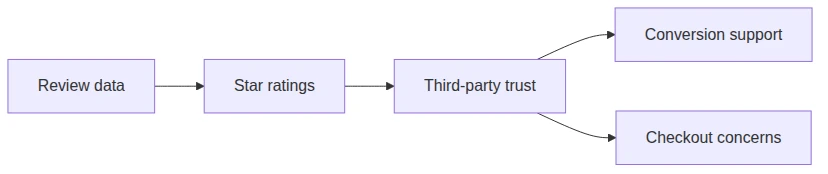
Embedding the widget is the easy part. A Trustpilot widget—called a TrustBox—is embedded third-party JavaScript that pulls reviews from Trustpilot’s servers and displays them on your site. It functions as credibility infrastructure, not a conversion guarantee. If most of your reviews sit on Google rather than Trustpilot, a Google review widget is the better fit for the same job.
| What a Trustpilot Widget Does | What It Does Not Do |
|---|---|
| Displays aggregate star ratings and review snippets | Guarantee a purchase or higher conversion rate |
| Loads review data from Trustpilot’s servers | Replace the need for relevant, recent, authentic reviews |
| Provides a third-party trust signal to visitors | Overcome fundamental UX or pricing objections |
| Can be customized for different placements | Automatically improve your product or service quality |
The Research Behind Trust Signals
Nielsen Norman Group found that external reviews are more persuasive than self-hosted testimonials. Users perceive third-party platforms as less biased. That’s the widget’s core value: it signals independence.
But the Baymard Institute reports that 19% of users abandon checkout due to trust concerns. A widget can help address that gap. It cannot fix a broken checkout flow or vague shipping policy.
Trustpilot reported 160 billion annual TrustBox impressions in its FY25 investor presentation. That number is a load metric, not an engagement metric. It counts how many times the widget appeared, not how many people clicked or acted on it.
Why Relevance Beats Volume
A generic star rating won’t cut it. Clutch found that 96% of consumers consult reviews but remain skeptical of vague scores. The widget’s impact depends on review relevance, recency, and authenticity.
Vendor case studies—like Sugru’s 55% conversion uplift—show potential. Independent research paints a more measured picture. A Trustpilot review widget helps when reviews are specific, recent, and match the visitor’s intent. Old or irrelevant reviews erode trust instead of building it, which makes a steady review flow a Trustpilot review management problem rather than a widget problem.
Embed Trustpilot reviews where they support a buying decision. Product pages and checkout work well. Homepage banners rarely convert. The widget is a tool, not a magic button. Its real job is to give skeptical shoppers a reason to stay. That’s all. That’s enough.
Step-by-Step: How to Embed Trustpilot Reviews on Your Website
That skeptical shopper needs a reason to trust your site. The widget is the mechanism. Here is how to install one correctly.
Step 1: Access the TrustBox Library
Log into your Trustpilot Business account. Navigate to the “TrustBox” section in the main menu. This is the control center for every widget you deploy.
Step 2: Choose Your Widget Type
Trustpilot offers two primary formats. A product review TrustBox displays SKU-specific ratings. Use this on individual product pages. A service review TrustBox shows your company-level star rating. Place this on your homepage or contact page. Pick the type that matches the visitor’s intent.
| Widget Type | Best Placement | What It Shows |
|---|---|---|
| Product Review TrustBox | Product detail pages | SKU-specific star rating and reviews |
| Service Review TrustBox | Homepage, About, Contact | Company-level aggregate rating |
Step 3: Configure Display Settings
Set your review count threshold. A widget with two reviews looks thin. Aim for at least ten. Enable language filtering to show only reviews in your customer’s language. Set a minimum star rating—four stars or higher—to feature your best feedback. Use targeted display options to show different widgets to different visitor segments.
Step 4: Generate the Embed Code
Click “Generate Code.” Trustpilot provides a JavaScript snippet. Copy it exactly. Do not modify the script. Any change can break the widget or violate Trustpilot’s terms.
Step 5: Paste the Snippet into Your Site
Place the JavaScript near the closing </body> tag. This prevents the widget from blocking page rendering. Shopify merchants can use Trustpilot’s enhanced Shopify app, generally available since June 2026, for a simpler setup. A tag manager like Google Tag Manager also works.
Step 6: Test Everything
Check rendering on desktop and mobile. Resize your browser window. The widget must not cause layout shifts. Reserve a fixed height in your CSS to prevent content from jumping. Verify your Content-Security-Policy allows scripts from widget.trustpilot.com. Blocking that domain kills the widget silently.
Common Mistakes to Avoid
Do not place widgets where they cause cumulative layout shift. Google penalizes shifting content. Always reserve widget height. Ignoring Content-Security-Policy headers is the top reason widgets fail silently. Test after every site update. A broken Trustpilot review widget hurts credibility more than having none at all.

Where to Place Your Widget for Maximum Persuasive Impact
A correctly installed widget still needs the right home. Placement determines whether a Trustpilot widget persuades or gets ignored. The standard advice—homepage banner, product pages, checkout—is too generic. It ignores how visitors actually process trust signals.
| Placement | Best For | Why It Works |
|---|---|---|
| Pricing page | Reducing price anxiety | Reviews address value concerns directly |
| Shipping/returns section | Overcoming delivery hesitation | Topic-specific reviews match visitor intent |
| Near objection-handling blocks | Reinforcing rebuttals | Social proof supports your arguments |
| Paid landing pages | Validating ad promises | Reviews confirm the offer is real |
| Payment form area | Lowering checkout abandonment | Trust signals reduce security fears |
Pricing pages carry the highest uncertainty. A visitor comparing plans wonders if the service delivers. Place a static block of 3–4 relevant reviews next to your pricing table. Those reviews should mention value, support, or results. The same logic applies to shipping and returns. Trustpilot’s Targeted TrustBox feature lets you display delivery-specific reviews near your shipping policy. That alignment addresses a specific objection at the exact moment it arises.
Landing pages for paid traffic need special treatment. A visitor clicked an ad. They are skeptical. A Trustpilot review widget that shows reviews matching the ad’s promise closes the gap. A February 2026 Clutch study found that shoppers are increasingly skeptical of generic star ratings and pay closer attention to written experiences and signs of authenticity.
The Baymard Institute found that 19% of users abandon checkout due to trust concerns. A widget near the payment form addresses that fear. Use a static block, not a carousel. Carousels hide evidence. Users see one review at a time. A static block with 3–4 visible reviews outperforms rotating formats. Footer badges establish legitimacy but rarely change purchase decisions. They are too far from the action.
To embed Trustpilot reviews effectively, match the review content to the page context. That is the real strategy. Not placement alone. Relevance plus placement.

Common Implementation Risks and How to Avoid Them
Placement and relevance matter, but execution determines whether a Trustpilot widget builds trust or backfires. A poorly implemented widget can damage credibility faster than having none at all. Here are the common risks and how to avoid them.
| Risk | Why It Matters | Mitigation Strategy |
|---|---|---|
| Page performance | Third-party scripts can cause layout shifts and delay Largest Contentful Paint (LCP). Google penalizes slow pages. | Load the widget asynchronously. Reserve a fixed height in CSS to prevent cumulative layout shift. Follow Google's web.dev guidance on third-party scripts. |
| Over-curated appearance | A wall of 5-star reviews creates suspicion. Consumers trust balanced feedback. | Display your full rating distribution. Trustpilot's external verifiability is a feature, not a flaw. Let users see the mix. |
| Review freshness | A high score from 3 years ago is not persuasive. Outdated reviews signal irrelevance. | Show recent reviews first. Prioritize review velocity over aggregate score. A 4.2 from last month beats a 4.8 from 2023. |
| Legal and compliance risks | The FTC's Consumer Reviews Rule prohibits fake reviews and misleading displays. The May 2026 FTC enforcement action shows real consequences. | Display reviews honestly. Never filter out negative reviews entirely. Include a date stamp. Follow FTC guidelines. |
| Mobile usability | Widgets that don't resize or hide navigation controls hurt UX. Mobile traffic dominates ecommerce. | Test on real devices. Use responsive widget settings. Ensure the widget doesn't block buttons or links. |
| Consent management | Widgets that load before cookie consent can violate privacy regulations. | Defer widget loading until the user accepts cookies. Use a consent management platform to control script execution. |
The Counterintuitive Truth
The best Trustpilot widget is often smaller, less prominent, and more candid than typical recommendations suggest. A giant carousel of perfect scores triggers skepticism. A compact block showing a 4.3 average with recent, mixed reviews signals authenticity. A February 2026 Clutch study reported that 96% of consumers regularly consult reviews for unfamiliar products or services. Those same consumers can spot a curated facade. The Baymard Institute separately found that 19% of users abandoned checkout because they did not trust the site with their credit-card information. A genuine, well-placed Trustpilot review widget addresses that fear. A fake-looking one amplifies it. Prioritize honesty over polish. Your conversion rate will thank you.
How to Measure Whether Your Widget Is Actually Working
That honest approach only works if you can prove it drives results. Most articles cite a generic conversion uplift without showing how to measure it. A Trustpilot widget is a tool, not a magic button. You need real metrics.
| Metric | What to Track | Why It Matters |
|---|---|---|
| Conversion rate (A/B test) | With vs. without widget, segmented by traffic source and device | Isolates the widget's true effect from seasonal noise |
| Click-through rate to Trustpilot profile | % of visitors who click the widget to read full reviews | Shows if the widget builds enough curiosity to verify claims |
| Page performance impact | Core Web Vitals (CLS, LCP) before and after widget load | A slow widget kills conversions faster than it helps |
| Review engagement metrics | Time spent viewing widget, scroll depth near widget area | Indicates whether visitors actually read reviews or ignore them |
| Support-contact reduction | Volume of pre-sale inquiries before vs. after widget launch | A good widget answers common objections, reducing inbound questions |
| Return-to-site behavior | Visitors who click through to Trustpilot and later return to purchase | Measures delayed conversion from trust-building |
Conversion Rate (A/B Test)
Run a controlled split. Half your traffic sees the Trustpilot review widget. Half does not. Segment by device and source. A widget that works on desktop may hurt mobile performance. A Forrester TEI study modeled a 401% ROI for Trustpilot as a platform. That figure is commissioned research, not a controlled widget test. Your own A/B test gives you real data.
Click-Through Rate to Trustpilot Profile
Skeptical visitors want verification. A widget that sends them to Trustpilot's external profile builds confidence. Track how many click through. Low click-through means the widget content is not compelling enough.
Page Performance Impact
Third-party widgets cause layout shifts. Measure Cumulative Layout Shift (CLS) and Largest Contentful Paint (LCP) before and after adding the widget. Google penalizes slow pages.
Review Engagement Metrics
Use scroll-tracking heatmaps. See if visitors pause near the widget. If they scroll past it without stopping, the placement or content is wrong.
Support-Contact Reduction
Track pre-sale email or chat volume. A widget that answers common objections—shipping times, product quality—reduces inbound questions. That is a direct efficiency gain.
Conclusion
A Trustpilot widget earns trust only when displayed honestly, measured rigorously, and optimized for performance. Track conversion through A/B tests, monitor page speed impact, and prioritize authentic reviews over curated perfection. The real competitive advantage lies not in a single widget but in a complete system that turns every review into a signal for growth. ReviewSense centralizes feedback from Google, Facebook, Apple, and Google Play into one dashboard, then surfaces sentiment trends and crisis alerts so you act before reputation erodes. Stop managing reviews in scattered tabs. Turn scattered reviews into actionable insights that improve customer experience and drive growth. Start your 7-day free trial.